
How to Print Part of a Spreadsheet in Excel
Print only part of an Excel spreadsheet with Print Selection or a saved print area, print separate ranges, and fit the selection on one page. Continue Reading How to Print Part of a Spreadsheet in Excel
 Kermit Matthews
Print only part of an Excel spreadsheet with Print Selection or a saved print area, print separate ranges, and fit the selection on one page. Continue Reading How to Print Part of a Spreadsheet in Excel
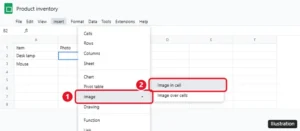
Insert an image into a cell in Google Sheets with Insert > Image > Image in cell or the IMAGE function, lock it in place, and fix images that won’t show. Continue Reading How to Insert an Image Into a Cell in Google Sheets

Turn off Low Quality Image Mode on iPhone 7 in Settings > Messages so photos send at full quality. Check Low Data Mode if images still look compressed. Continue Reading How to Turn Off Low Quality Image Mode on iPhone

Change the Spotify volume level on iPhone to Loud, Normal, or Quiet under Settings and privacy > Playback, and fix low or uneven Spotify volume. Continue Reading How to Change the Spotify Volume Level on iPhone

Delete apps on iPhone SE from the Home Screen, App Library or Settings, offload apps to save space, and fix apps that won’t delete. Continue Reading How to Delete Apps on iPhone SE (and Any iPhone)

Go to Settings > Cellular, turn on Cellular Data, and switch on FaceTime. How much data FaceTime uses, tips to save data, and fixes if calls fail. Continue Reading How to Use FaceTime Without Wi-Fi on an iPhone 6
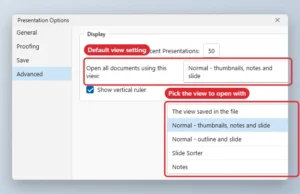
Change the view PowerPoint opens with: File > Options > Advanced > Open all documents using this view. Plus Slide Show monitor settings. Continue Reading How to Change the Default View in PowerPoint
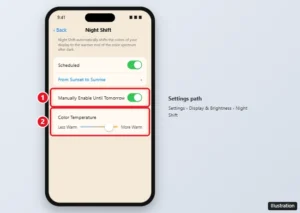
The iPhone’s blue light filter is Night Shift. Turn it on in Settings or Control Center, schedule it, make it warmer, or use Color Filters for a stronger tint. Continue Reading Where Is the Blue Light Filter on an iPhone? (Night Shift)

Double space a whole document in the Google Docs iPhone app: select all, open Format > Paragraph, and set line spacing to 2.00, plus troubleshooting tips. Continue Reading How to Double Space an Entire Document in the Google Docs iPhone App

Unlock screen rotation on an iPad from Control Center, check the side switch on older iPads, and fix an iPad that won’t rotate. Continue Reading How to Unlock Screen Rotation on an iPad
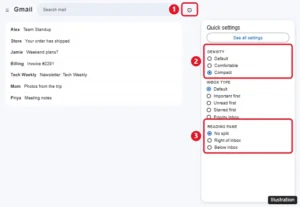
Change the view in Gmail with Quick settings: density, inbox type, reading pane, conversation view, and theme, on a computer, iPhone, or Android. Continue Reading How to Change the View in Gmail

Click Review > Word Count or press Ctrl + Shift + G to see characters with and without spaces. How to count a selection and steps for Mac and mobile. Continue Reading How to Get a Character Count in Microsoft Word

Stop your iPhone from deleting apps by turning off Offload Unused Apps, restore offloaded apps, and block app deletion with Screen Time. Continue Reading How to Stop Your iPhone From Deleting Apps Automatically

Change font color in Google Docs on a computer or phone, use custom hex colors, apply colors fast with paint format or styles, and set a default color. Continue Reading How to Change Font Color in Google Docs (Desktop and Mobile)
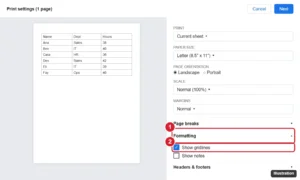
Print gridlines in Google Sheets by checking Show gridlines in print settings, or add borders for darker lines, print a selection, and fit it on one page. Continue Reading How to Print With Gridlines in Google Sheets

Add a column to a Google Docs table: right-click a cell and choose Insert column left or right, or use Format > Table. Plus mobile steps and sizing tips. Continue Reading How to Add a Column to a Table in Google Docs

Underline existing text in Photoshop CS5 with the Type tool and the Character panel’s Underline button or Ctrl + Shift + U, plus custom line options. Continue Reading How to Underline Existing Text in Photoshop CS5

Add a PowerPoint text box from Insert > Text Box or the keyboard, delete it by its border, and remove placeholders or Slide Master boxes that keep coming back. Continue Reading How to Add or Delete a Text Box in PowerPoint
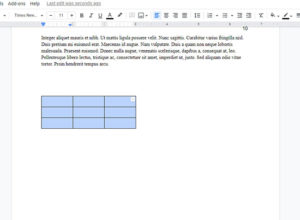
Make a table smaller in Google Docs by dragging gridlines, setting sizes in Table options, trimming cell padding and font size, plus the iPhone and Android app. Continue Reading How to Make a Table Smaller in Google Docs
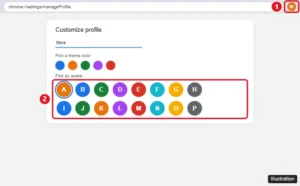
Change your Google Chrome profile avatar from Customize profile, or change your Google Account photo so it updates in Chrome, Gmail, and other Google apps. Continue Reading How to Change Your Google Chrome Profile Avatar
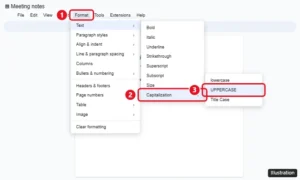
Select the text and click Format > Text > Capitalization > UPPERCASE. The same menu has lowercase and Title Case. Plus mobile options and fixes. Continue Reading How to Convert Text to Uppercase in Google Docs

Remove the border from a text box in Word with Shape Outline > No Outline, remove fills, make borderless text boxes the default, and fix borders that remain. Continue Reading How to Remove the Border From a Text Box in Word

Keep your last filter in the iPhone Camera app by turning on Creative Controls in Settings > Camera > Preserve Settings. What each option saves and more. Continue Reading How to Keep Your Photo Filter in the iPhone Camera App
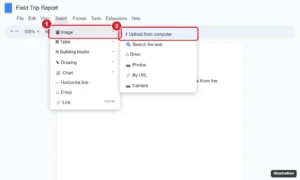
Upload a picture to Google Docs from your computer, Drive, Photos, the web, or your phone, then resize it, wrap text around it, and add alt text. Continue Reading How to Upload a Picture to Google Docs (Computer and Phone)

Turn off the passcode on an iPhone 7 in Touch ID & Passcode settings, learn what stops working, fix a grayed-out option, and faster unlock alternatives. Continue Reading How to Turn Off the Passcode on an iPhone 7

Stop Excel zooming on scroll: File > Options > Advanced, uncheck Zoom on roll with IntelliMouse. Plus fixes for a stuck Ctrl key and touchpad zoom. Continue Reading How to Stop Excel From Zooming When You Scroll the Mouse Wheel

Include original attachments when replying in iPhone Mail by tapping Include, forwarding the email, or attaching the file again manually. Continue Reading How to Include Attachments When Replying on an iPhone
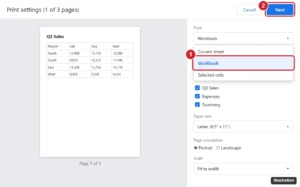
Print every tab in Google Sheets: press Ctrl + P, change Print from Current sheet to Workbook, pick sheets, then click Next. Plus PDF tips. Continue Reading How to Print an Entire Workbook in Google Sheets
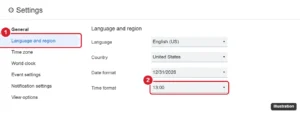
Switch Google Calendar to a 24-hour clock on the web in Language and region, and on Android or iPhone through your phone’s date and time settings. Continue Reading How to Switch to a 24-Hour Clock in Google Calendar

Turn off microphone access on iPhone app by app in Privacy & Security, stop Siri listening, remove the dictation key, and check which apps used your mic. Continue Reading How to Turn Off Microphone Access on iPhone

Turn off read receipts on Apple Watch in the Watch app with a custom Messages setting, turn them off on iPhone for both, or change them per conversation. Continue Reading How to Turn Off Read Receipts on Apple Watch
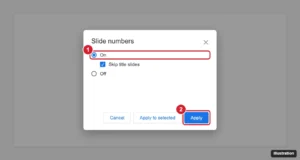
Add slide numbers in Google Slides from Insert > Slide numbers, skip the title slide, number only some slides, change the style, and remove them. Continue Reading How to Add Slide Numbers in Google Slides
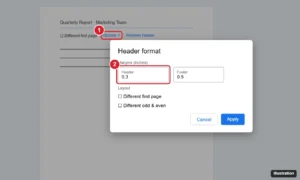
Change the header margin in Google Docs: double-click the header, choose Options > Header format, and set a new Header margin. Plus fixes and tips. Continue Reading How to Change the Header Margin in Google Docs
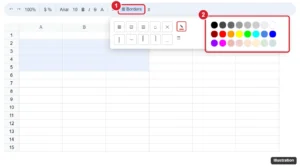
Change cell border color in Google Sheets by choosing a color with the Borders pencil before applying borders, recolor existing borders, and use mobile. Continue Reading How to Change Cell Border Color in Google Sheets

Add fonts to Photoshop CS5 by installing them in Windows or macOS and restarting Photoshop, plus fixes when a new font does not appear. Continue Reading How to Add Fonts to Photoshop CS5 (Windows and Mac)

Make an Excel 2010 sheet fit on one page: File > Print > Fit Sheet on One Page, or set Scale to Fit to 1 page wide by 1 tall. Plus readability tips. Continue Reading How to Make an Excel 2010 Spreadsheet Fit on One Page
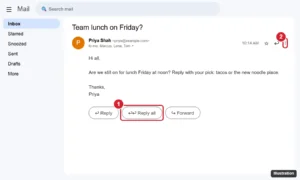
Reply all in Gmail by clicking Reply all under the message, or use the three-dot menu in the app. Plus the A shortcut and how to make it the default. Continue Reading How to Reply All in Gmail
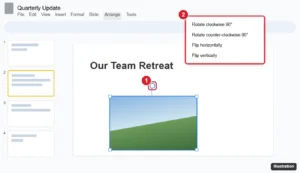
Rotate a picture in Google Slides with the rotation handle, Arrange > Rotate for 90-degree turns and flips, or an exact angle in Format options. Continue Reading How to Rotate a Picture in Google Slides (Any Angle)

Sort a column from highest to lowest in Google Sheets with Sort sheet Z to A, keep headers in place, sort by multiple columns, or use the SORT function. Continue Reading How to Sort a Column From Highest to Lowest in Google Sheets
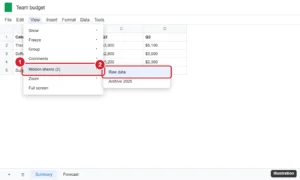
Unhide a sheet in Google Sheets with View > Hidden sheets or the All Sheets list, unhide on mobile, and fix a grayed-out Hidden sheets option. Continue Reading How to Unhide a Sheet in Google Sheets (Desktop and Mobile)

Remove a contact from Favorites on iPhone 13 in the Phone app with Edit or a swipe, plus how to reorder favorites and stop them from coming back. Continue Reading How to Remove a Contact from Favorites on iPhone 13

Remove the preview window at the bottom of your Gmail inbox by setting Reading pane to No split, or move it to the right. Steps for Quick settings and more. Continue Reading How to Remove the Preview Pane at the Bottom of Gmail
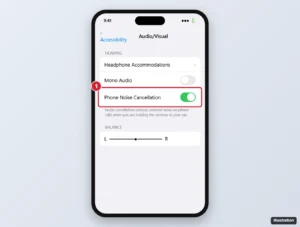
Turn on Phone Noise Cancellation on an iPhone 7 in Accessibility settings, learn what it does on calls, and get tips to reduce noise the other person hears. Continue Reading How to Enable Phone Noise Cancellation on an iPhone 7

Remove paragraph shading in Word with the Shading button or Borders and Shading, and clear highlighting, pasted backgrounds and field shading. Continue Reading How to Remove Paragraph Shading in Word

Right-click a cell and choose Insert row above or below, or press Tab in the last cell to add a row at the end. Steps for several rows and the mobile app. Continue Reading How to Add a Row to a Table in Google Docs

Hide Friend Activity in Spotify desktop: stop sharing your listening activity, turn off the friends panel, or use a Private session. Mobile steps too. Continue Reading How to Hide Friend Activity in the Spotify Desktop App
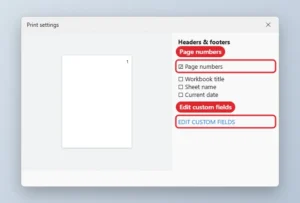
Move Google Sheets page numbers to the top: File, Print, Headers and footers, check Page numbers, then Edit custom fields to place them in the header. Continue Reading How to Put Page Numbers at the Top in Google Sheets

Stop your iPhone from erasing all data after 10 failed passcode attempts: turn off Erase Data in Face ID & Passcode, and learn what happens after lockouts. Continue Reading How to Turn Off the iPhone Erase Data Setting
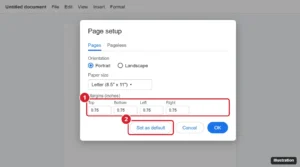
Set default margins in Google Docs with File > Page setup > Set as default, change margins for one document or with the ruler, and fix defaults. Continue Reading How to Set Default Margins in Google Docs
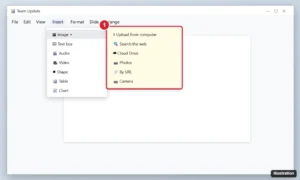
Insert a picture in Google Slides from your computer, the web, Drive, Photos, a URL or camera, then resize, crop, mask, replace it or set it as the background. Continue Reading How to Insert a Picture in Google Slides (Every Method)