Skip to content
Live2Tech
  • iPhone
  • Windows
    • Windows 11
    • Windows 10
  • Office
    • Word
    • Excel
    • Powerpoint
    • Outlook
  • Google
    • Google Docs
    • Google Sheets
    • Google Slides
    • Gmail
    • Chrome
    • Google Drive
  • Mac & Apple
    • Mac
    • iPad
    • Apple Watch
  • All Tutorials

iOS 12

iPhone Podcasts settings with the Continuous Playback switch turned off

How to Stop Podcasts From Automatically Playing on an iPhone

September 25, 2026February 9, 2023 by Kermit Matthews

Stop podcasts from auto-playing on your iPhone: turn off Continuous Playback, clear Up Next, and stop podcasts from starting in the car or on headphones. Continue Reading How to Stop Podcasts From Automatically Playing on an iPhone

Categories iPhone Tags iOS 12, iPhone Apps, Podcasts
Phone Messages settings scrolled to the SMS and MMS section with the Character Count switch turned on and highlighted

How to Show a Character Count for Text Messages on an iPhone

September 26, 2026June 7, 2022 by Kermit Matthews

Show a character count while texting on iPhone: Settings > Apps > Messages > Character Count. It appears for SMS messages, not iMessage. Continue Reading How to Show a Character Count for Text Messages on an iPhone

Categories iPhone Tags iOS 12, Text Messages
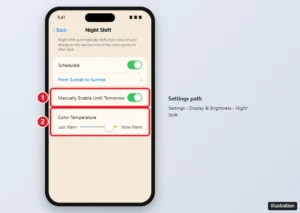
iPhone Night Shift settings with Scheduled, Manually Enable Until Tomorrow, and the Color Temperature slider highlighted

Where Is the Blue Light Filter on an iPhone? (Night Shift)

September 29, 2026May 27, 2022 by Kermit Matthews

The iPhone’s blue light filter is Night Shift. Turn it on in Settings or Control Center, schedule it, make it warmer, or use Color Filters for a stronger tint. Continue Reading Where Is the Blue Light Filter on an iPhone? (Night Shift)

Categories iPhone Tags Display, iOS 12, iphone 7
iPhone Settings Privacy Microphone screen with app switches, one being turned off

How to Turn Off Microphone Access on an iPhone 7

October 20, 2026April 1, 2022 by Kermit Matthews

Turn off microphone access on iPhone 7 in Settings > Privacy > Microphone, or per app in Settings. Plus the orange dot, Siri, and Safari mic settings. Continue Reading How to Turn Off Microphone Access on an iPhone 7

Categories iPhone Tags iOS 12, Privacy

Join Our Free Newsletter

Featured guides and deals

You may opt out at any time.
Read our Privacy Policy

Live2Tech

Plain-English, step-by-step guides for the devices and apps you use every day.

Apple

  • iPhone
  • iPad
  • Mac
  • Apple Watch

Windows

  • Windows 11
  • Windows 10

Microsoft Office

  • Word
  • Excel
  • Powerpoint
  • Outlook

Google

  • Google Docs
  • Google Sheets
  • Google Slides
  • Gmail
  • Chrome
  • Google Drive
  • About Us
  • Contact
  • Disclaimer
  • Privacy Policy
© Live2Tech.com 2026
  • iPhone
  • Windows
    • Windows 11
    • Windows 10
  • Office
    • Word
    • Excel
    • Powerpoint
    • Outlook
  • Google
    • Google Docs
    • Google Sheets
    • Google Slides
    • Gmail
    • Chrome
    • Google Drive
  • Mac & Apple
    • Mac
    • iPad
    • Apple Watch
  • All Tutorials