If Excel zooms in and out when you scroll the mouse wheel, the setting Zoom on roll with IntelliMouse is turned on. To fix it, click File > Options > Advanced, uncheck Zoom on roll with IntelliMouse under Editing options, and click OK. The scroll wheel will move up and down again. If that box is already unchecked, a stuck Ctrl key, touchpad pinch gestures, or mouse software is usually the cause.
Here’s how to fix each cause in Excel for Windows and Mac.
Fix 1: Turn off Zoom on roll with IntelliMouse
- In Excel, click File > Options. (In Excel 2007, click the Office button > Excel Options.)
- Click Advanced.
- Under Editing options, uncheck Zoom on roll with IntelliMouse.
- Click OK.
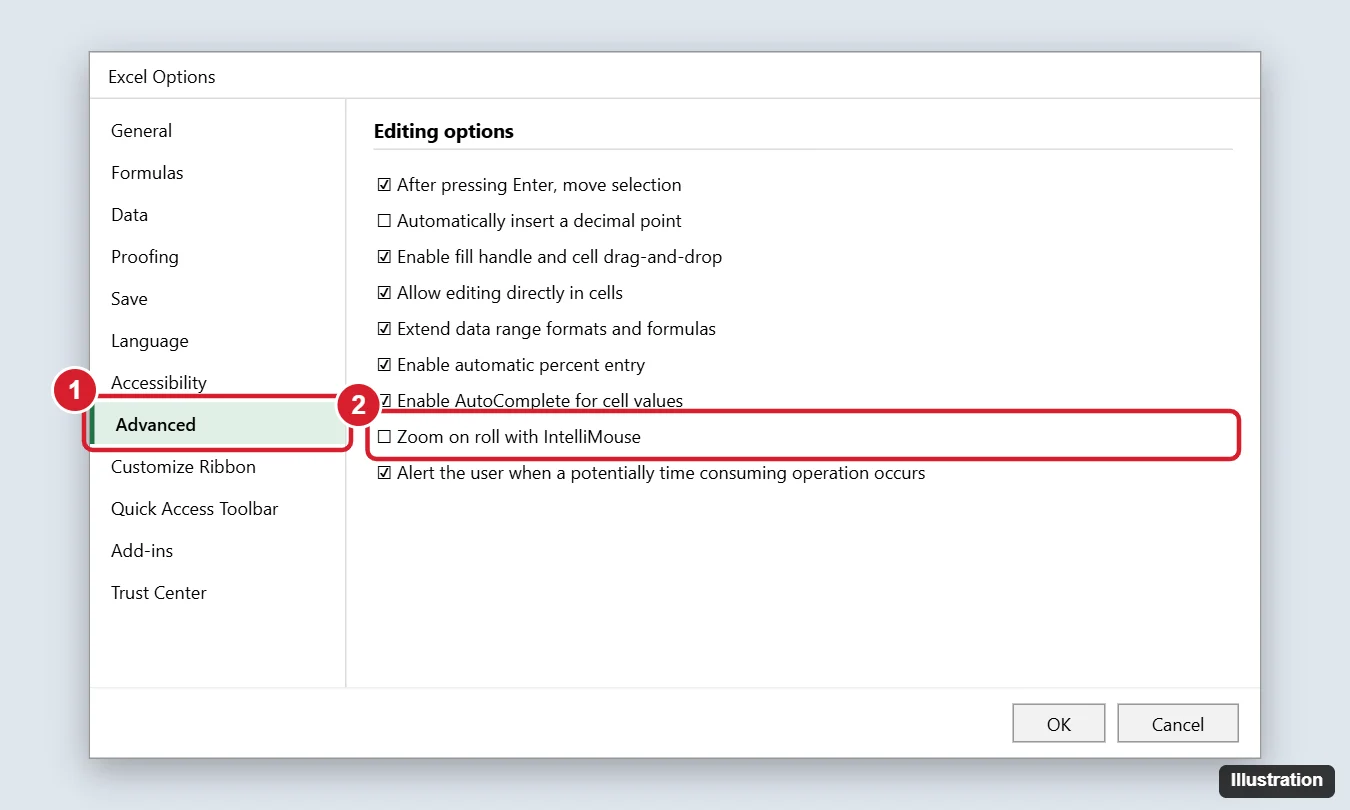
This setting applies to Excel on this computer, not just the current workbook.
Fix 2: Check for a stuck Ctrl key
Holding Ctrl while scrolling zooms in Excel and most apps. If Ctrl is stuck, every scroll zooms.
- Press both Ctrl keys a few times firmly.
- Open the On-Screen Keyboard (press Windows + Ctrl + O) and see if Ctrl looks pressed.
- Check that Sticky Keys isn’t on: Settings > Accessibility > Keyboard.
- Try a different keyboard to rule out hardware problems.
Fix 3: Touchpad pinch-to-zoom
On laptops, two fingers moving slightly apart can register as a pinch. In Windows 11, go to Settings > Bluetooth & devices > Touchpad > Scroll & zoom and uncheck Pinch to zoom. In Windows 10, it’s under Settings > Devices > Touchpad.
Fix 4: Mouse software
Apps like Logi Options+, Microsoft Mouse and Keyboard Center, or gaming mouse software can map the wheel to zoom. Open the app and reset the wheel to Scroll, or set it per app for Excel.
Excel for Mac
Excel for Mac doesn’t have the IntelliMouse option. Zooming while scrolling usually means you’re holding Command or Control, or it’s a trackpad pinch. Check System Settings > Trackpad > Scroll & Zoom, and Accessibility > Zoom to make sure Use scroll gesture with modifier keys to zoom isn’t zooming the whole screen.
How to reset the zoom level
Click View > 100%, or drag the zoom slider in the bottom-right corner back to 100%. For more zoom tips, see how to zoom on Windows.
Frequently asked questions
Why did this start suddenly?
Someone may have changed the option, an update reset settings, or the Ctrl key got stuck. Mouse software updates can also change wheel behavior.
Does this affect Word too?
No. The IntelliMouse option is only in Excel. In Word and other apps, Ctrl + scroll always zooms.
How do I scroll sideways in Excel?
Hold Shift while scrolling, or tilt the wheel if your mouse supports it.

Kermit Matthews is a freelance writer based in Philadelphia, Pennsylvania with more than a decade of experience writing technology guides. He has a Bachelor’s and Master’s degree in Computer Science and has spent much of his professional career in IT management.
He specializes in writing content about iPhones, Android devices, Microsoft Office, and many other popular applications and devices.