Skip to content
Live2Tech
  • iPhone
  • Windows
    • Windows 11
    • Windows 10
  • Office
    • Word
    • Excel
    • Powerpoint
    • Outlook
  • Google
    • Google Docs
    • Google Sheets
    • Google Slides
    • Gmail
    • Chrome
    • Google Drive
  • Mac & Apple
    • Mac
    • iPad
    • Apple Watch
  • All Tutorials

Image Rotation

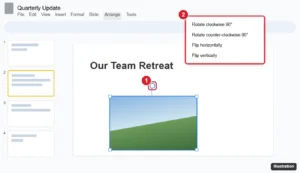
Presentation editor with a selected image showing the rotation handle and the Arrange Rotate menu highlighted

How to Rotate a Picture in Google Slides (Any Angle)

September 25, 2026March 9, 2022 by Kermit Matthews

Rotate a picture in Google Slides with the rotation handle, Arrange > Rotate for 90-degree turns and flips, or an exact angle in Format options. Continue Reading How to Rotate a Picture in Google Slides (Any Angle)

Categories Google Slides Tags Featured Slides Guides, Image Rotation
PowerPoint Picture Tools Format tab with the Rotate menu open and Flip Horizontal highlighted

How to Flip a Picture in PowerPoint 2013

September 24, 2026November 9, 2021 by Kermit Matthews

Flip a picture in PowerPoint 2013 and later with Format > Rotate > Flip Horizontal or Flip Vertical, plus how to flip shapes and undo a flip. Continue Reading How to Flip a Picture in PowerPoint 2013

Categories Powerpoint Tags Featured Powerpoint Guides, Image Rotation, Pictures, powerpoint 2013

Join Our Free Newsletter

Featured guides and deals

You may opt out at any time.
Read our Privacy Policy

Live2Tech

Plain-English, step-by-step guides for the devices and apps you use every day.

Apple

  • iPhone
  • iPad
  • Mac
  • Apple Watch

Windows

  • Windows 11
  • Windows 10

Microsoft Office

  • Word
  • Excel
  • Powerpoint
  • Outlook

Google

  • Google Docs
  • Google Sheets
  • Google Slides
  • Gmail
  • Chrome
  • Google Drive
  • About Us
  • Contact
  • Disclaimer
  • Privacy Policy
© Live2Tech.com 2026
  • iPhone
  • Windows
    • Windows 11
    • Windows 10
  • Office
    • Word
    • Excel
    • Powerpoint
    • Outlook
  • Google
    • Google Docs
    • Google Sheets
    • Google Slides
    • Gmail
    • Chrome
    • Google Drive
  • Mac & Apple
    • Mac
    • iPad
    • Apple Watch
  • All Tutorials