
How to Block a Call on iPhone
Block a call on iPhone from Recents, Contacts, FaceTime or Messages with Block Caller, add numbers in Settings, and see what a blocked caller can still do. Continue Reading How to Block a Call on iPhone
 Kermit Matthews
Block a call on iPhone from Recents, Contacts, FaceTime or Messages with Block Caller, add numbers in Settings, and see what a blocked caller can still do. Continue Reading How to Block a Call on iPhone

Turn off Low Data Mode on iPhone 11 for cellular data and Wi-Fi, why there is no Data Mode menu, and how it differs from Low Power Mode. Continue Reading How to Turn Off Low Data Mode on iPhone 11 (Cellular and Wi-Fi)

Make the iPhone 13 screen brighter with Control Center or Settings, and fix dimming from Auto-Brightness, Reduce White Point, and Low Power Mode. Continue Reading How to Make the iPhone 13 Screen Brighter
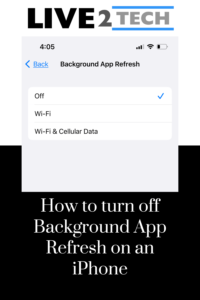
Some of the settings on your iPhone involve things that many of us don’t think about. One of these is a feature called “background app… Continue Reading How to Turn Off Background App Refresh iPhone 13 Settings

Set AirDrop to Contacts Only on iPhone SE from Settings or Control Center, learn what it needs to work, and fix contacts who cannot see your iPhone. Continue Reading How to Set AirDrop to Contacts Only on iPhone SE (and Other iPhones)

Remove columns in Google Docs with Format > Columns > one column, delete column breaks, or delete a table column with a right-click. Continue Reading How to Remove Columns in Google Docs
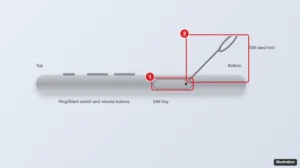
The SIM tray is on the left side, below the volume buttons. Push the eject tool into the hole, pull out the tray, and lift out the nano-SIM. eSIM tips too. Continue Reading How to Remove the SIM Card From an iPhone 13

Click File > Page setup, choose Standard 4:3, Widescreen 16:9, 16:10, or Custom, and click Apply. Best sizes for screens, print, and social posts. Continue Reading How to Change Slide Dimensions in Google Slides

Add a page in Google Docs with Ctrl + Enter or Insert > Break > Page break on a computer or phone, switch from Pageless to Pages, and delete extra pages. Continue Reading How to Add a Page in Google Docs

In the Google Docs app, tap More > Share & export > Send a copy, choose PDF or Word, then Save to Files. Or turn on Available offline to use it without Wi-Fi. Continue Reading How to Save a Google Doc to Your iPhone

Print a title on every page in Excel 2013 with Print Titles and Rows to repeat at top, or add it to the header, plus fixes when Print Titles is grayed out. Continue Reading How to Include a Title at the Top of Every Page in Excel 2013

Save an Excel chart as an image with Save as Picture on Windows or Mac, choose PNG, JPG, or SVG, and use copy-paste or screenshots in Excel for the web. Continue Reading How to Save an Excel Chart as an Image (PNG, JPG, or SVG)

Print the top row on every page in Excel 2016 with Page Layout > Print Titles, repeat columns on the left, and fix a grayed-out Print Titles button. Continue Reading How to Print the Top Row on Every Page in Excel 2016

Remove all page breaks in Excel with Reset All Page Breaks, delete single breaks in Page Break Preview, hide dotted lines, and control breaks with scaling. Continue Reading How to Remove All Page Breaks in Excel 2013 (and Newer)

Go to Page Layout, open Page Setup, and on the Margins tab check Horizontally and Vertically under Center on page. How to preview and apply to many sheets. Continue Reading How to Center a Worksheet Horizontally and Vertically in Excel 2010

Double-press the Home button, then swipe the app preview up to close it. Steps for newer iPhones, when to close apps, and what to do if one freezes. Continue Reading How to Close an Open App on an iPhone 5

View and change startup apps in Windows from Settings or Task Manager, read the startup impact ratings, and add a program with the Startup folder. Continue Reading How to View and Change Startup Apps in Windows

Change your iPhone 11 Home Screen: set a new wallpaper, rearrange apps, add widgets, tint icons, and hide pages. Updated for iOS 18 and iOS 26. Continue Reading How to Change the Home Screen on iPhone 11

Email a Google Doc as a PDF with File > Email > Email this file, or download and attach it, plus steps for the mobile app. Continue Reading How to Email a Google Docs File as a PDF Attachment
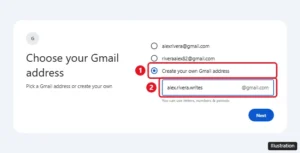
Create a new Gmail account in about five minutes on a computer, iPhone, or Android, plus username rules, adding a second account, and phone number tips. Continue Reading How to Create a New Gmail Account (Computer, iPhone, and Android)

Make app icons bigger on iPhone 7 with Display Zoom, plus larger text, bold text, and Zoom options for easier reading on your iPhone. Continue Reading How to Make App Icons Bigger on iPhone 7 (Display Zoom)

Delete your YouTube search history on an iPad: remove single searches, clear all history in the app or at My Activity, and pause search history. Continue Reading How to Delete Your YouTube Search History on an iPad

Click Layout and choose Title and two columns, or add side-by-side text boxes or a borderless table. How to align columns evenly and add dividers. Continue Reading How to Make Columns in Google Slides

Crop a picture into a perfect circle in PowerPoint with Aspect Ratio 1:1 and Crop to Shape, then reposition the photo and add a border. Continue Reading How to Crop a Picture into a Circle in PowerPoint 2013
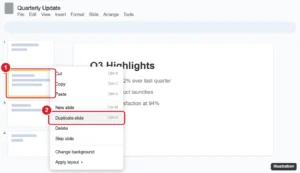
Duplicate a slide in Google Slides with the right-click menu or Ctrl + D, duplicate several slides at once, copy slides to other decks, and use mobile. Continue Reading How to Duplicate a Slide in Google Slides (Desktop and Mobile)
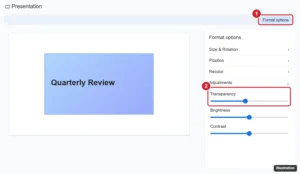
Make a picture more see-through in Google Slides with Format Options > Adjustments > Opacity, reset it, fade it behind text, and see what shapes and apps offer. Continue Reading How to Make an Image More Transparent in Google Slides

Rotate a picture in Google Docs by dragging its handle or setting an exact angle in Image options, flip it with Google Drawings, and rotate on mobile. Continue Reading How to Rotate (or Flip) a Picture in Google Docs
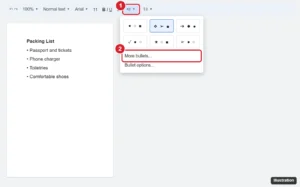
Change bullet point styles in Google Docs with toolbar presets or More bullets for any symbol, and adjust bullet color, size, and list levels. Continue Reading How to Change the Bullet Point Style in Google Docs
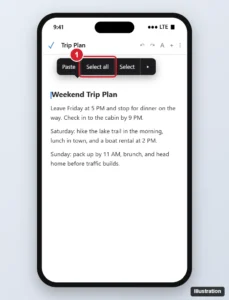
Select all text in the Google Docs iPhone app: tap the pencil, touch and hold the text, then tap Select all. Plus formatting tips and fixes. Continue Reading How to Select All in the Google Docs iPhone App
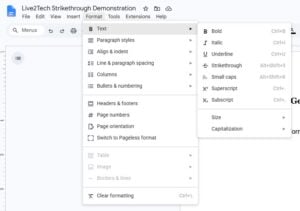
Cross out text in Google Docs from Format > Text > Strikethrough or a shortcut on Windows, Chromebook or Mac, take the line off, and fix a line that acts wrong. Continue Reading How to Draw a Line Through Text in Google Docs
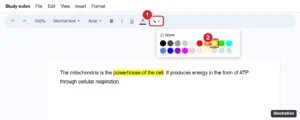
Highlight text in Google Docs with the Highlight color button, use custom colors, highlight on mobile, and remove highlighting from the whole document. Continue Reading How to Highlight in Google Docs

Make your iPhone 7 camera light flash for text messages with LED Flash for Alerts, flash in silent mode, and fix a flash that does not work. Continue Reading How to Make Your iPhone Flash When You Get a Text
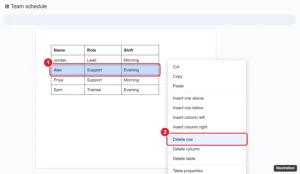
Right-click a cell in the row and choose Delete row. How to delete several rows at once, remove rows in the mobile app, and fix rows that will not delete. Continue Reading How to Delete a Table Row in Google Docs

Reset network settings on an iPhone 11 to fix Wi-Fi, cellular, and Bluetooth problems: the exact steps, what gets erased, and how to set things up again. Continue Reading How to Reset Network Settings on an iPhone 11

Find the Group Messaging switch in iPhone Messages settings, see which group type you are in, and check MMS, RCS and carrier settings when it is missing. Continue Reading How to Turn On Group Messaging on iPhone

Skip a slide in Google Slides by right-clicking it and choosing Skip slide, unskip it later, skip several at once, and see how skipped slides behave. Continue Reading How to Skip a Slide in a Google Slides Presentation
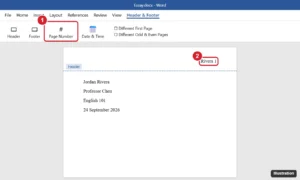
Add your last name and page number in Word: Insert > Page Number > Top of Page > Plain Number 3, then type your name before the number. MLA tips included. Continue Reading How to Add Your Last Name and Page Number in Word

Curve text in Word for Microsoft 365 with WordArt and Text Effects > Transform. Make an arch or a full circle, adjust the curve, and wrap text around a picture. Continue Reading How to Curve Text in Word Into an Arch or Circle
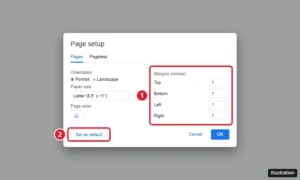
Set 1-inch margins in Google Docs with File > Page setup, make them the default, and adjust margins with the ruler or on your phone. Continue Reading How to Set 1-Inch Margins in Google Docs

Edge searches from two places, and either one can still send you to Bing: the address bar at the top of the window and the… Continue Reading How to Switch Microsoft Edge From Bing to Google Search
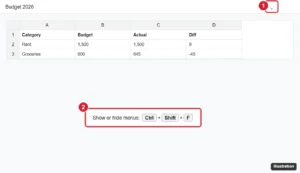
Google Sheets toolbar missing? Press Ctrl+Shift+F or click the arrow to show menus, exit full screen, show the formula bar, and fix zoom or extension issues. Continue Reading Why Is My Google Sheets Toolbar Missing? How to Get It Back
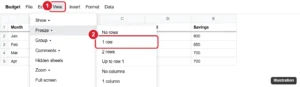
Lock a row in Google Sheets by freezing it with View > Freeze so it stays visible, or protect it with Data > Protect sheets and ranges. Continue Reading How to Lock a Row in Google Sheets
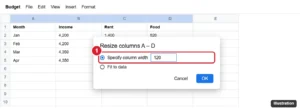
Make multiple columns the same width in Google Sheets with Resize columns, by dragging one selected border, or fit them to data. Rows too. Continue Reading How to Make Columns the Same Width (Distribute Evenly) in Google Sheets

Add a vertical line between columns in Word 2013 and newer with More Columns > Line between, fix a line that will not show, and customize its style. Continue Reading How to Add Lines Between Columns in Word 2013 and Later
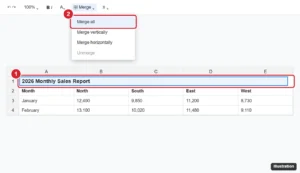
Make a title in Google Sheets: add a title row, merge and center it, format it, freeze it, print it on every page, and name the file and sheet tabs. Continue Reading How to Make a Title in Google Sheets

Edit a Word document on an iPhone 13 with the free Word app: open files from email or Files, use the edit toolbar, track changes, save, and share, or use Pages. Continue Reading How to Edit a Word Document on an iPhone 13
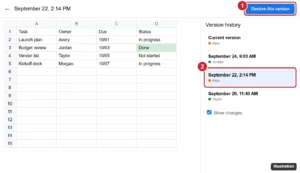
Restore an earlier version of a Google Sheets file from version history, recover only certain data with Make a copy, and name versions for later. Continue Reading How to Restore a Version From Version History in Google Sheets

The red number on the YouTube icon is a notification badge. Clear it by checking notifications, or turn off Badges in iPhone Settings > Notifications > YouTube. Continue Reading Why Is There a Red Number on My YouTube App Icon?

Save a Google Doc as a PDF on iPhone or Android from Share & export, find where the PDF is saved, and use Print to PDF as an alternative. Continue Reading How to Save a Google Doc as a PDF on Your Phone

Set Gmail to Reply or Reply all by default in Settings > General > Default reply behavior on the web, and in the Gmail app settings on Android. Continue Reading How to Change the Default Reply Behavior in Gmail