To set 1-inch margins in Google Docs, click File > Page setup, type 1 in the Top, Bottom, Left, and Right margin boxes, and click OK. Google Docs uses 1-inch margins by default for new documents, so if yours are different, the document was probably created from a template or someone changed them. Click Set as default in Page setup to use 1-inch margins for every new document.
How to set 1-inch margins on a computer
- Open your document in Google Docs.
- Click File > Page setup.
- Make sure the Pages tab is selected (not Pageless).
- Under Margins, enter 1 for Top, Bottom, Left, and Right. The unit is inches in the US. If you see centimeters, enter 2.54.
- Click OK.
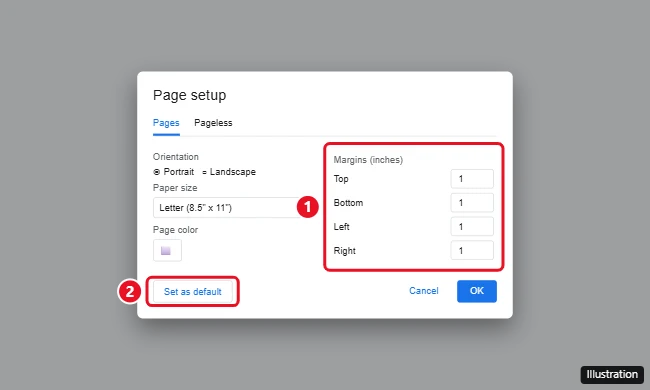
Make 1-inch margins the default
In File > Page setup, set the margins to 1 inch and click Set as default, then OK. New documents you create will use those margins.
Adjust margins with the ruler
If the ruler is hidden, click View > Show ruler. Drag the gray areas at each end of the horizontal ruler to change the left and right margins, and the vertical ruler on the left for top and bottom. This is quick, but typing exact values in Page setup is more precise.
Don’t confuse margins with the blue indent markers on the ruler. Indents move text within the margins but don’t change the margins themselves.
Change margins on a phone or tablet
- Open the document in the Google Docs app.
- Tap the three-dot menu > Page setup.
- Tap Margins and choose Default (1 inch) or Custom to enter your own values.
Margins not changing?
- Pageless format: Pageless documents don’t have page margins. Switch to Pages in File > Page setup.
- Section breaks: Documents with section breaks can have different margins per section. In Page setup, choose Apply to: Whole document.
- Tables or images: Wide tables and images can extend past the margin. Resize them.
Frequently asked questions
Are Google Docs margins 1 inch by default?
Yes, for new documents with the Letter paper size. Documents from templates or other people may use different margins.
What margins does MLA or APA format use?
Both MLA and APA call for 1-inch margins on all sides, with double spacing.
How do I set margins to 1 inch in Word?
In Microsoft Word, go to Layout > Margins > Normal, which is 1 inch on all sides.
Why does my printout have different margins?
Printers have unprintable areas at the edges. Check the print preview and make sure scaling is set to Default or 100%.

Kermit Matthews is a freelance writer based in Philadelphia, Pennsylvania with more than a decade of experience writing technology guides. He has a Bachelor’s and Master’s degree in Computer Science and has spent much of his professional career in IT management.
He specializes in writing content about iPhones, Android devices, Microsoft Office, and many other popular applications and devices.