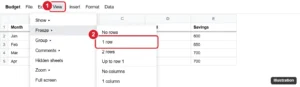
How to Lock a Row in Google Sheets
Lock a row in Google Sheets by freezing it with View > Freeze so it stays visible, or protect it with Data > Protect sheets and ranges. Continue Reading How to Lock a Row in Google Sheets
Our most popular and well-liked how-to guides and tutorials about topics involving the Google Sheets spreadsheet application.
Lock a row in Google Sheets by freezing it with View > Freeze so it stays visible, or protect it with Data > Protect sheets and ranges. Continue Reading How to Lock a Row in Google Sheets
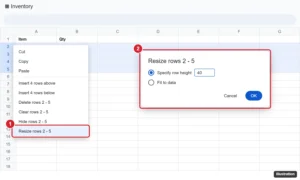
Select rows, right-click, and choose Resize rows. Enter a height in pixels or pick Fit to data. How to drag, resize every row, and use the mobile app. Continue Reading How to Set Row Height in Google Sheets
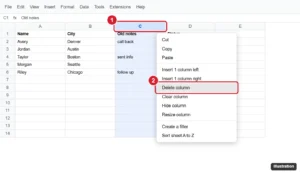
Delete a column in Google Sheets with the right-click menu, Edit menu, or a shortcut, delete several at once, and see how formulas react. Continue Reading How to Delete a Column in Google Sheets (Desktop and Mobile)
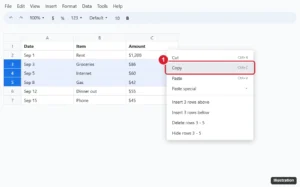
Copy multiple rows in Google Sheets: click the row numbers with Shift, press Ctrl + C, then paste. Plus non-adjacent rows and values-only paste. Continue Reading How to Copy Multiple Rows in Google Sheets

Select cells and click Insert > Checkbox. How to use custom values, count checked boxes with COUNTIF, cross out done tasks, and remove checkboxes. Continue Reading How to Insert a Checkbox in Google Sheets