To create a new Gmail account, go to accounts.google.com/signup, enter your name and birthday, pick a Gmail address, and create a password. Google may ask you to verify a phone number, then you agree to the terms and your inbox opens. It’s free, takes about five minutes, and gives you a Google Account that also works with YouTube, Google Drive, Google Photos, and the Play Store.
The steps below cover a computer, iPhone, and Android, plus how to add a second Gmail account without losing your first one.
What you need before you start
- A username idea or two. Popular names are usually taken, so have a backup ready.
- A phone that can receive texts. Google may ask you to verify a number to prove you’re not a robot. It’s not always required.
- Your date of birth. In most countries you must be at least 13 to manage your own account. Parents can create an account for a younger child with Family Link.
How to create a Gmail account on a computer
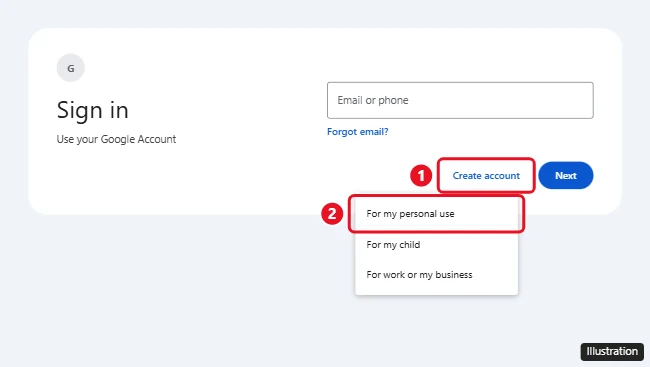
- Open a web browser and go to accounts.google.com/signup. You can also go to gmail.com, click Create account, and choose For my personal use.
- Type your First name and Last name (optional), then click Next.
- Enter your birthday and gender, then click Next.
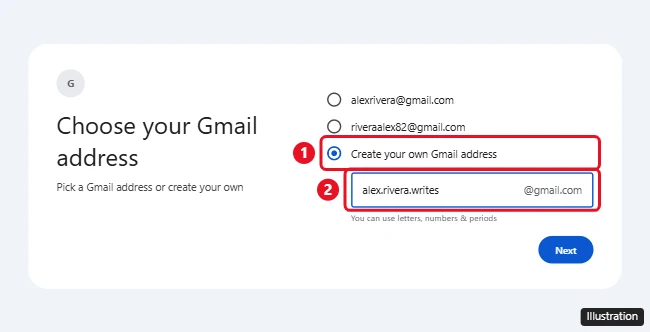
- On the Choose your Gmail address screen, pick one of the suggested addresses or select Create your own Gmail address and type the username you want. Click Next.
- Create a password, type it again in Confirm, and click Next.
- If you’re asked to confirm you’re not a robot, enter your phone number and type the code Google texts you.
- Add a recovery email (optional but recommended), then click Next.
- Review your account info, click Next, and select I agree on the Privacy and Terms page.
That’s it. Gmail opens to your new inbox, and you can sign in to any Google service with the new address.
Gmail username and password rules
- Length: Usernames must be 6 to 30 characters.
- Characters: You can use letters (a–z), numbers (0–9), and periods. Spaces, underscores, and other symbols aren’t allowed.
- Periods don’t count. Gmail ignores dots, so [email protected] and [email protected] are the same address. If one is taken, so is the other.
- No look-alikes or reused names. Google blocks addresses that are too close to an existing one, and addresses someone else used and deleted.
- Password: Use at least 8 characters with a mix of letters, numbers, and symbols. Don’t reuse a password from another site.
If your first choice is taken, try adding a middle initial, a word related to your job or hobby, or a number that isn’t your birth year.
How to create a Gmail account on an iPhone or iPad
- Install the Gmail app from the App Store and open it. (You can also use Safari and go to accounts.google.com/signup.)
- Tap Sign in, then Google. If you already use Gmail, tap your profile picture and choose Add another account instead.
- Tap Create account, then For my personal use.
- Follow the same prompts as on a computer: name, birthday, Gmail address, password, and phone verification if asked.
- Tap I agree to finish.
To add the account to the built-in Mail app too, go to Settings > Apps > Mail > Mail Accounts > Add Account > Google. On older versions of iOS, Mail is directly under Settings.
How to create a Gmail account on an Android phone
- Open Settings and tap Passwords & accounts (on Samsung phones, Accounts and backup > Manage accounts).
- Tap Add account > Google.
- Tap Create account > For my personal use.
- Enter your name, birthday, Gmail address, and password, and verify your phone number if asked.
- Tap I agree. The new account appears in the Gmail app automatically.
Menu names vary a little between phone makers. If you can’t find them, open the Gmail app, tap your profile picture, and choose Add another account > Google > Create account.
How to add a second Gmail account
You can have more than one Gmail account, and you don’t have to sign out of your current one to make another.
- In Gmail on a computer, click your profile picture in the top-right corner.
- Click Add another account, then Create account.
- Follow the sign-up steps above.
Afterward, click your profile picture any time to switch between accounts. In the Gmail app, swipe down on your profile picture to switch.
Can you create a Gmail account without a phone number?
Sometimes. Google decides whether to ask for a phone number based on things like your network and how many accounts have been made from it recently. If you’re asked and don’t want to use your mobile number, you can’t skip that screen, but you can try again later from your own home network or on a phone where you’re already signed in to Google. Avoid paid “virtual number” services. They often don’t work, and you could lose access if the number gets reassigned.
Another option is to create a Google Account with an email address you already have. On the Choose your Gmail address screen, select Use your existing email instead. You’ll get a Google Account without a new Gmail inbox.
Secure your new Gmail account
- Turn on 2-Step Verification or add a passkey at myaccount.google.com > Security.
- Add a recovery phone number and email so you can get back in if you forget your password.
- Run the Security Checkup in your Google Account once in a while.
Frequently asked questions
Is Gmail free?
Yes. A personal Gmail account is free and comes with 15 GB of storage shared across Gmail, Google Drive, and Google Photos. You can buy more with a Google One plan.
How many Gmail accounts can I have?
Google doesn’t publish a limit, and you can add several accounts to the same browser or phone. You may be asked to verify a phone number more often if you create a lot of accounts in a short time.
Can I change my Gmail address later?
In some cases, yes. Google is gradually rolling out an option, starting in the US, to change your @gmail.com address in your Google Account under Personal info > Email > Google Account email. You can do it once every 12 months, and your old address keeps working as an alternate. If you don’t see the option yet, create a new account and forward email from the old one.
Do I need a Gmail address to have a Google Account?
No. You can sign up with an existing email from another provider, such as Outlook or Yahoo.
Why does Google say my username isn’t allowed?
It’s either already taken, too similar to one that is, previously deleted, or reserved by Google. Try a different variation.

Kermit Matthews is a freelance writer based in Philadelphia, Pennsylvania with more than a decade of experience writing technology guides. He has a Bachelor’s and Master’s degree in Computer Science and has spent much of his professional career in IT management.
He specializes in writing content about iPhones, Android devices, Microsoft Office, and many other popular applications and devices.