Yahoo Mail still lets you create disposable email addresses. On a computer, go to Settings > More Settings > Mailboxes, click Add next to Disposable email addresses, choose a permanent nickname, then add a keyword. Your new address looks like [email protected], and anything sent to it lands in your regular inbox. You can create up to 3 for free in regions where Yahoo Mail Plus is offered, or up to 500 with a Yahoo Mail Plus subscription.
Disposable addresses are handy for newsletters, store sign-ups, and online forms. If one starts getting spam, delete it, and your real address stays private.
How Yahoo disposable addresses work
- Two parts: Every disposable address is [email protected]. You pick the nickname once, and it’s shared by all your disposable addresses. Each address gets its own keyword, like shopping or news.
- The nickname is permanent. Yahoo won’t let you change it later, so avoid your real name if privacy is the goal.
- Mail goes to your main inbox. You don’t have to sign in to anything separate.
- You can reply from it. Choose the disposable address in the From field when you write an email.
- Limits: Up to 3 free addresses, or up to 500 with Yahoo Mail Plus. If you go over the limit, a red triangle appears next to the extra address. The feature isn’t available in every country.
How to create a disposable email address in Yahoo Mail
- Sign in to mail.yahoo.com on a computer.
- Click the Settings icon (the gear) in the top-right corner, then More Settings.
- Click Mailboxes in the left column.
- Next to Disposable email addresses, click Add.
- Type a nickname in the permanent nickname field. Remember, you can’t change it later. Click Next.
- Type a keyword for this address, such as deals. You can also add a sender name and a description so you remember what it’s for.
- Click Save.
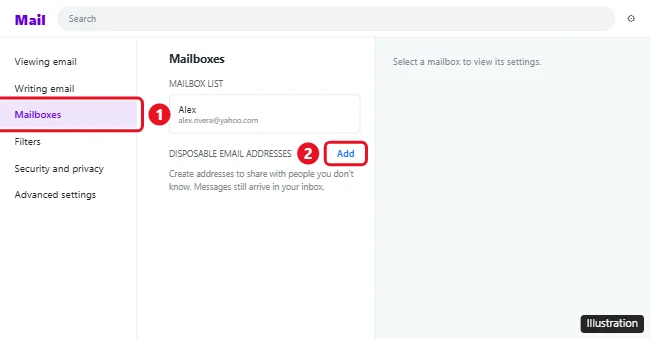
Your address is ready to use right away. To make another, click Add again and type a new keyword. The nickname stays the same.
How to send an email from a disposable address
- Click Compose.
- Click the arrow next to your email address in the From field.
- Choose the disposable address, then write and send your message as usual.
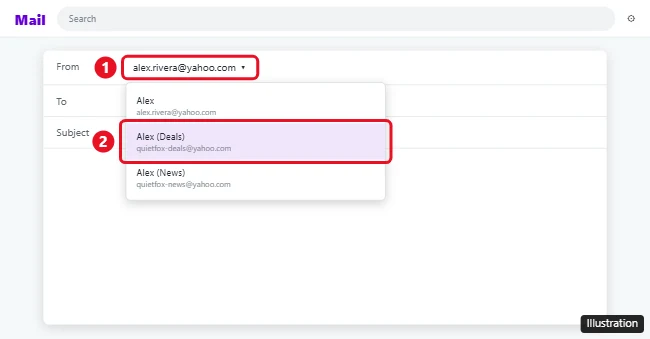
When you reply to a message that was sent to a disposable address, check the From field first so you don’t accidentally reveal your main address.
How to edit or delete a disposable address
- Go to Settings > More Settings > Mailboxes.
- Click the arrow to expand Disposable email addresses, then click the one you want to change.
- Edit the sender name or description and click Save, or click Delete address and then Confirm.
After you delete it, mail sent to that address no longer reaches you. Update any accounts that use it first, especially anything you might need to reset a password for.
Sort mail from disposable addresses automatically
Because every message arrives in your main inbox, it helps to send each address’s mail to its own folder.
- Go to Settings > More Settings > Filters, then click Add new filters.
- Name the filter, set To/Cc to contains, and type the disposable address.
- Choose a folder to move the messages to, then click Save.
Can you make one in the Yahoo Mail app?
Yahoo’s help page covers only the desktop website, so set up disposable addresses in a web browser at mail.yahoo.com. Mail sent to them still shows up in the app on your phone.
Other ways to hide your email address
If you don’t want to pay for Yahoo Mail Plus after your free addresses run out, there are other options:
- Gmail plus addresses: Add a plus sign and any word to a Gmail address, like [email protected]. It’s free, but anyone can guess your real address by removing the part after the plus sign.
- Hide My Email: iCloud+ subscribers can create random addresses that forward to their inbox.
- A second free account: See how to create a new Gmail account for sign-ups you want to keep separate.
Also see setting a Yahoo Mail vacation response.
Frequently asked questions
Is Yahoo’s disposable email feature free?
You can create up to 3 disposable addresses for free if Yahoo Mail Plus is offered where you live. For more, up to 500, you need a Yahoo Mail Plus subscription.
Can I change my disposable address nickname?
No. The nickname is permanent once you set it. You can delete individual addresses and create new keywords at any time.
Where does mail sent to a disposable address go?
To your main Yahoo Mail inbox, unless you set up a filter to move it to a folder.
Why don’t I see Disposable email addresses in my settings?
The feature isn’t available in every country. It may also be missing on older Yahoo Mail layouts, so make sure you’re using the current version of mail.yahoo.com.

Kermit Matthews is a freelance writer based in Philadelphia, Pennsylvania with more than a decade of experience writing technology guides. He has a Bachelor’s and Master’s degree in Computer Science and has spent much of his professional career in IT management.
He specializes in writing content about iPhones, Android devices, Microsoft Office, and many other popular applications and devices.