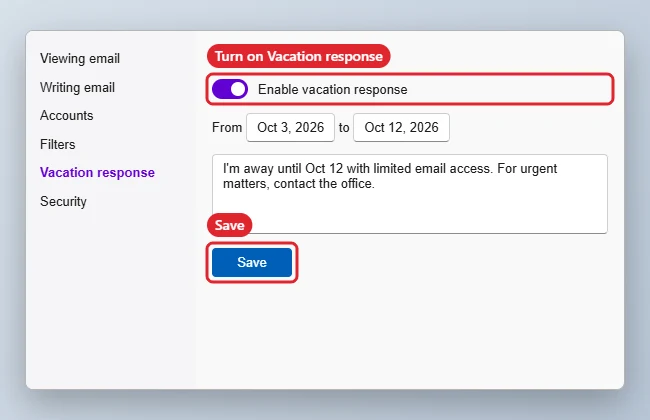
To set a vacation response in Yahoo Mail, click the Settings gear, choose More Settings, then Vacation response. Turn it on, pick the start and end dates, type your message and click Save. Yahoo sends the reply automatically to people who email you during those dates. Menu names can change, so follow the closest match if your screen looks a little different. If your work email is a Microsoft 365 account in Outlook instead, you can schedule an out of office reply in Outlook with separate messages for colleagues and outside senders.
Steps to Set the Auto-Reply
- Sign in to Yahoo Mail on the web.
- Click the Settings gear, then More Settings.
- Choose Vacation response.
- Turn on the vacation response and set the From and To dates.
- Write your message, then click Save.
Vacation Response Options
| Option | Use |
|---|---|
| Date range | Starts and stops the reply automatically |
| Message | What senders receive |
| Different reply for some domains | Send a separate message to, for example, work contacts (where offered) |
| Turn off early | Switch the response off and save |
Does it reply to spam?
Mail sent to your spam folder generally doesn’t get a vacation reply.
To keep sign-up mail away from your main address in the first place, see how Yahoo Mail disposable addresses work.
Can I include a link or phone number?
Yes. Add contact details for urgent matters, but avoid sharing sensitive information with everyone.
When the Vacation Reply Misbehaves
- No option in the phone app: Set it on the web; it then works for all devices.
- Senders don’t get replies: Yahoo usually sends one reply per sender during the period, not one per email.
- Using Gmail too: See setting a vacation response in Gmail.
- Classic layout: See switching to classic Yahoo Mail.

Kermit Matthews runs Live2Tech from just outside Philadelphia. He is an IT specialist with over 20 years of experience, from a university help desk to small-business IT, IT management and his own consulting practice, and has written tech guides full time since 2020. Steps are checked against the current software on a real device or the maker’s official documentation. More about Kermit.