Edge searches from two places, and either one can still send you to Bing: the address bar at the top of the window and the search box in the middle of a new tab. For the address bar, pick Google from the Search engine used in the address bar menu, found under Settings > Privacy, search, and services > Search and connected services > Address bar and search. The new tab box has its own option, covered below.
Where Edge keeps the search engine setting
Microsoft’s own help page, change your default search engine in Microsoft Edge, says Bing is Edge’s default and walks through the same path used below. It applies to Edge on Windows 11 and Windows 10. On older versions of Edge the Address bar and search entry sat directly under Privacy, search, and services; current versions tuck it inside Search and connected services, which is why many older instructions seem to lead nowhere.
Two things in Edge accept a search, and they don’t always behave the same:
- The address bar at the top of the window. Typing words instead of a web address searches with the engine chosen in the setting above.
- The search box on the new tab page, the box in the middle of a fresh tab. It has its own option and can stay on Bing even after the address bar uses Google (more on that below).
Windows 10 users get the same Edge steps, but note that Microsoft says that after October 14, 2025, it no longer provides free software updates, technical assistance or security fixes for Windows 10.
Change the address bar from Bing to Google
The pictures in this section are older screenshots from an earlier version of Edge on Windows 10. Current menus look different, so follow the labels in each step rather than the exact layout.
- Open Microsoft Edge on your computer.
- Click Settings and more, the three dots at the top-right of the window.

- Click Settings near the bottom of the menu. Settings opens in a new tab.

- In the list on the left, click Privacy, search, and services.

- Click Search and connected services, then click Address bar and search.

- Open the menu next to Search engine used in the address bar and choose Google.
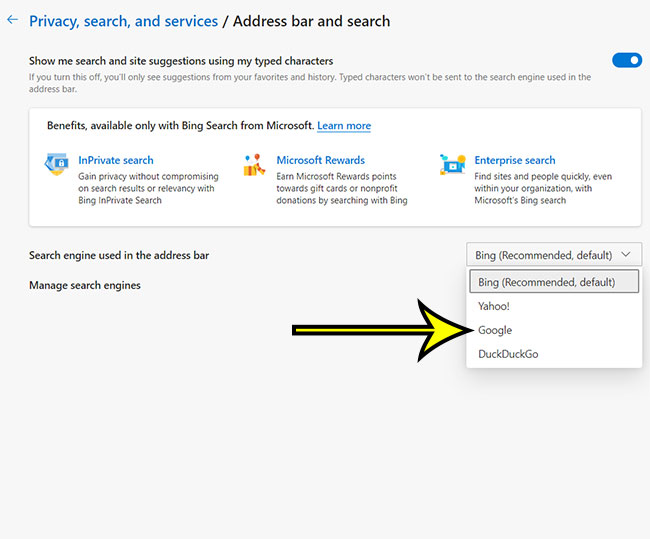
Confirm the change
Open a new tab, click in the address bar (not the box in the middle of the page), type a couple of words such as weather tomorrow and press Enter. The results page should be google.com. If Bing opens, go back to step 6 and check the menu; if the menu shows Google but searches still go to Bing, you probably typed into the new tab page box instead. To return to Bing later, pick it from the same menu.
If Google isn’t listed, Microsoft’s fix is a search first. Microsoft’s instruction for adding one is to perform a search in the address bar using that search engine, or on a website that supports search, and Edge then offers it in the list. Microsoft adds that the engine has to support OpenSearch technology. In practice:
- Type google.com in Edge’s address bar and press Enter.
- Search for anything from the Google page.
- Go back to Settings > Privacy, search, and services > Search and connected services > Address bar and search and open the menu again. Google should now appear; select it.
If it still isn’t there, close and reopen Edge, run another Google search, and look again. A choice of engine that keeps disappearing is a different problem, covered further down.
The search box on the new tab page
If the switch seems not to have taken, this box is the likely reason. The box in the middle of a new tab is part of the new tab page, and Edge treats it separately from the address bar. Depending on your Edge version, the Address bar and search page has an option that decides whether searches from new tabs use that search box or go to the address bar. Microsoft’s help page doesn’t spell out the wording, so look for an option on that page that mentions new tabs. Setting it to use the address bar sends those searches to Google too.
If you’d rather the whole new tab page be Google’s, that’s a separate change to what a new tab shows; see changing the new tab page in Edge to Google. To have the Home button open Google, see making Google your homepage in Edge, Chrome and Firefox.
What still opens Bing after the switch
- The Windows search box on the taskbar. Web results there come from Windows, not from Edge’s setting, and Microsoft doesn’t document a setting that switches it to Google. The options that do exist on the Windows side are collected in making Google your default search engine on Windows 11.
- Links that point to Bing. A link from another app or a widget that goes to a bing.com address opens Bing no matter which engine Edge uses for your own searches.
- Other browsers. Each browser keeps its own engine. If Chrome is the one stuck on Bing, see removing Bing from Chrome; for Firefox, see setting the default search engine in Firefox.
Choosing Google as Edge’s search engine also doesn’t make Edge stop being your default browser, or make another browser the default. That’s a Windows setting; setting Chrome as the default browser in Windows 11 explains it.
Work or school PCs and a setting you can’t change
If the Search engine used in the address bar menu is grayed out, or Edge shows a message that your browser is managed by your organization, the choice is set by an administrator. Microsoft’s Microsoft Edge browser policy documentation lists the policies involved, including DefaultSearchProviderEnabled (“Enable the default search provider”), DefaultSearchProviderSearchURL (“Default search provider search URL”) and NewTabPageSearchBox (“Configure the new tab page search box experience”). There’s nothing to switch on your side; ask your IT team whether Google can be allowed.
On a personal PC, an engine that keeps changing back to Bing or to something unfamiliar can point to an extension or a program that changes browser settings. Review the extensions you have installed, remove any you don’t recognize, and then set Google again.
Edge on a Mac or a phone
Edge for Mac also opens Settings from the Settings and more menu. Microsoft’s help page gives Windows steps only, so look for the same Address bar and search section, and expect small differences in layout. On an iPhone, the Edge app has its own setting, covered in changing the default search engine in Edge on an iPhone. If you also use Safari, its engine is separate again: see changing Safari’s search engine on an iPhone.
Edge search engine answers
Why does a new tab still show Bing results when the address bar uses Google?
You’re searching from the new tab page’s own box. Use the address bar, or change the new tab option described above.
Will an Edge update reset my choice?
Microsoft’s help page doesn’t say that updates change the search engine. If yours changes, check the extensions and managed-browser points above before setting it again.
Why did older instructions mention Internet Explorer?
Internet Explorer had its own search provider settings. Edge replaced it, and the steps on this page are the ones that apply to current versions of Edge.
A few other browser and Windows tasks people tackle alongside this one: adding Google Chrome to the Windows 10 taskbar, changing your Google Chrome user avatar and moving Safari’s address bar back to the top on an iPhone. For unrelated Windows and Google Docs chores, see creating a new user in Windows 10, extracting ZIP files in Windows and setting default margins in Google Docs.
Next step: open Edge now, make the change in Address bar and search, and run one test search from the address bar to confirm Google answers.
Using Safari on a Mac as well? Here is how to change the default search engine in Safari on a Mac.

Kermit Matthews runs Live2Tech from just outside Philadelphia. He is an IT specialist with over 20 years of experience, from a university help desk to small-business IT, IT management and his own consulting practice, and has written tech guides full time since 2020. Steps are checked against the current software on a real device or the maker’s official documentation. More about Kermit.