
How to Duplicate a Slide in Google Slides (Desktop and Mobile)
Duplicate a slide in Google Slides with the right-click menu or Ctrl + D, duplicate several slides at once, copy slides to other decks, and use mobile.
How-to guides and tutorials to help you perform specific tasks and use applications and devices made by Google.
Duplicate a slide in Google Slides with the right-click menu or Ctrl + D, duplicate several slides at once, copy slides to other decks, and use mobile.
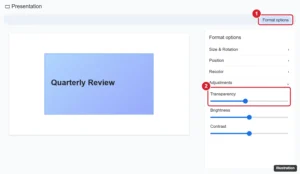
Select the image, click Format options, expand Adjustments, and drag the Transparency slider. How to make shapes transparent and use faded backgrounds.

Rotate a picture in Google Docs by dragging its handle or setting an exact angle in Image options, flip it with Google Drawings, and rotate on mobile.
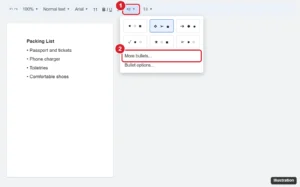
Change bullet point styles in Google Docs with toolbar presets or More bullets for any symbol, and adjust bullet color, size, and list levels.
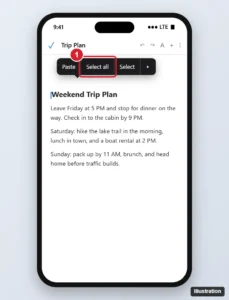
Select all text in the Google Docs iPhone app: tap the pencil, touch and hold the text, then tap Select all. Plus formatting tips and fixes.
Draw a line through text in Google Docs with Alt + Shift + 5 (Command + Shift + X on Mac) or Format > Text > Strikethrough, on desktop and mobile.
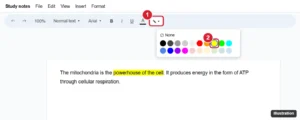
Highlight text in Google Docs with the Highlight color button, use custom colors, highlight on mobile, and remove highlighting from the whole document.
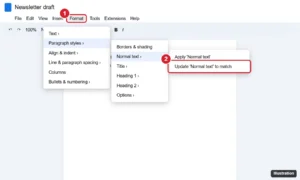
Change the font of a whole Google Doc: press Ctrl + A and pick a font, or update the Normal text style and save it as your default for new docs.

Change table border colour in Google Docs: select cells and use Border color in the toolbar, or set it for the whole table in Table properties.
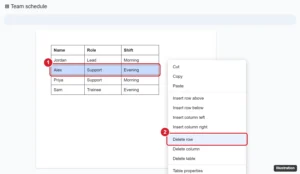
Right-click a cell in the row and choose Delete row. How to delete several rows at once, remove rows in the mobile app, and fix rows that will not delete.

Skip a slide in Google Slides by right-clicking it and choosing Skip slide, unskip it later, skip several at once, and see how skipped slides behave.
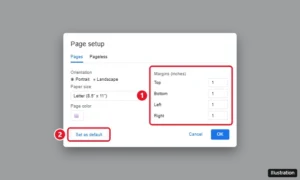
Set 1-inch margins in Google Docs with File > Page setup, make them the default, and adjust margins with the ruler or on your phone.
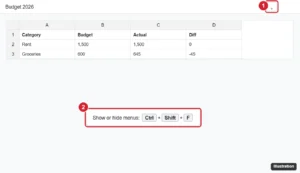
Google Sheets toolbar missing? Press Ctrl+Shift+F or click the arrow to show menus, exit full screen, show the formula bar, and fix zoom or extension issues.
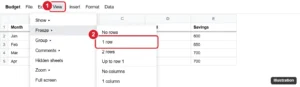
Lock a row in Google Sheets by freezing it with View > Freeze so it stays visible, or protect it with Data > Protect sheets and ranges.
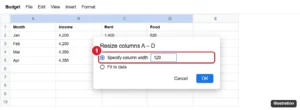
Make multiple columns the same width in Google Sheets with Resize columns, by dragging one selected border, or fit them to data. Rows too.
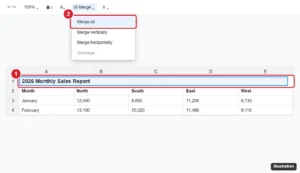
Make a title in Google Sheets: add a title row, merge and center it, format it, freeze it, print it on every page, and name the file and sheet tabs.
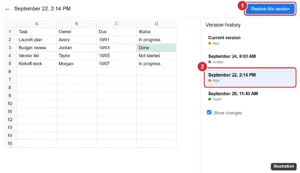
Restore an earlier version of a Google Sheets file from version history, recover only certain data with Make a copy, and name versions for later.

Save a Google Doc as a PDF on iPhone or Android from Share & export, find where the PDF is saved, and use Print to PDF as an alternative.

Set Gmail to Reply or Reply all by default in Settings > General > Default reply behavior on the web, and in the Gmail app settings on Android.
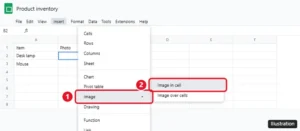
Insert an image into a cell in Google Sheets with Insert > Image > Image in cell or the IMAGE function, lock it in place, and fix images that won’t show.
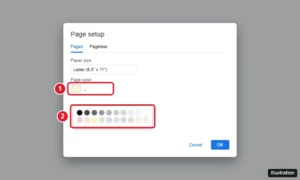
Change the background in Google Docs with Page setup > Page color, add a background image behind text or as a watermark, and change it on your phone.

Double space a whole document in the Google Docs iPhone app: select all, open Format > Paragraph, and set line spacing to 2.00, plus troubleshooting tips.
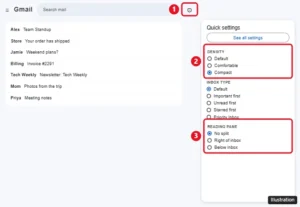
Change the view in Gmail with Quick settings: density, inbox type, reading pane, conversation view, and theme, on a computer, iPhone, or Android.

Change font color in Google Docs on a computer or phone, use custom hex colors, apply colors fast with paint format or styles, and set a default color.
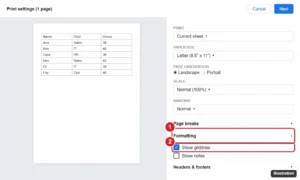
Print gridlines in Google Sheets by checking Show gridlines in print settings, or add borders for darker lines, print a selection, and fit it on one page.

Add a column to a Google Docs table: right-click a cell and choose Insert column left or right, or use Format > Table. Plus mobile steps and sizing tips.
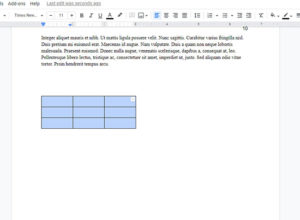
New tables that you create in Google Docs often take up the entire width of the page. While you have likely found the option to …
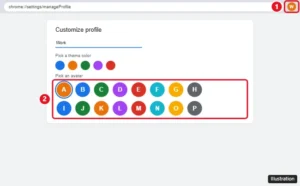
Change your Google Chrome profile avatar from Customize profile, or change your Google Account photo so it updates in Chrome, Gmail, and other Google apps.
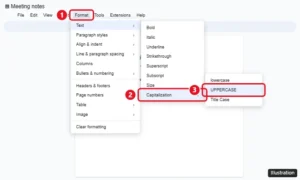
Select the text and click Format > Text > Capitalization > UPPERCASE. The same menu has lowercase and Title Case. Plus mobile options and fixes.
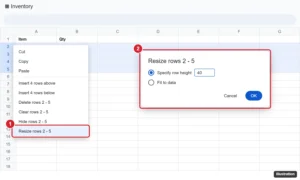
Select rows, right-click, and choose Resize rows. Enter a height in pixels or pick Fit to data. How to drag, resize every row, and use the mobile app.
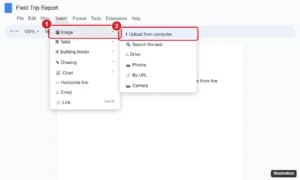
Upload a picture to Google Docs from your computer, Drive, Photos, the web, or your phone, then resize it, wrap text around it, and add alt text.
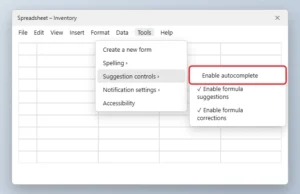
Turn off autocomplete in Google Sheets from Tools > Suggestion controls, and disable formula suggestions, corrections, and Smart Fill prompts.
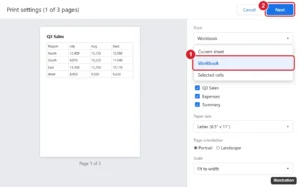
Print every tab in Google Sheets: press Ctrl + P, change Print from Current sheet to Workbook, pick sheets, then click Next. Plus PDF tips.
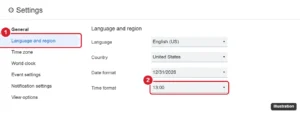
Switch Google Calendar to a 24-hour clock on the web in Language and region, and on Android or iPhone through your phone’s date and time settings.

Switch between Editing and Suggesting mode in Google Docs with the mode button or shortcuts, accept or reject suggestions, and fix being stuck in one mode.
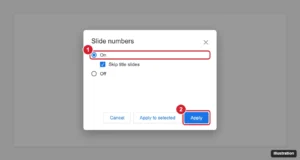
Add slide numbers in Google Slides from Insert > Slide numbers, skip the title slide, number only some slides, change the style, and remove them.
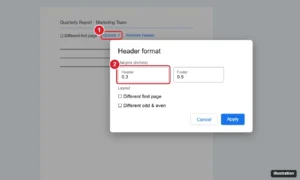
Change the header margin in Google Docs: double-click the header, choose Options > Header format, and set a new Header margin. Plus fixes and tips.
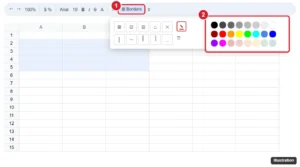
Change cell border color in Google Sheets by choosing a color with the Borders pencil before applying borders, recolor existing borders, and use mobile.

Reply all in Gmail by clicking Reply all under the message, or use the three-dot menu in the app. Plus the A shortcut and how to make it the default.
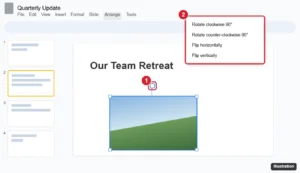
Rotate a picture in Google Slides with the rotation handle, Arrange > Rotate for 90-degree turns and flips, or an exact angle in Format options.

Sort a column from highest to lowest in Google Sheets with Sort sheet Z to A, keep headers in place, sort by multiple columns, or use the SORT function.
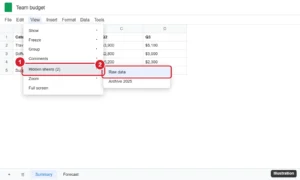
Unhide a sheet in Google Sheets with View > Hidden sheets or the All Sheets list, unhide on mobile, and fix a grayed-out Hidden sheets option.
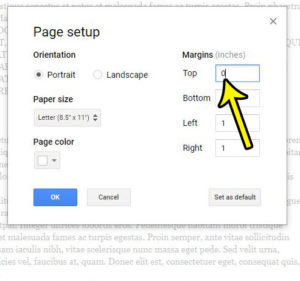
The header section of your document is a useful place to put important information like your last name or page number. Many schools and corporations …
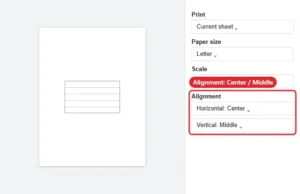
Center a Google Sheets printout: open File > Print, expand Formatting and set Alignment to Center and Middle. Plus scale and margin tips.

Remove the preview window at the bottom of your Gmail inbox by setting Reading pane to No split, or move it to the right. Steps for Quick settings and more.

Right-click a cell and choose Insert row above or below, or press Tab in the last cell to add a row at the end. Steps for several rows and the mobile app.
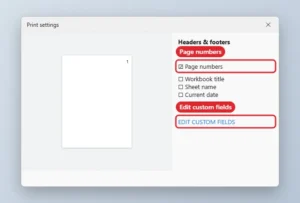
Move Google Sheets page numbers to the top: File, Print, Headers and footers, check Page numbers, then Edit custom fields to place them in the header.
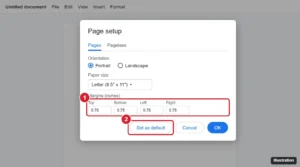
Set default margins in Google Docs with File > Page setup > Set as default, change margins for one document or with the ruler, and fix defaults.
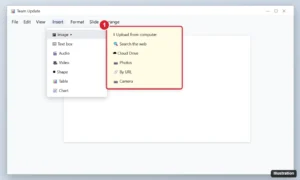
Insert a picture in Google Slides from your computer, the web, Drive, Photos, a URL or camera, then resize, crop, mask, replace it or set it as the background.
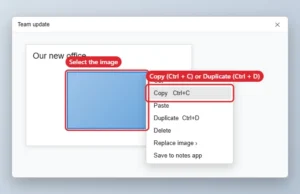
Copy a picture in Google Slides with Ctrl + D to duplicate or Ctrl + C and Ctrl + V to paste elsewhere. Save it via Keep or by downloading the slide.