To switch Google Calendar to a 24-hour clock on a computer, click the Settings gear at the top right, choose Settings, open Language and region under General, and change Time format from 1:00pm to 13:00. The change saves automatically. On a phone, the Google Calendar app follows your phone’s clock setting: turn on Use 24-hour format in Android’s Date & time settings, or 24-Hour Time in Settings > General > Date & Time on an iPhone.
Switch to a 24-hour clock on the web
- Go to calendar.google.com.
- Click the Settings gear at the top right, then Settings.
- Under General, click Language and region.
- Open the Time format menu and choose 13:00.
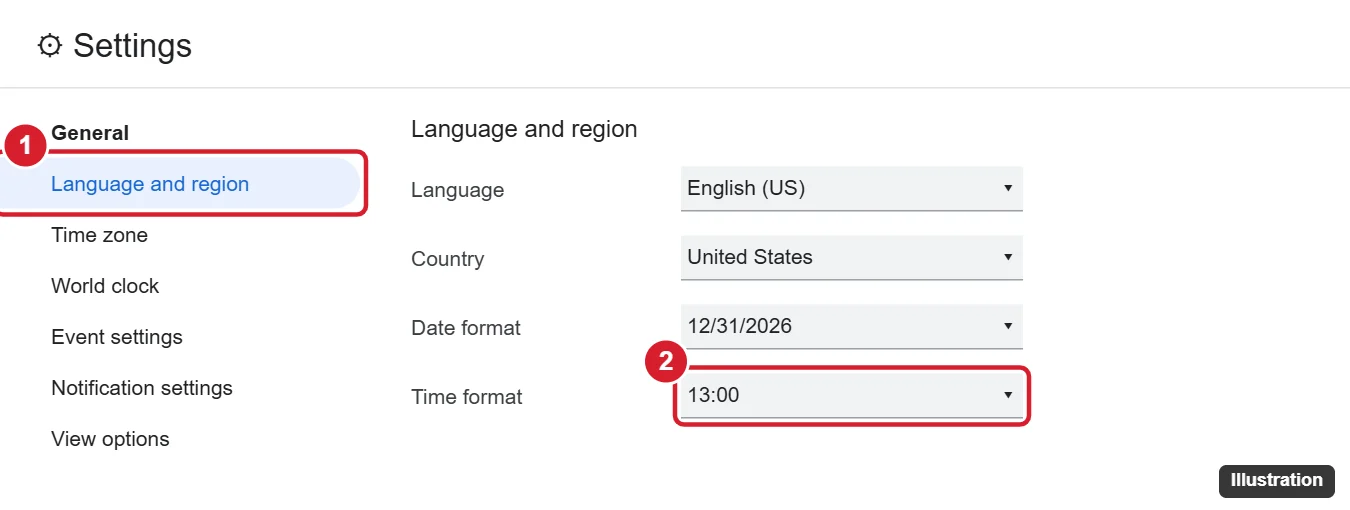
This setting applies to Google Calendar on the web for your account. It doesn’t change the phone apps.
Switch to a 24-hour clock on Android
- Open your phone’s Settings.
- Go to System > Date & time. On Samsung, go to General management > Date and time.
- Turn off Use locale default if you see it, then turn on Use 24-hour format.
- Open Google Calendar. Times now show as 13:00, 14:00, and so on.
Switch to a 24-hour clock on iPhone and iPad
- Open Settings > General > Date & Time.
- Turn on 24-Hour Time.
Both the Google Calendar app and Apple’s Calendar app follow this setting. If 24-Hour Time is grayed out, your iPhone may be managed by a work profile or Screen Time settings.
Troubleshooting
- The web still shows am/pm. Refresh the page. If you use more than one Google account, make sure you changed the setting in the right one.
- Your phone app didn’t change. Close and reopen the Google Calendar app after changing the phone’s clock setting.
- Some times still show in 12-hour format. Event descriptions and invitations from other people show the time exactly as they typed it.
Related settings
- Date format: In Language and region on the web, choose how dates look, such as 31/12/2026 or 2026-12-31.
- Week start: Under View options, set Start week on to Monday or another day.
- Time zone: Under Time zone, set your primary time zone and add a secondary one to see both side by side.
Frequently asked questions
Why does Google Calendar use 12-hour time by default?
It follows your language and country. English (US) defaults to 12-hour time, while many other regions default to 24-hour time.
Does changing the time format move my events?
No. Only the way times are displayed changes. Events stay at the same times.
Can I use 24-hour time on the web but 12-hour on my phone?
Yes. The web setting and your phone’s clock setting are separate.

Kermit Matthews runs Live2Tech from just outside Philadelphia. He started on a university help desk, spent years as the IT person for small businesses, and has been writing tech guides full time since 2020. Each guide is checked on a device he owns, and re-checked when a menu moves. More about Kermit.