Skip to content
Live2Tech
  • iPhone
  • Windows
    • Windows 11
    • Windows 10
  • Office
    • Word
    • Excel
    • Powerpoint
    • Outlook
  • Google
    • Google Docs
    • Google Sheets
    • Google Slides
    • Gmail
    • Chrome
    • Google Drive
  • Mac & Apple
    • Mac
    • iPad
    • Apple Watch
  • All Tutorials

Windows 10

How-to guides and tutorials to help you perform specific tasks and use the Windows 10 operating system and its apps.

Windows 10 Power Options System Settings with Change settings that are currently unavailable and Turn on fast startup highlighted

How to Turn Off Fast Startup in Windows 10 (and When You Should)

November 10, 2026July 29, 2024 by Kermit Matthews

Turn off Fast Startup in Windows 10 through Power Options, powercfg, or Group Policy, and learn when disabling it fixes boot, update, and USB issues. Continue Reading How to Turn Off Fast Startup in Windows 10 (and When You Should)

Categories Windows 10
Windows 10 Settings Storage page showing the C drive used and free space bar and a breakdown by category such as Apps and features and Temporary files, highlighted

How to Check Storage on Windows 10 (and Free Up Space)

November 17, 2026July 29, 2024 by Kermit Matthews

Check storage on Windows 10 in This PC, Settings > Storage, or Disk Management, see what is using space, and free it up with Storage Sense and cleanup. Continue Reading How to Check Storage on Windows 10 (and Free Up Space)

Categories Windows 10
System Information window with the BIOS Version and Date row highlighted

How to Check the BIOS Version in Windows 10

November 13, 2026July 29, 2024 by Kermit Matthews

Check your BIOS version in Windows 10 with msinfo32 or PowerShell, see the BIOS mode, and learn when a BIOS update is worth installing. Continue Reading How to Check the BIOS Version in Windows 10

Categories Windows 10
Windows 10 Settings Family and other users page with a Microsoft account expanded and the Remove button highlighted

How to Remove an Administrator Account From Windows 10 (Local or Microsoft)

November 14, 2026July 29, 2024 by Kermit Matthews

Remove a Microsoft admin account in Windows 10 from another admin via Settings > Accounts > Family & other users, or switch to a local account. Continue Reading How to Remove an Administrator Account From Windows 10 (Local or Microsoft)

Categories Windows 10
App store page for switching out of S mode with the Get button highlighted

How to Switch Out of S Mode in Windows 10

November 17, 2026July 29, 2024 by Kermit Matthews

Switch out of S mode in Windows 10 for free from Activation settings and the Store. It is one-way, so read this before you click Get. Continue Reading How to Switch Out of S Mode in Windows 10

Categories Windows 10
HP laptop keyboard top row with the prt sc key highlighted next to the Windows and Fn keys

How to Take a Screenshot on an HP Laptop

November 17, 2026July 29, 2024 by Kermit Matthews

Find the Print Screen key on your HP laptop, know when it needs Fn, and use the Windows shortcuts that copy or save a screenshot to Pictures > Screenshots. Continue Reading How to Take a Screenshot on an HP Laptop

Categories Windows 10, Windows 11
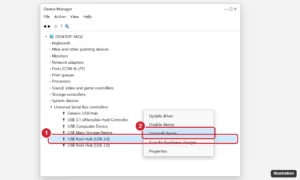
Windows Device Manager with Universal Serial Bus controllers expanded, a USB Root Hub right-clicked, and Uninstall device highlighted

How to Open a USB Drive on Windows 10

November 17, 2026July 29, 2024 by Kermit Matthews

Open a USB flash drive on Windows 10 in File Explorer, set AutoPlay, eject safely, and fix a USB drive that does not show up or asks to be formatted. Continue Reading How to Open a USB Drive on Windows 10

Categories Windows 10
Administrator Command Prompt window running the del command to delete files in the TEMP folder

How to Delete Temporary Files in Windows 10 Using CMD

November 10, 2026July 29, 2024 by Kermit Matthews

Delete temporary files in Windows 10 with Command Prompt using del and rd, clear the Windows Temp folder, and make a one-click cleanup batch file. Continue Reading How to Delete Temporary Files in Windows 10 Using CMD

Categories Windows 10
Command prompt showing the Python version check, a pip install command for the notebook package, and the command that launches the notebook server in the browser

How to Install Jupyter Notebook on Windows 10 and 11

November 10, 2026July 29, 2024 by Kermit Matthews

Install Jupyter Notebook on Windows 10 or 11 with pip or Anaconda, launch it in the right folder, use a virtual environment and fix PATH errors. Continue Reading How to Install Jupyter Notebook on Windows 10 and 11

Categories Windows 10, Windows 11
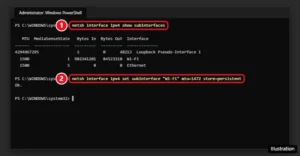
Windows Terminal running netsh commands to show and set the MTU for the Wi-Fi interface

How to Change the MTU Size in Windows 11 and 10

November 12, 2026June 25, 2024 by Kermit Matthews

Find the right MTU with a ping test, then change it on Windows 11 or 10 with a single netsh or PowerShell command. Plus how to reset it and fix errors. Continue Reading How to Change the MTU Size in Windows 11 and 10

Categories Windows 10, Windows 11
Windows 11 Select an app to open this .jnlp file dialog with OpenWebStart selected and the Always button highlighted

How to Open a JNLP File in Windows 11

November 10, 2026June 25, 2024 by Kermit Matthews

Open JNLP files on Windows 11 with the free OpenWebStart, or Java 8’s Java Web Start. Plus how to set the default app and fix blocked apps. Continue Reading How to Open a JNLP File in Windows 11

Categories Windows 10, Windows 11
MSYS2 UCRT64 terminal installing GCC with pacman and a Windows Terminal showing gcc --version

How to Install GCC on Windows 11 or 10 (MSYS2 or WSL)

November 12, 2026June 13, 2024 by Kermit Matthews

Install GCC on Windows 11 or 10 with MSYS2 and MinGW-w64, add it to your Path, and compile a test program. Plus the WSL option and common fixes. Continue Reading How to Install GCC on Windows 11 or 10 (MSYS2 or WSL)

Categories Windows 10, Windows 11
Windows Terminal running vulkaninfo --summary showing the Vulkan instance version and GPU driver

How to Install Vulkan on Windows 11 or 10

November 13, 2026June 13, 2024 by Kermit Matthews

Vulkan comes with your graphics driver, so update your NVIDIA, AMD, or Intel driver to install it. How to check it works, get the SDK, and fix errors. Continue Reading How to Install Vulkan on Windows 11 or 10

Categories Gaming, Windows 10, Windows 11
Microsoft Teams Settings Devices page with the Mirror my video switch highlighted under Camera

How to Mirror or Flip Your Webcam on Windows 11 and 10

November 12, 2026June 12, 2024 by Kermit Matthews

Windows has no webcam mirror setting, but Teams and Zoom do, and OBS or your webcam’s software can flip video for every app. Plus fixes for upside-down cameras. Continue Reading How to Mirror or Flip Your Webcam on Windows 11 and 10

Categories Windows 10, Windows 11
Windows 11 File Explorer with the cloud storage folder shown in the navigation pane under Home and Gallery

OneDrive Missing From File Explorer? How to Get It Back

November 17, 2026June 3, 2024 by Kermit Matthews

OneDrive gone from File Explorer? Check the cloud icon, start or sign in to OneDrive, restart Explorer, then reset or reinstall the app. Your files stay safe. Continue Reading OneDrive Missing From File Explorer? How to Get It Back

Categories Windows 10, Windows 11
MySQL Workbench Setup New Connection dialog with Hostname 127.0.0.1, Port 3306, Username root, and the Test Connection button highlighted

How to Connect MySQL Workbench to Localhost (and Fix Errors)

November 13, 2026April 1, 2024 by Kermit Matthews

Connect MySQL Workbench to localhost with 127.0.0.1 and port 3306, and fix errors like 10061, access denied, and caching_sha2_password. Continue Reading How to Connect MySQL Workbench to Localhost (and Fix Errors)

Categories Windows 10
Windows 10 Task Manager Startup tab listing apps with status and startup impact, with one app selected and the Disable button highlighted

How to View and Change Startup Apps in Windows

November 17, 2026November 30, 2022 by Kermit Matthews

View and change startup apps in Windows from Settings or Task Manager, read the startup impact ratings, and add a program with the Startup folder. Continue Reading How to View and Change Startup Apps in Windows

Categories Windows 10
how ot change default search from Bing to Google in Microsoft Edge

How to Switch Microsoft Edge From Bing to Google Search

November 16, 2026August 1, 2022 by Kermit Matthews

Edge searches from two places, and either one can still send you to Bing: the address bar at the top of the window and the… Continue Reading How to Switch Microsoft Edge From Bing to Google Search

Categories Windows 10
Windows 10 Settings Apps and features list with Sort by set to Install date highlighted

How to Sort Programs by Most Recently Installed in Windows 10

November 10, 2026May 16, 2022 by Kermit Matthews

Sort programs by install date in Windows 10 using Settings, the Installed On column in Control Panel, or PowerShell, and learn why some dates look wrong. Continue Reading How to Sort Programs by Most Recently Installed in Windows 10

Categories Windows 10
how to remove the mail icon in windows 10

How to Remove Mail Icon from Taskbar – Windows 10

November 15, 2026February 23, 2022 by Kermit Matthews

The taskbar that appears at the bottom of the screen in Windows 10 is a useful location for the apps that you use the most.… Continue Reading How to Remove Mail Icon from Taskbar – Windows 10

Categories Windows 10
Windows 10 Touchpad settings with the Touchpad sensitivity dropdown open and options highlighted

How to Change Touchpad Sensitivity in Windows 10

November 10, 2026November 12, 2021 by Kermit Matthews

Change touchpad sensitivity in Windows 10 in Settings or your touchpad maker’s software, adjust cursor speed, and stop accidental palm taps. Continue Reading How to Change Touchpad Sensitivity in Windows 10

Categories Windows 10
Windows Create Shortcut wizard with a website address typed in the location box and the Next button highlighted

How to Put a Netflix Icon on Your Windows Desktop

November 14, 2026April 29, 2021 by Kermit Matthews

Put a Netflix icon on your desktop with a website shortcut, install Netflix as an app from Edge or Chrome, or use the Store app, and give it the right icon. Continue Reading How to Put a Netflix Icon on Your Windows Desktop

Categories Windows 7, Windows 10 Tags Netflix
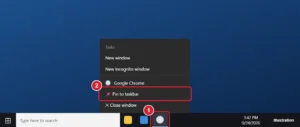
Windows 10 taskbar with the Chrome jump list open and Pin to taskbar highlighted

How to Add Google Chrome to the Taskbar in Windows 10

November 12, 2026April 22, 2021 by Kermit Matthews

Pin Google Chrome to the Windows 10 taskbar from the taskbar or Start menu, plus how to pin websites and Chrome profiles and fix a missing option. Continue Reading How to Add Google Chrome to the Taskbar in Windows 10

Categories Windows 10, Chrome
Laptop BIOS setup Main tab with the boot sound and boot animation options set to Disabled

How to Turn Off the Acer Predator Boot Sound and Animation

November 14, 2026August 24, 2020 by Kermit Matthews

Turn off the Acer Predator boot sound and logo animation in the BIOS by pressing F2 and disabling Boot Sound on the Main tab, or check PredatorSense. Continue Reading How to Turn Off the Acer Predator Boot Sound and Animation

Categories Windows 10, Windows 11
Windows 10 Print Server Properties dialog on the Drivers tab listing installed printer drivers

How to View Installed Printer Drivers in Windows 11 and 10

November 12, 2026June 8, 2020 by Kermit Matthews

View installed printer drivers in Windows 10 with Print Server Properties, Print Management, or PowerShell, check which driver a printer uses, and remove them. Continue Reading How to View Installed Printer Drivers in Windows 11 and 10

Categories Windows 10 Tags Printers
Folder Properties dialog with Size and Size on disk highlighted

How to View the Size of a Folder in Windows 10

November 10, 2026August 13, 2019 by Kermit Matthews

Check a folder size in Windows 10 with Properties, folder tooltips or Storage settings, and what Size on disk means. Continue Reading How to View the Size of a Folder in Windows 10

Categories Windows 10
how to change windows 10 focus assist settings

How to Change Focus Assist Settings in Windows 10

November 16, 2026February 8, 2019 by Kermit Matthews

Getting control over the notifications on your devices can be a relaxing situation. We are so inundated with alerts, banners, notification sounds, and other types… Continue Reading How to Change Focus Assist Settings in Windows 10

Categories Windows 10
how to open new folders in separate windows in windows 10

How to Open Each Folder in Its Own Window in Windows 10

November 17, 2026January 11, 2019 by Kermit Matthews

Do you like to keep a lot of folders open on your computer so that you can quickly navigate between the different files and directories… Continue Reading How to Open Each Folder in Its Own Window in Windows 10

Categories Windows 10
how to show or hide the people button in windows 10

How to Hide the People Icon on the Windows 10 Taskbar

November 10, 2026December 27, 2018 by Kermit Matthews

To hide the People icon on the Windows 10 taskbar, right-click an empty part of the taskbar and clear the check mark next to the… Continue Reading How to Hide the People Icon on the Windows 10 Taskbar

Categories Windows 10
how to enable airplane mode in windows 10

How to Turn On Airplane Mode in Windows 11 and 10

November 9, 2026December 21, 2018 by Kermit Matthews

The quickest way to turn on airplane mode in Windows 11 is to press Windows key + A to open Quick Settings and select the… Continue Reading How to Turn On Airplane Mode in Windows 11 and 10

Categories Windows 10
how stop pop up on hover in windows 10

How to Turn Off Icon Pop-Up Descriptions in Windows

November 10, 2026December 17, 2018 by Kermit Matthews

To stop the small info box that appears when you rest the pointer on a desktop icon, open File Explorer’s folder options, select the View… Continue Reading How to Turn Off Icon Pop-Up Descriptions in Windows

Categories Windows 10
turn off windows 10 lock screen notifications

How to Turn Off Lock Screen Notifications in Windows

November 16, 2026December 14, 2018 by Kermit Matthews

In Windows 11, go to Settings > System > Notifications, select Notifications to expand its options, and clear Show notifications on the lock screen if… Continue Reading How to Turn Off Lock Screen Notifications in Windows

Categories Windows 10
Newer posts
← Previous Page1 … Page11 Page12

Join Our Free Newsletter

Featured guides and deals

You may opt out at any time.
Read our Privacy Policy

Live2Tech

Plain-English, step-by-step guides for the devices and apps you use every day.

Apple

  • iPhone
  • iPad
  • Mac
  • Apple Watch

Windows

  • Windows 11
  • Windows 10

Microsoft Office

  • Word
  • Excel
  • Powerpoint
  • Outlook

Google

  • Google Docs
  • Google Sheets
  • Google Slides
  • Gmail
  • Chrome
  • Google Drive
  • About Us
  • Contact
  • Disclaimer
  • Privacy Policy
© Live2Tech.com 2026
  • iPhone
  • Windows
    • Windows 11
    • Windows 10
  • Office
    • Word
    • Excel
    • Powerpoint
    • Outlook
  • Google
    • Google Docs
    • Google Sheets
    • Google Slides
    • Gmail
    • Chrome
    • Google Drive
  • Mac & Apple
    • Mac
    • iPad
    • Apple Watch
  • All Tutorials