Acer Predator laptops play their boot sound and logo animation before Windows starts, so the switch for them sits in the BIOS rather than in Windows. On the Predator 17X, the model Acer’s knowledge base article covers, one BIOS option handles both the sound and the animation. The Windows startup chime that can follow is a separate sound with its own checkbox in Windows, so you may need to turn off both.
Which sound or animation is it?
| When you hear or see it | What it is | Where to turn it off |
|---|---|---|
| Right after you press the power button, with the Predator logo on screen | The firmware’s startup animation and sound | The BIOS (next section) |
| On the Windows sign-in screen | The Windows startup sound | Windows’ Sound settings (further down) |
| After you sign in, from an app or lighting effect | An app that starts with Windows | That app’s own settings |
If you are not sure, watch one restart closely. Anything that plays while the Predator logo is showing, before the Windows spinning dots, comes from the BIOS.
Turn off the Predator animation and sound in the BIOS
Acer’s knowledge base article for the Predator 17X gives these steps, and the option there is called POST Animation & Sound. The option’s name and the tab it sits on vary by model and BIOS version, so look for a similar setting if yours is labeled differently. Predator desktops may place it on another tab.
- Save your work. Hold the power button for about 10 seconds until the laptop shuts off completely.
- Press the power button, then tap F2 as soon as the Predator logo appears, until the BIOS setup screen opens.
- Use the right arrow key to move to the Main tab.
- Use the down arrow key to select POST Animation & Sound (or your model’s equivalent) and press Enter.
- Choose Disabled and press Enter.
- Press F10, then choose Yes to save and exit. The laptop restarts without the logo sound and animation.
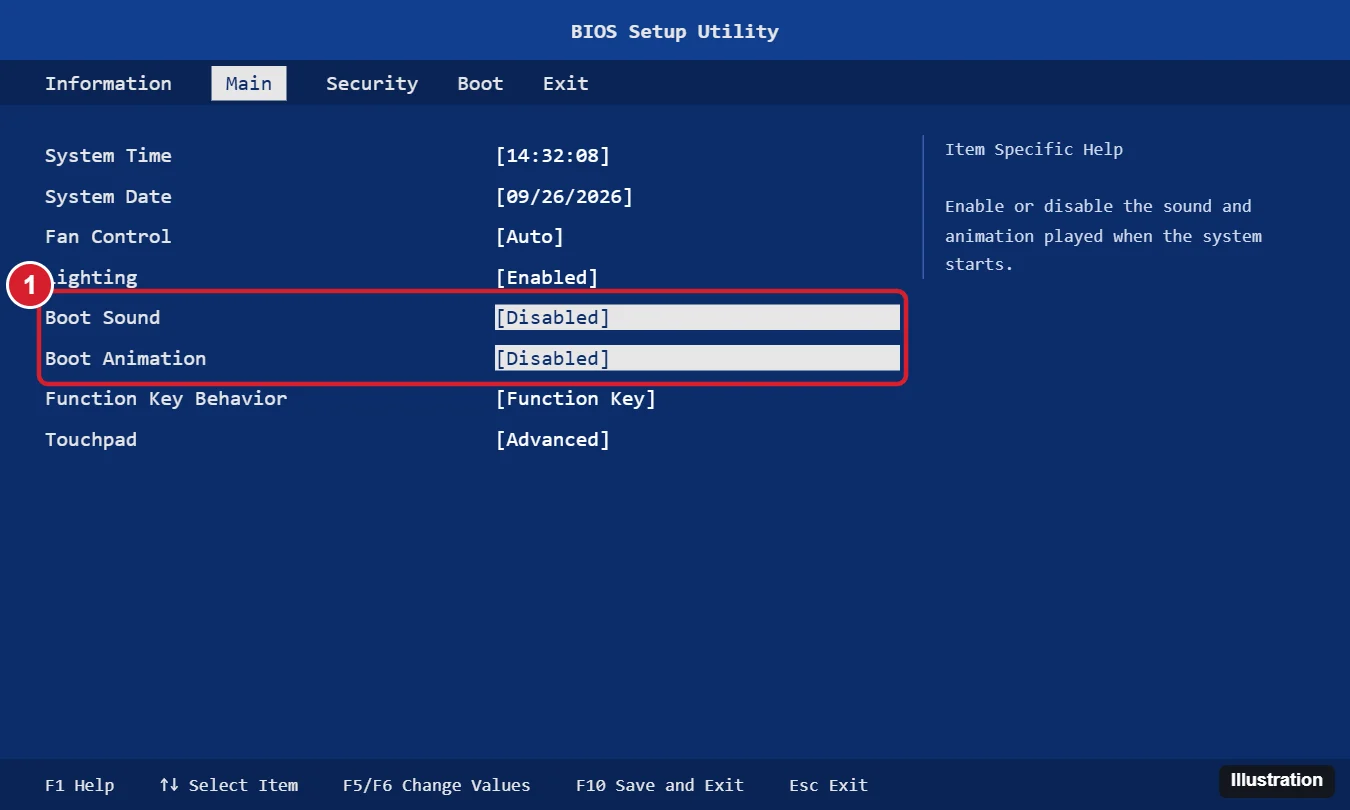
The illustration above is a generic layout, not a capture of a current Predator BIOS. On Acer’s documented model the sound and animation share one option, so you change a single setting.
Change only this one option. Changing other firmware settings you do not understand can stop the PC from starting properly.
If F2 does not open the BIOS
Windows can restart straight into the firmware screen for you on UEFI PCs, which skips the key timing altogether. Microsoft describes the route on its Windows Recovery Environment page:
- On Windows 11, open Settings > System > Recovery. On Windows 10, open Settings > Update & Security > Recovery.
- Next to Advanced startup, select Restart now.
- Select Troubleshoot > Advanced options > UEFI Firmware Settings, then Restart.
More routes, including what to try when Windows will not start, are in opening the BIOS in Windows 11 and entering the BIOS on Windows 10. If your Predator still runs Windows 10, note that in Microsoft’s words, “Windows 10 has reached the end of support on October 14, 2025”; Microsoft’s end of support page lists the options.
If your BIOS has no such option
Acer documents this setting for specific Predator models, and its pages do not promise it on every model. If you cannot find anything like it on the Main tab or elsewhere in the setup screen, your model’s BIOS may simply not offer it. Check the support page for your exact model on Acer’s site or contact Acer support.
Acer’s pages read for this article do not document a boot-sound switch in the PredatorSense or Predator app, and they do not say a BIOS update adds the option. Do not install modified firmware or third-party BIOS tools to get it; a failed firmware change can leave the laptop unable to start.
Turn off the Windows startup sound too
The chime that plays as Windows reaches the sign-in screen is a Windows setting, not an Acer one. Open Control Panel, select Hardware and Sound > Change system sounds, and clear the Play Windows Start-up Sound checkbox (the exact capitalization can differ between Windows versions). Select OK to save.
For other Windows sound events, see changing system sounds in Windows 10.
Turn the sound and animation back on
Repeat the BIOS steps and set the option back to Enabled, then press F10 and choose Yes. Avoid loading the BIOS defaults just to undo this one change: defaults reset every firmware setting, which is explained in resetting the BIOS in Windows 11.
Predator startup answers
Does turning this off mute other sounds?
No. The BIOS option only covers the logo sound and animation before Windows loads. Windows sounds, game audio and app sounds are controlled in Windows.
Why did the sound come back after a BIOS change?
If someone loaded the BIOS defaults, the option returns to its default. Open the BIOS and set it to Disabled again.
Do I need to update the BIOS to get this option?
Acer’s pages for this setting do not say so. Only update firmware when Acer’s support page for your exact model recommends it for another reason.

Kermit Matthews runs Live2Tech from just outside Philadelphia. He is an IT specialist with over 20 years of experience, from a university help desk to small-business IT, IT management and his own consulting practice, and has written tech guides full time since 2020. Steps are checked against the current software on a real device or the maker’s official documentation. More about Kermit.