Update your graphics driver instead of hunting for a Vulkan download: the Vulkan runtime that games use usually arrives with the current driver from NVIDIA, AMD or Intel, so there’s nothing separate for players to install. To check that it works, start a game that uses Vulkan; developers can run the vulkaninfo tool that comes with the Vulkan SDK.
The steps apply to current versions of Windows 11 and to Windows 10.
Why there’s no separate Vulkan download for players
Vulkan is a graphics API: a common language games use to talk to your graphics chip, much like DirectX. Two pieces make it work on Windows. The Vulkan loader (the file vulkan-1.dll) sits in the Windows system folder, and a Vulkan driver from your GPU maker does the actual work.
The Khronos Group, which publishes the Vulkan standard, explains in its post on the Vulkan runtime and loader on Windows that graphics drivers from your GPU maker will often install the Vulkan runtime, and that a driver update may also update it. LunarG, which makes the official SDK, puts it plainly in its Windows getting started page: the Vulkan loader is delivered with your vendor’s driver package, and the SDK “does not install Vulkan drivers.”
That’s why a “Vulkan runtime” from a download site is the wrong fix. The right one is a current graphics driver from the GPU maker or your PC maker.
Check whether your graphics chip supports Vulkan
First find out which GPU you have. On Windows 11, right-click the Start button, select Device Manager and expand Display adapters. Laptops often list two: a built-in chip and a separate graphics card. More ways are in checking your GPU on Windows 11.
Then check the maker’s own list rather than a rule of thumb:
| Maker | Where to check | What it says |
|---|---|---|
| NVIDIA | NVIDIA’s Vulkan driver page | NVIDIA’s general release drivers provide Vulkan 1.4; its developer driver notes list Blackwell, Ada Lovelace, Ampere and Turing GPUs for full Vulkan 1.4 support |
| AMD | a recent AMD Software: Adrenalin Edition release note | Each driver release’s notes list the Radeon and Ryzen graphics it supports (this recent release covers RX 7000 and 9000 series and Ryzen graphics) |
| Intel | Intel’s supported APIs table | Shows the Vulkan version for each Intel graphics family; some older chips list none |
| Any maker | Khronos conformant products list | Products that passed Vulkan conformance, with the Vulkan version (use Ctrl+F to search) |
If your chip isn’t listed for Vulkan at all, no driver or download will add it, and the game’s other graphics option (often DirectX) is the one to use.
Get the Vulkan runtime by updating the graphics driver
Use one source per GPU, and always the maker’s own site:
- NVIDIA: install the latest general release driver from NVIDIA, either through the NVIDIA app or a manual download. Steps are in updating NVIDIA drivers.
- AMD: install the current AMD Software: Adrenalin Edition package from AMD’s support site.
- Intel: Intel says to update to the latest Intel Graphics driver for full API support; its Driver & Support Assistant can find it. See updating Intel drivers.
- Laptops: if the chipmaker’s installer refuses your model, get the graphics driver from the laptop maker’s support page.
Windows Update can also deliver drivers. Microsoft’s driver updates page gives the path on Windows 11:
- Open Settings > Windows Update > Advanced options and make sure Receive updates for other Microsoft products is on.
- Under Additional options, select Optional updates.
- If a graphics driver is listed, select it and choose Download and install.
- Restart the PC.
If Windows Update doesn’t offer a graphics driver, get it from the maker’s site. The general walkthrough is in updating your graphics driver.
One Intel caveat: another Intel page, Where Do I Find and Install an API Driver?, says Vulkan drivers are installed separately and come with the game or application that needs them. If a current Intel driver doesn’t fix a Vulkan error, reinstall the game, which may carry its own Vulkan components.
Check that Vulkan works
For players, the simplest test is the game itself. Start a game that offers Vulkan, pick it in the game’s graphics settings and see whether it runs without a Vulkan error.
Developers who installed the SDK can use LunarG’s command-line check. Open Terminal and run vulkaninfo. The first item it reports, Vulkan Instance Version, is the version of your Vulkan loader, and each device listed shows the Vulkan version its driver supports. The SDK’s vkcube demo should show a spinning cube.
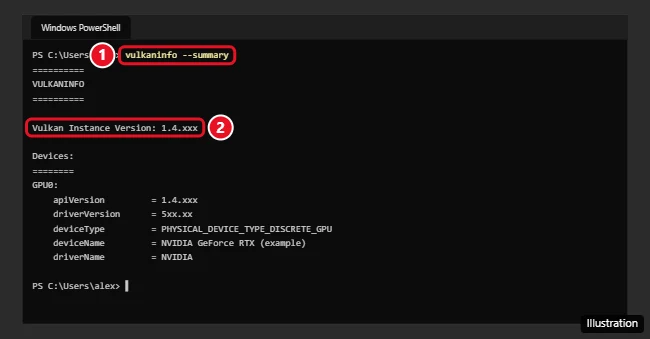
The illustration above uses a variant of the command; LunarG’s page shows plain vulkaninfo. LunarG also names the Vulkan Capabilities Viewer, included in the SDK, as the preferred way to see what your device supports.
The Vulkan SDK is for developers
You only need the SDK to build or debug Vulkan software. LunarG’s page lists what it includes: the Khronos validation layer, the Vulkan Configurator, SPIR-V tools, GFXReconstruct and the Vulkan Capabilities Viewer. It needs 64-bit Windows 10 or later (Windows 11 on Arm PCs), 8 GB of memory, about 1 GB of disk space and a Vulkan driver already installed from your GPU maker.
- Download the Windows SDK installer from LunarG’s site at vulkan.lunarg.com.
- Run it. By default it installs to
C:\VulkanSDKin a folder named for the version. - Open a new terminal and run
vulkaninfoandvkcubeto confirm the setup.
When a game says Vulkan or vulkan-1.dll is missing
None of the GPU makers publish a dedicated fix for vulkan-1.dll errors. Intel’s general advice for a driver that “does not support” an API, in its graphics API troubleshooting article, is a sensible order to follow:
- Confirm your GPU supports Vulkan (the table above).
- Reinstall the newest graphics driver from the GPU or PC maker. If a new driver started the problem on NVIDIA, rolling back the NVIDIA driver is the other direction to try.
- Install pending updates in Settings > Windows Update.
- Contact the game’s publisher if the error stays.
Never download vulkan-1.dll from a DLL website. A loose copy can be the wrong version, may be tampered with, and doesn’t add the driver that actually runs Vulkan.
On a laptop with two GPUs, the game may be starting on the built-in chip. Windows 11 lets you pick the GPU per app in Settings > System > Display > Graphics.
Vulkan runtime answers
What is “Vulkan Run Time Libraries” in my installed apps?
It’s the Vulkan runtime. Khronos says graphics drivers often install it, and Intel says some games and apps bring their own. It isn’t a separate product you chose to install, and games that use Vulkan depend on it.
Does Windows 10 still work with Vulkan?
Drivers may still install there, but Microsoft’s end of support page states that “On October 14, 2025, Windows 10 support ended,” with no more security fixes. GPU makers decide how long they keep shipping Windows 10 drivers.
Should I pick Vulkan or DirectX 12 in a game?
If a game offers both, try each. Results depend on the game and the GPU. DirectX comes with Windows itself; see updating DirectX on Windows 11.
How do I see which graphics driver version I have?
Device Manager, the GPU maker’s app and other places that show it are covered in checking your graphics driver in Windows 11.
Next step: identify your GPU, then install its maker’s latest driver and restart before launching the game again.

Kermit Matthews runs Live2Tech from just outside Philadelphia. He is an IT specialist with over 20 years of experience, from a university help desk to small-business IT, IT management and his own consulting practice, and has written tech guides full time since 2020. Steps are checked against the current software on a real device or the maker’s official documentation. More about Kermit.