Skip to content
Live2Tech
  • iPhone
  • Windows
    • Windows 11
    • Windows 10
  • Office
    • Word
    • Excel
    • Powerpoint
    • Outlook
  • Google
    • Google Docs
    • Google Sheets
    • Google Slides
    • Gmail
    • Chrome
    • Google Drive
  • Mac & Apple
    • Mac
    • iPad
    • Apple Watch
  • All Tutorials

Windows 10

How-to guides and tutorials to help you perform specific tasks and use the Windows 10 operating system and its apps.

How to Add Tags to Files in Windows 10

November 10, 2026August 12, 2024 by Kermit Matthews

Learn how to efficiently organize your files in Windows 10 by adding tags. This guide covers step-by-step instructions to help keep your digital workspace tidy. Continue Reading How to Add Tags to Files in Windows 10

Categories Windows 10
Windows Map Network Drive dialog with a network share path in the Folder box and Reconnect at sign-in highlighted

How to Connect to an SMB Share in Windows 10 (Map a Network Drive)

November 12, 2026August 12, 2024 by Kermit Matthews

Connect to an SMB share in Windows 10 through File Explorer, Map network drive, or net use, save credentials, and fix common network share errors. Continue Reading How to Connect to an SMB Share in Windows 10 (Map a Network Drive)

Categories Windows 10
Windows Tablet PC Settings dialog on the Display tab with the Calibrate and Setup buttons

How to Calibrate a Touch Screen in Windows 10 and 11

November 11, 2026August 12, 2024 by Kermit Matthews

Calibrate a Windows 10 touch screen in Tablet PC Settings, fix touches landing on the wrong monitor, reset calibration, and check the touch driver. Continue Reading How to Calibrate a Touch Screen in Windows 10 and 11

Categories Windows 10
Windows Settings Access work or school page showing the PC connected to an organisation domain

How to Hybrid Join Windows 10 (and Check Its Status)

November 10, 2026August 12, 2024 by Kermit Matthews

Hybrid join is set up by IT so domain-joined Windows 10 PCs also register with Microsoft Entra ID. Check status with dsregcmd /status. Continue Reading How to Hybrid Join Windows 10 (and Check Its Status)

Categories Windows 10
Windows 10 Startup and Recovery dialog with the System failure options and Write debugging information set to Automatic memory dump highlighted

How to Force a Blue Screen in Windows 10 for Testing

November 15, 2026August 12, 2024 by Kermit Matthews

Force a blue screen in Windows 10 for testing with the CrashOnCtrlScroll registry setting or NotMyFault, set up memory dumps, and turn the feature off after. Continue Reading How to Force a Blue Screen in Windows 10 for Testing

Categories Windows 10
Windows 10 Ease of Access Keyboard settings with Sticky Keys and Filter Keys toggles highlighted

How to Unlock a Laptop Keyboard in Windows 11 and 10 (Fixes That Work)

November 13, 2026August 12, 2024 by Kermit Matthews

Laptop keyboard locked or not typing in Windows 10? Turn off Filter Keys, check Num Lock and Fn Lock, reinstall the driver, and rule out hardware. Continue Reading How to Unlock a Laptop Keyboard in Windows 11 and 10 (Fixes That Work)

Categories Windows 10
McAfee account download page with This PC selected and the Download button highlighted

How to Install McAfee on Windows

November 17, 2026August 12, 2024 by Kermit Matthews

Install McAfee from your account at protection.mcafee.com, redeem a retail card, activate a preinstalled copy and see what Windows does with Microsoft Defender. Continue Reading How to Install McAfee on Windows

Categories Windows 10

How to Remove Group Policy from Windows 10

November 15, 2026August 12, 2024 by Kermit Matthews

Learn how to remove Group Policy from Windows 10 with our step-by-step guide. Simplify your system administration in just a few easy steps. Continue Reading How to Remove Group Policy from Windows 10

Categories Windows 10
Map Network Drive dialog with drive letter Z selected, a server share path in the Folder box and Reconnect at sign-in checked

How to Connect to a Server on Windows 10 (Shares, RDP, FTP, SSH)

November 14, 2026August 12, 2024 by Kermit Matthews

Connect to a server on Windows 10: open shared folders, map a network drive, use Remote Desktop, FTP or SSH, and fix common errors. Continue Reading How to Connect to a Server on Windows 10 (Shares, RDP, FTP, SSH)

Categories Windows 10
Command Prompt showing nvidia-smi with the CUDA Version field and nvcc --version showing the installed CUDA toolkit release

How to Check Your CUDA Version on Windows 10

November 10, 2026August 12, 2024 by Kermit Matthews

Check your CUDA version on Windows 10 with nvcc –version or nvidia-smi, understand the difference, and find the version PyTorch or TensorFlow uses. Continue Reading How to Check Your CUDA Version on Windows 10

Categories Windows 10
Windows 10 About page under Device specifications showing the device name, processor, Device ID and Product ID, with Device ID highlighted and a Copy button

How to Find the Device ID in Windows 10 (PC and Hardware IDs)

November 10, 2026August 12, 2024 by Kermit Matthews

Find your PC’s Device ID in Windows 10 Settings > System > About, get hardware IDs in Device Manager, and find the serial number and UUID. Continue Reading How to Find the Device ID in Windows 10 (PC and Hardware IDs)

Categories Windows 10
Windows 10 Setup tool asking What do you want to do, with Create installation media selected and Next highlighted

How to Create Windows 10 Installation Media (USB or ISO)

November 16, 2026August 12, 2024 by Kermit Matthews

Create Windows 10 installation media with Microsoft’s Media Creation Tool on a USB drive or ISO file, then boot from it to install Windows. Continue Reading How to Create Windows 10 Installation Media (USB or ISO)

Categories Windows 10
PowerShell showing winget version, a search and an install command

How to Install Winget on Windows 10: Check, Update and Use It

November 12, 2026August 12, 2024 by Kermit Matthews

Install or update winget on Windows 10 through the App Installer, check it works in PowerShell, and use it to search, install and upgrade apps. Continue Reading How to Install Winget on Windows 10: Check, Update and Use It

Categories Windows 10
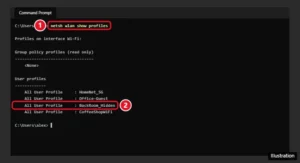
Command Prompt showing netsh wlan show profiles and a saved hidden network name

How to Find a Hidden Network’s SSID and Connect on Windows

November 13, 2026August 12, 2024 by Kermit Matthews

Windows cannot reveal an unknown hidden SSID, but you can find it in saved profiles or your router, then connect with Add network. Step by step. Continue Reading How to Find a Hidden Network’s SSID and Connect on Windows

Categories Networking, Windows 10, Windows 11
Windows 10 Date and time settings with Set time zone automatically off and the UTC plus 8 Kuala Lumpur, Singapore time zone selected

How to Change Windows 10 to Philippine Time (UTC+8)

November 14, 2026August 12, 2024 by Kermit Matthews

Set Philippine time (UTC+8) in Windows 10 by choosing the Kuala Lumpur, Singapore time zone, syncing the clock and setting the Philippines region. Continue Reading How to Change Windows 10 to Philippine Time (UTC+8)

Categories Windows 10
Windows 10 File Explorer with a PNG image right-clicked and the Open with submenu listing Photos, Paint, a browser and Choose another app

How to Open a PNG File in Windows 10

November 10, 2026August 12, 2024 by Kermit Matthews

Open PNG files in Windows 10 with Photos, Paint or a browser, set the default app, convert PNG to JPG or PDF, and fix PNGs that won’t open. Continue Reading How to Open a PNG File in Windows 10

Categories Windows 10
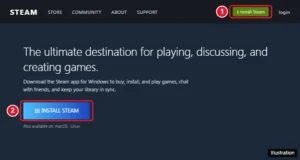
Steam website with the Install Steam button highlighted in the top-right corner and on the About page

How to Download and Install Steam on a Windows PC

November 15, 2026August 12, 2024 by Kermit Matthews

Download Steam from Valve, run SteamSetup.exe, and sign in to start installing games on Windows 11 or 10. Plus requirements, winget, and fixes. Continue Reading How to Download and Install Steam on a Windows PC

Categories Gaming, Windows 10, Windows 11
Two monitors with the snipping toolbar Rectangle mode and a selection covering only the left monitor highlighted

How to Take a Screenshot of One Screen With Dual Monitors on Windows 10

November 10, 2026August 9, 2024 by Kermit Matthews

Screenshot just one monitor in Windows 10 with Windows + Shift + S, Alt + Print Screen, or Snipping Tool, and crop dual-monitor captures. Continue Reading How to Take a Screenshot of One Screen With Dual Monitors on Windows 10

Categories Windows 10
United States International keyboard layout with the grave, circumflex, apostrophe, and C keys highlighted with the French accented letters they help type

How to Type French Accents on an English Keyboard in Windows 10

November 17, 2026August 9, 2024 by Kermit Matthews

Type French accents like é, è, ê, ç, and œ on an English keyboard in Windows 10 with US-International, Alt codes, Word shortcuts, or the touch keyboard. Continue Reading How to Type French Accents on an English Keyboard in Windows 10

Categories Windows 10
Photos app with Favorites selected in the navigation pane

How to Find Favourite Photos in Windows 10

November 13, 2026August 9, 2024 by Kermit Matthews

Find your favourite photos in Windows 10: open the Photos app and select Favorites, or Albums, Favorites in older versions. Add or remove with the heart. Continue Reading How to Find Favourite Photos in Windows 10

Categories Windows 10
Cloud storage settings Manage backup with Desktop, Documents and Pictures toggles highlighted

How to Sync OneDrive on Windows 10

November 7, 2026August 9, 2024 by Kermit Matthews

Set up OneDrive sync on Windows 10: sign in, back up Desktop, Documents and Pictures, and choose which folders sync. Continue Reading How to Sync OneDrive on Windows 10

Categories Windows 10
Windows Event Viewer with PrintService Operational log selected and Enable Log highlighted in the Actions pane

How to Check Print History in Windows 10

November 7, 2026August 9, 2024 by Kermit Matthews

Check print history in Windows 10 by opening the print queue, turning on the PrintService log in Event Viewer, or viewing the printer’s job log. Continue Reading How to Check Print History in Windows 10

Categories Windows 10
Windows 10 Display settings with the Night light toggle and the Night light settings link highlighted

How to Turn Off Blue Light (Night Light) on Windows 10

November 12, 2026August 9, 2024 by Kermit Matthews

Turn off Night light on Windows 10 in Settings or Action Center, stop its schedule, lower its strength, and fix a screen that stays yellow. Continue Reading How to Turn Off Blue Light (Night Light) on Windows 10

Categories Windows 10

How to Hide the Search Bar in Windows 10

November 10, 2026August 9, 2024 by Kermit Matthews

Learn how to hide the search bar in Windows 10 with our easy step-by-step guide. Free up screen space and keep your desktop clutter-free with these simple steps! Continue Reading How to Hide the Search Bar in Windows 10

Categories Windows 10

How to Make a Bootable Windows 10 USB Drive

November 14, 2026August 9, 2024 by Kermit Matthews

Creating a bootable Windows 10 USB is essential for installations or repairs. Follow our step-by-step guide to easily make your own using just a few tools. Continue Reading How to Make a Bootable Windows 10 USB Drive

Categories Windows 10
Settings Your info page with the Sign in with a local account instead link highlighted

How to Change the Microsoft Account on Windows 10

November 7, 2026August 9, 2024 by Kermit Matthews

Switch your Windows 10 profile to a different Microsoft account without losing files, or add the new account as a separate user. Continue Reading How to Change the Microsoft Account on Windows 10

Categories Windows 10
Administrator Command Prompt showing net user listing accounts, then net localgroup administrators adding the user Jordan and confirming the Administrators group members

How to Make a User an Administrator in Windows 10 With CMD

November 13, 2026August 9, 2024 by Kermit Matthews

Make a user an administrator in Windows 10 with Command Prompt using net localgroup, confirm it, remove admin rights, or use PowerShell instead. Continue Reading How to Make a User an Administrator in Windows 10 With CMD

Categories Windows 10
Microphone Properties dialog on the Levels tab with the Microphone volume slider and Microphone Boost slider highlighted

How to Turn Up Mic Volume in Windows 10

November 11, 2026August 9, 2024 by Kermit Matthews

Turn up microphone volume in Windows 10 from Sound settings, add Microphone Boost in the Levels tab, and fix a mic that stays too quiet. Continue Reading How to Turn Up Mic Volume in Windows 10

Categories Windows 10

How to Make a Windows 10 Install USB With Rufus

November 14, 2026August 9, 2024 by Kermit Matthews

Learn how to use Rufus to install Windows 10 with our step-by-step guide. From downloading Rufus to creating a bootable USB, we’ve got you covered! Continue Reading How to Make a Windows 10 Install USB With Rufus

Categories Windows 10
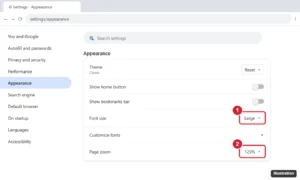
Browser Appearance settings with the Font size and Page zoom menus highlighted

How to Make Chrome Always Open in Full Screen on Windows 10

November 12, 2026August 8, 2024 by Kermit Matthews

Make Chrome open in full screen on Windows 10 with the –start-fullscreen shortcut flag, plus maximized and kiosk modes and how to exit them. Continue Reading How to Make Chrome Always Open in Full Screen on Windows 10

Categories Chrome, Windows 10
Command Prompt showing a copy command copying one file and a robocopy command copying a folder with its summary table

How to Copy Files Using Command Prompt in Windows 10 (copy, xcopy, robocopy)

November 13, 2026August 8, 2024 by Kermit Matthews

Copy files and folders with Command Prompt in Windows 10 using copy, xcopy, and robocopy, with examples for wildcards, USB drives, and backups. Continue Reading How to Copy Files Using Command Prompt in Windows 10 (copy, xcopy, robocopy)

Categories Windows 10
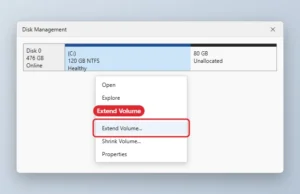
Disk Management with the C drive right-click menu open and Extend Volume highlighted

How to Extend the C Drive in Windows 10 With Unallocated Space

November 10, 2026August 8, 2024 by Kermit Matthews

Extend the C drive in Windows 10 with Disk Management when unallocated space sits right after C. Includes why Extend Volume may be greyed out. Continue Reading How to Extend the C Drive in Windows 10 With Unallocated Space

Categories Windows 10
Windows 10 Change account type dialog with the account type drop-down set to Administrator and the OK button highlighted

How to Give Administrator Permission in Windows 10

November 13, 2026August 8, 2024 by Kermit Matthews

Give administrator permission in Windows 10: make a user an admin, take ownership and grant folder permissions, and run programs as administrator. Continue Reading How to Give Administrator Permission in Windows 10

Categories Windows 10
Registry Editor showing the SCHANNEL Protocols TLS 1.2 Server key selected and the Enabled value set to 1 highlighted

How to Disable TLS 1.0 and 1.1 on Windows 10

November 10, 2026August 8, 2024 by Kermit Matthews

Disable TLS 1.0 and 1.1 on Windows 10 with Registry Editor or PowerShell, update Internet Options and .NET settings, and test. Continue Reading How to Disable TLS 1.0 and 1.1 on Windows 10

Categories Windows 10
Antivirus app Protection page with the Virus Protection switch highlighted and a menu asking how long to turn it off

How to Disable or Uninstall Quick Heal in Windows 10

November 12, 2026August 8, 2024 by Kermit Matthews

Temporarily disable Quick Heal antivirus on Windows 10, turn off other shields or add exclusions, turn protection back on, or uninstall Quick Heal. Continue Reading How to Disable or Uninstall Quick Heal in Windows 10

Categories Windows 10
Windows Permissions dialog for a folder with a user selected and the Allow and Deny permission checkboxes, such as Modify, Read and Write, highlighted

How to Change File Permissions in Windows 10

November 13, 2026August 8, 2024 by Kermit Matthews

Change file and folder permissions in Windows 10 from the Security tab, handle inheritance, take ownership to fix Access denied, and use icacls. Continue Reading How to Change File Permissions in Windows 10

Categories Windows 10
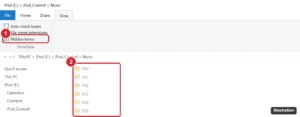
Windows File Explorer showing the hidden iPod_Control Music folder on an iPod drive with Hidden items turned on

How to Transfer Music from an Old iPod to a Windows 10 Computer

November 12, 2026August 8, 2024 by Kermit Matthews

Transfer music from an old iPod to a Windows 10 PC by copying the hidden iPod_Control Music folder, then import it into iTunes or another app. Continue Reading How to Transfer Music from an Old iPod to a Windows 10 Computer

Categories Windows 10
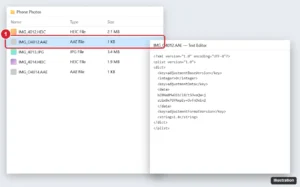
File Explorer folder of phone photos with an AAE file highlighted next to its matching photo, and a text editor window showing the AAE file as XML adjustment data

How to Open an AAE File on Windows 10 (and What It Is)

November 10, 2026August 8, 2024 by Kermit Matthews

AAE files are iPhone photo edit data, not images. Open one in Notepad, delete it safely, and learn how to get edited photos onto Windows 10. Continue Reading How to Open an AAE File on Windows 10 (and What It Is)

Categories Windows 10
System Properties window on the Advanced tab with Performance, User Profiles, Startup and Recovery settings and the Environment Variables button

How to Open System Properties in Windows 10 (5 Quick Ways)

November 12, 2026August 7, 2024 by Kermit Matthews

Open System Properties in Windows 10 with sysdm.cpl, direct commands for each tab, Settings > About, or This PC, and learn what each tab does. Continue Reading How to Open System Properties in Windows 10 (5 Quick Ways)
Categories Windows 10
Computer sign-in screen for Other user with the user name typed as dot backslash alex and the Sign in to line showing the computer name, highlighted

How to Log In With a Local Account Instead of a Domain Account on Windows 10

November 10, 2026August 7, 2024 by Kermit Matthews

Sign in with a local account on a domain-joined Windows 10 PC: click Other user and type .\username. Plus creating a local account and fixes. Continue Reading How to Log In With a Local Account Instead of a Domain Account on Windows 10

Categories Windows 10
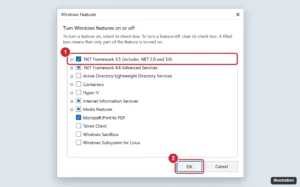
Windows Features dialog with .NET Framework 3.5 (includes .NET 2.0 and 3.0) checked and the OK button highlighted

How to Enable .NET Framework 2.0 in Windows 10 (and Fix Install Errors)
November 13, 2026August 7, 2024 by Kermit Matthews

Enable .NET Framework 2.0 in Windows 10 by turning on .NET 3.5 in Windows Features or with DISM, plus fixes for errors 0x800F0906 and 0x800F081F. Continue Reading How to Enable .NET Framework 2.0 in Windows 10 (and Fix Install Errors)

Categories Windows 10

How to Install Windows 10 in VirtualBox (Step-by-Step)

November 14, 2026August 7, 2024 by Kermit Matthews

Learn how to install Windows 10 in VirtualBox with our easy step-by-step guide for beginners. Follow these simple instructions to set up your virtual machine today! Continue Reading How to Install Windows 10 in VirtualBox (Step-by-Step)
Categories Windows 10

How to Format an SD Card on Windows 10: A Step-by-Step Guide

November 10, 2026August 7, 2024 by Kermit Matthews

Learn how to easily format your SD card on Windows 10 with our step-by-step guide, ensuring optimal performance and freeing up storage space. Continue Reading How to Format an SD Card on Windows 10: A Step-by-Step Guide

Categories Windows 10
Word processor mail merge letter with field codes shown and a date format switch added to the MERGEFIELD for the date

How to Check Your Monitor Model in Windows 10 and 11

November 10, 2026August 7, 2024 by Kermit Matthews

Find your monitor model in Windows 10 or 11: Settings > System > Display > Advanced display, or use PowerShell, Device Manager or dxdiag. Continue Reading How to Check Your Monitor Model in Windows 10 and 11

Categories Windows 10, Windows 11
Windows 10 File Explorer with a JSON file right-clicked and Open with Notepad highlighted

How to Open a JSON File in Windows 10 (4 Easy Ways)

November 10, 2026August 7, 2024 by Kermit Matthews

Open a JSON file in Windows 10 with Notepad, a web browser, a code editor, or Excel, and set a default app for .json files. Tips for safe editing. Continue Reading How to Open a JSON File in Windows 10 (4 Easy Ways)

Categories Windows 10
Database software installer wizard on the configuration option step with Create and configure a single instance database selected

How to Install Oracle 19c on Windows 10: Step-by-Step Guide

November 10, 2026August 7, 2024 by Kermit Matthews

Install Oracle Database 19c on Windows 10: requirements, download, extract to the Oracle home, run setup.exe, create a database, connect and fix errors. Continue Reading How to Install Oracle 19c on Windows 10: Step-by-Step Guide

Categories Windows 10
Windows 10 File Explorer right-click menu on a font file with Install for all users highlighted

How to Add a Font to Adobe Acrobat on Windows 10

November 10, 2026August 7, 2024 by Kermit Matthews

Add a font to Adobe Acrobat on Windows 10 by installing it for all users, then use it in Edit PDF and make sure fonts are embedded. Continue Reading How to Add a Font to Adobe Acrobat on Windows 10

Categories Windows 10

Forgot Your Windows Password? How to Get Back In (Windows 11 and 10)

November 15, 2026August 7, 2024 by Kermit Matthews

Discover simple methods to bypass your Windows 10 password safely and efficiently with our step-by-step guide. Unlock your system in no time! Continue Reading Forgot Your Windows Password? How to Get Back In (Windows 11 and 10)

Categories Windows 10
Administrator PowerShell window showing wsl --install completing, then wsl --set-default-version 2 and wsl --status reporting Default Version 2

How to Install WSL2 on Windows 10 (One Command or Manual)

November 13, 2026August 7, 2024 by Kermit Matthews

Install WSL 2 on Windows 10 with wsl –install, or manually on older builds, then convert WSL 1 distros and fix common errors like 0x80370102. Continue Reading How to Install WSL2 on Windows 10 (One Command or Manual)

Categories Windows 10

How to Install ADUC on Windows 10: A Step-by-Step Guide

November 10, 2026August 7, 2024 by Kermit Matthews

Learn how to install Active Directory Users and Computers (ADUC) on Windows 10 with our easy, step-by-step guide. Get started managing your network today! Continue Reading How to Install ADUC on Windows 10: A Step-by-Step Guide

Categories Windows 10
Older posts
Newer posts
← Previous Page1 … Page9 Page10 Page11 Page12 Next →

Join Our Free Newsletter

Featured guides and deals

You may opt out at any time.
Read our Privacy Policy

Live2Tech

Plain-English, step-by-step guides for the devices and apps you use every day.

Apple

  • iPhone
  • iPad
  • Mac
  • Apple Watch

Windows

  • Windows 11
  • Windows 10

Microsoft Office

  • Word
  • Excel
  • Powerpoint
  • Outlook

Google

  • Google Docs
  • Google Sheets
  • Google Slides
  • Gmail
  • Chrome
  • Google Drive
  • About Us
  • Contact
  • Disclaimer
  • Privacy Policy
© Live2Tech.com 2026
  • iPhone
  • Windows
    • Windows 11
    • Windows 10
  • Office
    • Word
    • Excel
    • Powerpoint
    • Outlook
  • Google
    • Google Docs
    • Google Sheets
    • Google Slides
    • Gmail
    • Chrome
    • Google Drive
  • Mac & Apple
    • Mac
    • iPad
    • Apple Watch
  • All Tutorials