Skip to content
Live2Tech
  • iPhone
  • Windows
    • Windows 11
    • Windows 10
  • Office
    • Word
    • Excel
    • Powerpoint
    • Outlook
  • Google
    • Google Docs
    • Google Sheets
    • Google Slides
    • Gmail
    • Chrome
    • Google Drive
  • Mac & Apple
    • Mac
    • iPad
    • Apple Watch
  • All Tutorials

Kermit Matthews

Kermit Matthews runs Live2Tech from just outside Philadelphia. He is an IT specialist with over 20 years of experience, from a university help desk to small-business IT, IT management and his own consulting practice, and has written tech guides full time since 2020. Steps are checked against the current software on a real device or the maker's official documentation. More about Kermit.

Locked Out of Your Windows 11 Admin Account? Get Back In

November 15, 2026June 4, 2024 by Kermit Matthews

Learn how to bypass the admin password on Windows 11 with our step-by-step guide. Follow these instructions to regain access to your computer. Continue Reading Locked Out of Your Windows 11 Admin Account? Get Back In

Categories Windows 11
Windows 11 taskbar hidden icons flyout with a chat app tray icon right-clicked and the Check for Updates menu item highlighted

How to Update Discord on Windows 11 (and Fix Update Loops)

November 10, 2026June 4, 2024 by Kermit Matthews

Update Discord on Windows 11 from the system tray or with Ctrl+R, force an update by restarting or reinstalling, and fix a stuck update loop. Continue Reading How to Update Discord on Windows 11 (and Fix Update Loops)

Categories Windows 11
Windows 11 Language and region settings with the language menu and Language options highlighted

How to Reset Keyboard Settings in Windows 11

November 18, 2026June 4, 2024 by Kermit Matthews

Reset keyboard settings in Windows 11: remove extra layouts, stop automatic switching, turn off Sticky and Filter keys, and reinstall the driver. Continue Reading How to Reset Keyboard Settings in Windows 11

Categories Windows 11
Windows Security Enter network credentials prompt with the user name and password fields highlighted

How to Find Your Network Username and Password in Windows 11

November 17, 2026June 4, 2024 by Kermit Matthews

Windows 11 network credentials are the other PC’s account name and password. Here is what to enter, how to find saved ones in Credential Manager, and fixes. Continue Reading How to Find Your Network Username and Password in Windows 11

Categories Networking, Windows 11
Windows 11 File Explorer with the cloud storage folder shown in the navigation pane under Home and Gallery

OneDrive Missing From File Explorer? How to Get It Back

November 18, 2026June 3, 2024 by Kermit Matthews

OneDrive gone from File Explorer? Check the cloud icon, start or sign in to OneDrive, restart Explorer, then reset or reinstall the app. Your files stay safe. Continue Reading OneDrive Missing From File Explorer? How to Get It Back

Categories Windows 10, Windows 11
DirectX Diagnostic Tool System tab in Windows 11 with DirectX Version: DirectX 12 highlighted

How to Update DirectX on Windows 11

November 17, 2026June 3, 2024 by Kermit Matthews

Update DirectX on Windows 11 through Windows Update, check your version with dxdiag, install the End-User Runtime for older games, and fix missing DLL errors. Continue Reading How to Update DirectX on Windows 11

Categories Windows 11
Windows File Explorer with an EPUB file right-clicked and Open with showing Thorium Reader and calibre

How to Open an EPUB File on Windows 11

November 10, 2026June 3, 2024 by Kermit Matthews

Windows 11 has no built-in EPUB reader. Install free Thorium Reader or calibre, then right-click the file and choose Open with. Plus DRM and default app tips. Continue Reading How to Open an EPUB File on Windows 11

Categories Windows 11

How to Increase Virtual Memory (Page File) in Windows 11

November 15, 2026June 3, 2024 by Kermit Matthews

Learn how to increase virtual memory in Windows 11 with our step-by-step guide. Boost performance and prevent slowdowns with these easy instructions. Continue Reading How to Increase Virtual Memory (Page File) in Windows 11

Categories Windows 11
Start menu with the power button menu open and the Sleep option highlighted

How to Put Windows 11 to Sleep

November 15, 2026June 3, 2024 by Kermit Matthews

Put Windows 11 to sleep from the Start menu or keyboard, set the power button or lid to sleep, and fix a missing Sleep option. Continue Reading How to Put Windows 11 to Sleep

Categories Windows 11

Convert a Windows 11 Microsoft Sign-In to a Local Account

November 18, 2026June 3, 2024 by Kermit Matthews

Learn to switch from a Microsoft to a local account on Windows 11 with our easy-to-follow guide. Enhance privacy and control in just a few steps! Continue Reading Convert a Windows 11 Microsoft Sign-In to a Local Account

Categories Windows 11
Task Manager Processes tab sorted by the Memory column with the highest memory app highlighted and memory usage at 78 percent

How to Lower RAM Usage in Windows 11 (What Actually Works)

November 15, 2026June 3, 2024 by Kermit Matthews

Lower RAM usage in Windows 11: find memory-heavy apps in Task Manager, disable startup apps, tame your browser, and know when to add more RAM. Continue Reading How to Lower RAM Usage in Windows 11 (What Actually Works)

Categories Windows 11
Windows recovery Troubleshoot screen with the Reset this PC option highlighted

How to Factory Reset a Dell Laptop Without a Password (Windows 11)

November 13, 2026May 31, 2024 by Kermit Matthews

Factory reset a Dell laptop without a password on Windows 11 using Shift+Restart from the sign-in screen, Dell SupportAssist OS Recovery, or a recovery USB. Continue Reading How to Factory Reset a Dell Laptop Without a Password (Windows 11)

Categories Windows 11
Windows 11 File Explorer with an ISO file right-clicked and the Mount option highlighted, plus the mounted DVD drive in the sidebar

How to Open an ISO File in Windows 11

November 18, 2026May 31, 2024 by Kermit Matthews

Open an ISO file in Windows 11 by double-clicking it or choosing Mount. Plus how to eject it, extract files, make a bootable USB, and fix a missing Mount. Continue Reading How to Open an ISO File in Windows 11

Categories Windows 11
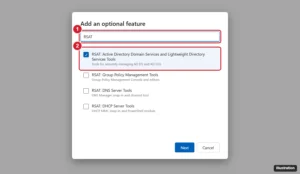
Windows 11 Add an optional feature window with a search for RSAT and the Active Directory tools checked

How to Access Active Directory on Windows 11 (Install RSAT)

November 18, 2026May 31, 2024 by Kermit Matthews

Access Active Directory on Windows 11 by installing RSAT from Optional features or PowerShell, then open Active Directory Users and Computers. Continue Reading How to Access Active Directory on Windows 11 (Install RSAT)

Categories Windows 11
Windows Security scan options with the offline scan option selected and Scan now highlighted

How to Remove a Trojan Virus From Windows 11

November 18, 2026May 31, 2024 by Kermit Matthews

Remove a trojan from Windows 11 with Windows Security: update protection, run a Full scan and the offline scan, then change passwords from a clean device. Continue Reading How to Remove a Trojan Virus From Windows 11

Categories Windows 11
Windows 11 Start search result for a desktop app with Open file location highlighted in the right pane

How to Open File Location in Windows 11

November 15, 2026May 31, 2024 by Kermit Matthews

Open a file or app’s location on Windows 11 from Start search, a shortcut, or Task Manager, copy its full path, and see why the option is sometimes missing. Continue Reading How to Open File Location in Windows 11

Categories Windows 11
Windows 11 media player app showing an audio CD track list with the Rip CD button highlighted

How to Rip a CD on Windows 11

November 9, 2026May 31, 2024 by Kermit Matthews

Rip a CD on Windows 11 with the built-in Media Player or Windows Media Player Legacy, choose MP3, AAC or FLAC, and fix CDs that will not rip. Continue Reading How to Rip a CD on Windows 11

Categories Windows 11
Windows 11 Settings Apps Startup page with the Discord startup switch highlighted

How to Stop Discord From Opening on Startup in Windows 11

November 17, 2026May 31, 2024 by Kermit Matthews

Stop Discord from opening at startup: turn off Open Discord in User Settings > Windows Settings, or switch it off in Settings > Apps > Startup. Continue Reading How to Stop Discord From Opening on Startup in Windows 11

Categories Windows 11
Terminal window installing OpenSSL with winget and then running openssl version, with the install command and the version output highlighted

How to Install OpenSSL on Windows 11 (winget, Installer, or Git)

November 10, 2026May 31, 2024 by Kermit Matthews

Install OpenSSL on Windows 11 with winget or a trusted installer, add it to PATH, verify with openssl version, and try common certificate commands. Continue Reading How to Install OpenSSL on Windows 11 (winget, Installer, or Git)

Categories Windows 11
Windows 11 Start search showing the Copilot app as the best match with Open and Pin to taskbar highlighted

How to Get Copilot on Windows 11 (Install, Open, and Fix Missing Copilot)

November 11, 2026May 31, 2024 by Kermit Matthews

Get Copilot on Windows 11: check if it is installed, get the free app from the Microsoft Store, open it with Windows+C, and fix it if Copilot is missing. Continue Reading How to Get Copilot on Windows 11 (Install, Open, and Fix Missing Copilot)

Categories Windows 11

Forgot Your Windows 11 Administrator Password?

November 18, 2026May 31, 2024 by Kermit Matthews

Windows 11 can’t show a stored password, but you can reset it. Options for Microsoft and local accounts, PINs, other admins, IT, and a last-resort reset. Continue Reading Forgot Your Windows 11 Administrator Password?

Categories Windows 11

How to Uninstall Norton on Windows 11

November 18, 2026May 31, 2024 by Kermit Matthews

Remove Norton from Windows 11 with Settings, Control Panel or the Norton 360 Remover tool, then turn on Defender and cancel auto-renewal. Continue Reading How to Uninstall Norton on Windows 11

Categories Windows 11
Windows 11 Gaming settings Game Bar page with the Gaming menu item and the controller shortcut toggle highlighted

How to Open Xbox Game Bar on Windows 11 (and Fix It)

November 18, 2026May 30, 2024 by Kermit Matthews

Open Xbox Game Bar on Windows 11 with Windows + G or a controller, enable it in Gaming settings, use its widgets, and fix it when it will not open. Continue Reading How to Open Xbox Game Bar on Windows 11 (and Fix It)

Categories Windows 11
User Account Control Settings window with the notification slider and the OK button highlighted

How to Disable UAC in Windows 11 (and Safer Alternatives)

November 10, 2026May 30, 2024 by Kermit Matthews

Turn off or reduce User Account Control prompts in Windows 11, understand each UAC level and the risks, and stop prompts for one app without disabling UAC. Continue Reading How to Disable UAC in Windows 11 (and Safer Alternatives)

Categories Windows 11
Windows 11 file right-click menu with the icon row and the Show more options item highlighted

How to Change Right-Click Options in Windows 11

November 10, 2026May 30, 2024 by Kermit Matthews

Change right-click options in Windows 11: bring back the classic menu, remove entries added by apps, customize Send to, and understand the new menu. Continue Reading How to Change Right-Click Options in Windows 11

Categories Windows 11
Internet Protocol Version 4 properties with a static IP address of 192.168.10.1 and subnet mask 255.255.255.0 highlighted

How to Transfer Files Between PCs With an Ethernet Cable in Windows 11

November 10, 2026May 30, 2024 by Kermit Matthews

Connect two Windows 11 PCs with an Ethernet cable, set static IPs, turn on sharing, and copy files over the network. Includes fixes. Continue Reading How to Transfer Files Between PCs With an Ethernet Cable in Windows 11

Categories Windows 11
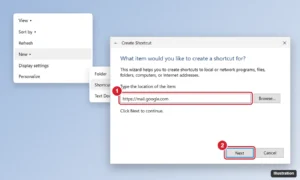
Windows 11 Create Shortcut wizard with a web mail address typed in the location box and the Next button highlighted

Install Gmail as a Desktop App in Windows 11

November 16, 2026May 30, 2024 by Kermit Matthews

Add a Gmail icon to your Windows 11 desktop by installing Gmail as an app in Chrome or Edge or creating a shortcut, then pin it to the taskbar and Start menu. Continue Reading Install Gmail as a Desktop App in Windows 11

Categories Gmail, Windows 11
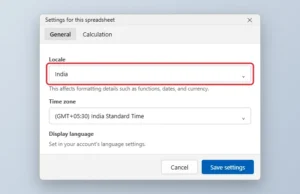
Spreadsheet settings dialog on the General tab with the Locale dropdown highlighted

How to Change the Language in Google Sheets

November 18, 2026May 29, 2024 by Kermit Matthews

Change the Google Sheets menu language in your Google Account, set a spreadsheet locale for dates and numbers, and translate cells. Continue Reading How to Change the Language in Google Sheets

Categories Google Sheets
Initialize Disk dialog with the GPT partition style highlighted

How to Initialize an SSD in Windows 11 and Windows 10

November 15, 2026May 29, 2024 by Kermit Matthews

Initialize a new SSD in Windows 11 Disk Management as GPT, then create a New Simple Volume so it appears in File Explorer. Continue Reading How to Initialize an SSD in Windows 11 and Windows 10

Categories Windows 11
Command Prompt running mklink J to link the phone backup folder to an external drive, with the command and the Junction created message highlighted

How to Back Up an iPhone to an External Hard Drive on Windows 11

November 10, 2026May 28, 2024 by Kermit Matthews

Back up your iPhone to an external hard drive on Windows 11 by redirecting the Apple Devices or iTunes backup folder with a junction, or copy only photos. Continue Reading How to Back Up an iPhone to an External Hard Drive on Windows 11

Categories Windows 11
Windows Settings Mouse pointer and touch page with pointer style options highlighted

How to Change the Cursor in Windows 11 (Style, Size and Color)

November 18, 2026May 28, 2024 by Kermit Matthews

Change the Windows 11 mouse cursor style, color and size in Accessibility settings, or pick a new pointer scheme. Continue Reading How to Change the Cursor in Windows 11 (Style, Size and Color)

Categories Windows 11
Windows 11 Settings Optional updates page with Driver updates expanded and Download and install highlighted

How to Install Drivers on Windows 11

November 17, 2026May 28, 2024 by Kermit Matthews

Install drivers on Windows 11 with Windows Update’s optional updates, the manufacturer’s website, or Device Manager, and roll back bad drivers. Continue Reading How to Install Drivers on Windows 11

Categories Windows 11
Windows 11 Registry Editor WindowMetrics key with the IconSpacing and IconVerticalSpacing values highlighted

Desktop Icons Too Far Apart in Windows 11? What You Can Do

November 14, 2026May 28, 2024 by Kermit Matthews

Reduce the space between desktop icons in Windows 11 by making icons smaller or by lowering IconSpacing and IconVerticalSpacing in the registry. Continue Reading Desktop Icons Too Far Apart in Windows 11? What You Can Do

Categories Windows 11
Windows 11 File Explorer cloud storage folder with files selected and the right-click menu showing Always keep on this device highlighted

Download OneDrive Files to Your PC and Stop Cloud Syncing

November 18, 2026May 28, 2024 by Kermit Matthews

Move files from OneDrive to your Windows 11 PC safely: download them, move them out of the OneDrive folder, stop folder backup, and avoid deleting files. Continue Reading Download OneDrive Files to Your PC and Stop Cloud Syncing

Categories Windows 11
Windows 11 Settings Storage Temporary files page with cache categories checked and the Remove files button highlighted

How to Clear Your Computer’s Cache in Windows 11

November 18, 2026May 23, 2024 by Kermit Matthews

Clear cache on Windows 11: temporary files, browser cache, DNS cache, Microsoft Store and Windows Update caches, and File Explorer history. Continue Reading How to Clear Your Computer’s Cache in Windows 11

Categories Windows 11
Windows 11 Settings Activation page with Upgrade your edition of Windows expanded and the Change product key and Upgrade options highlighted

How to Upgrade Windows 11 Home to Pro Without Reinstalling

November 12, 2026May 23, 2024 by Kermit Matthews

Upgrade Windows 11 Home to Pro without losing files by buying it in the Microsoft Store or entering a Pro product key, see what Pro adds, and fix errors. Continue Reading How to Upgrade Windows 11 Home to Pro Without Reinstalling

Categories Windows 11
Windows 11 Run dialog with the AppData path typed and File Explorer showing the AppData folder with Local, LocalLow, and Roaming

How to Find the AppData Folder in Windows 11 (4 Easy Ways)

November 17, 2026May 22, 2024 by Kermit Matthews

Find the AppData folder in Windows 11 with %appdata%, the Run dialog, or hidden items, and learn what Local, LocalLow, and Roaming hold. Continue Reading How to Find the AppData Folder in Windows 11 (4 Easy Ways)

Categories Windows 11

How to Change Function Key (Fn) Settings in Windows 11

November 17, 2026May 22, 2024 by Kermit Matthews

Learn how to easily change Fn key settings on Windows 11 with our step-by-step guide. Customize your function keys to suit your needs in just a few clicks! Continue Reading How to Change Function Key (Fn) Settings in Windows 11

Categories Windows 11
Windows 11 Settings Power and battery page with Screen, sleep and hibernate timeouts expanded and the plugged-in sleep option set to Never highlighted

How to Stop Your Computer From Sleeping in Windows 11

November 18, 2026May 22, 2024 by Kermit Matthews

Stop your Windows 11 PC from sleeping in Settings or with a powercfg command, keep a laptop awake with the lid closed, and use PowerToys Awake temporarily. Continue Reading How to Stop Your Computer From Sleeping in Windows 11

Categories Windows 11
Windows 11 Credential Manager with Web Credentials selected and a saved sign-in expanded to show the Show password link

How to Find Stored Passwords on Windows 11

November 17, 2026May 21, 2024 by Kermit Matthews

Find stored passwords on Windows 11 in Credential Manager, your browser’s password manager, and Wi-Fi settings, and see how to keep saved passwords secure. Continue Reading How to Find Stored Passwords on Windows 11

Categories Windows 11
Windows 11 Change account type dialog over the Other users page with Administrator selected

How to Give an Account Administrator Rights in Windows 11

November 18, 2026May 21, 2024 by Kermit Matthews

An existing admin can make any Windows 11 account an administrator in Settings > Accounts > Other users. Also see Run as administrator and managed PCs. Continue Reading How to Give an Account Administrator Rights in Windows 11

Categories Windows 11
Firmware setup Boot tab with Boot Option 1 highlighted and the list of drives available to boot from

How to Change the Boot Drive in Windows 11

November 6, 2026May 21, 2024 by Kermit Matthews

Change the boot drive in Windows 11 from UEFI firmware settings, boot once from USB with the boot menu key, and set the default on dual-boot PCs. Continue Reading How to Change the Boot Drive in Windows 11

Categories Windows 11
Keyboard shortcut illustration for full screen in Windows with F11 and Windows plus Shift plus Enter highlighted

How to Make Apps Full Screen on Windows 11 (Every Shortcut)

November 17, 2026May 21, 2024 by Kermit Matthews

Go full screen on Windows 11 with F11, Windows+Shift+Enter, or Alt+Enter in browsers, File Explorer, Store apps, games, and videos, and exit it easily. Continue Reading How to Make Apps Full Screen on Windows 11 (Every Shortcut)

Categories Windows 11
Desktop with one window pinned on top shown with a colored border and the keyboard shortcut label

How to Pin a Window on Top in Windows 11

November 17, 2026May 20, 2024 by Kermit Matthews

Keep a window always on top in Windows 11 with PowerToys Always On Top (Windows+Ctrl+T) or an app’s own keep-on-top option. Continue Reading How to Pin a Window on Top in Windows 11

Categories Windows 11
Windows 11 cloud Manage folder backup dialog with the Documents, Pictures, and Desktop backup switches turned off and Save changes highlighted

How to Save to Your PC Instead of OneDrive in Windows 11

November 18, 2026May 20, 2024 by Kermit Matthews

Save files to your PC instead of OneDrive in Windows 11: turn off folder backup, make Office save locally, move files back from OneDrive, or unlink OneDrive. Continue Reading How to Save to Your PC Instead of OneDrive in Windows 11

Categories Windows 11
Local Group Policy Editor setting that blocks specified Windows applications, enabled with a list of blocked program files

How to Lock or Restrict Apps in Windows 11 (Built-In Ways)

November 17, 2026May 20, 2024 by Kermit Matthews

Lock or block apps in Windows 11 with separate accounts, Family Safety, Group Policy, AppLocker or in-app locks, and learn each method’s limits. Continue Reading How to Lock or Restrict Apps in Windows 11 (Built-In Ways)

Categories Windows 11
Smart home app Account settings with the account migration option highlighted

How to Migrate a Nest Account to a Google Account

November 16, 2026May 17, 2024 by Kermit Matthews

Migrate your Nest account to a Google Account in the Nest app, learn what changes first, re-invite home members, and fix common migration problems. Continue Reading How to Migrate a Nest Account to a Google Account

Categories Google

How to Move Google Photos to a Flash Drive

November 15, 2026May 17, 2024 by Kermit Matthews

Move Google Photos to a USB flash drive: download from photos.google.com or Google Takeout, or copy from an Android or iPhone. Avoid the 4 GB FAT32 limit. Continue Reading How to Move Google Photos to a Flash Drive

Categories Google Photos
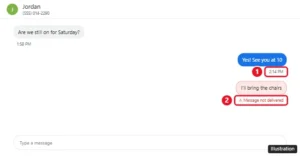
Google Voice conversation showing a sent text with a timestamp and a failed text with a red Message not delivered error

How to Tell if a Google Voice Text Was Delivered

November 12, 2026May 17, 2024 by Kermit Matthews

Google Voice has no delivered or read receipts. Here is what Sending, a timestamp, and Message not delivered mean, and how to fix texts that fail. Continue Reading How to Tell if a Google Voice Text Was Delivered

Categories Google Voice

How to Remove Saved Passwords from Google Chrome

November 10, 2026May 17, 2024 by Kermit Matthews

Learn how to easily remove saved passwords from Google Chrome with our step-by-step guide. Keep your browser secure and your data private in just a few clicks! Continue Reading How to Remove Saved Passwords from Google Chrome

Categories Chrome
Older posts
Newer posts
← Previous Page1 … Page18 Page19 Page20 … Page37 Next →

Join Our Free Newsletter

Featured guides and deals

You may opt out at any time.
Read our Privacy Policy

Live2Tech

Plain-English, step-by-step guides for the devices and apps you use every day.

Apple

  • iPhone
  • iPad
  • Mac
  • Apple Watch

Windows

  • Windows 11
  • Windows 10

Microsoft Office

  • Word
  • Excel
  • Powerpoint
  • Outlook

Google

  • Google Docs
  • Google Sheets
  • Google Slides
  • Gmail
  • Chrome
  • Google Drive
  • About Us
  • Contact
  • Disclaimer
  • Privacy Policy
© Live2Tech.com 2026
  • iPhone
  • Windows
    • Windows 11
    • Windows 10
  • Office
    • Word
    • Excel
    • Powerpoint
    • Outlook
  • Google
    • Google Docs
    • Google Sheets
    • Google Slides
    • Gmail
    • Chrome
    • Google Drive
  • Mac & Apple
    • Mac
    • iPad
    • Apple Watch
  • All Tutorials