Skip to content
Live2Tech
  • iPhone
  • Windows
    • Windows 11
    • Windows 10
  • Office
    • Word
    • Excel
    • Powerpoint
    • Outlook
  • Google
    • Google Docs
    • Google Sheets
    • Google Slides
    • Gmail
    • Chrome
    • Google Drive
  • Mac & Apple
    • Mac
    • iPad
    • Apple Watch
  • All Tutorials

Windows 11

Guides for Windows 11: settings, security, activation, troubleshooting, and more.

How to Add Another OneDrive Account in Windows 11

November 17, 2026June 17, 2024 by Kermit Matthews

Learn how to seamlessly add another OneDrive account in Windows 11 with our step-by-step guide, ensuring easy access and better file management. Continue Reading How to Add Another OneDrive Account in Windows 11

Categories Windows 11

How to Change Monitor 1 and 2 in Windows 11

November 13, 2026June 17, 2024 by Kermit Matthews

Learn how to easily switch Monitor 1 and 2 in Windows 11 with our simple guide. Follow these steps to rearrange your displays for optimal productivity. Continue Reading How to Change Monitor 1 and 2 in Windows 11

Categories Windows 11
Command Prompt running netsh mbn show interfaces with the command and the Device Id line showing the IMEI highlighted

How to Find the IMEI Number on a Windows 11 Laptop

November 10, 2026June 17, 2024 by Kermit Matthews

Find the IMEI on a Windows 11 laptop with netsh mbn show interfaces or Cellular settings, and learn why Wi-Fi-only laptops do not have one. Continue Reading How to Find the IMEI Number on a Windows 11 Laptop

Categories Windows 11

How to Increase USB Transfer Speed in Windows 11

November 16, 2026June 17, 2024 by Kermit Matthews

Boost your USB transfer speed in Windows 11 with these tips: update drivers, use high-quality cables, optimize power settings, and enable write caching. Continue Reading How to Increase USB Transfer Speed in Windows 11

Categories Windows 11
Task Manager Processes list with Windows Explorer right-clicked and Restart highlighted in the menu

Copy and Paste Not Working in Windows 11? 9 Fixes

November 13, 2026June 17, 2024 by Kermit Matthews

Fix copy and paste not working in Windows 11: restart Windows Explorer, clear the clipboard, fix Remote Desktop rdpclip, check the keyboard and repair files. Continue Reading Copy and Paste Not Working in Windows 11? 9 Fixes

Categories Windows 11
Family group web page with the More options menu open and Remove from family group highlighted

Ease or Remove Microsoft Family Safety Limits on Windows 11

November 12, 2026June 17, 2024 by Kermit Matthews

Turn off Microsoft Family Safety as the organizer: disable limits, remove a member, leave the group, and fix adults still restricted on Windows 11. Continue Reading Ease or Remove Microsoft Family Safety Limits on Windows 11

Categories Windows 11
Microphone Properties Listen tab with Listen to this device ticked and playback set to speakers

How to Play Your Microphone Through Speakers on Windows 11

November 12, 2026June 17, 2024 by Kermit Matthews

Hear your microphone through speakers on Windows 11: Sound > More sound settings > Recording > Properties > Listen > Listen to this device. Continue Reading How to Play Your Microphone Through Speakers on Windows 11

Categories Windows 11
Windows Startup Settings screen listing numbered boot options with option 7, Disable driver signature enforcement, highlighted

How to Disable Driver Signature Enforcement in Windows 11
November 10, 2026June 14, 2024 by Kermit Matthews

Disable driver signature enforcement in Windows 11 for one boot with Startup Settings or long-term with test mode, then safely turn it back on. Continue Reading How to Disable Driver Signature Enforcement in Windows 11

Categories Windows 11

How to Drag and Drop in Windows 11

November 10, 2026June 14, 2024 by Kermit Matthews

Learn the ins and outs of using drag and drop in Windows 11 with this comprehensive guide, making file management smoother and more efficient. Continue Reading How to Drag and Drop in Windows 11

Categories Windows 11
Windows 11 Settings Sound page with the output volume slider and the Enhance audio option highlighted

How to Increase Volume on an HP Laptop in Windows 11

November 14, 2026June 14, 2024 by Kermit Matthews

Increase the volume on an HP laptop in Windows 11 with the volume keys, Volume mixer, Loudness Equalization, HP’s audio app, and updated audio drivers. Continue Reading How to Increase Volume on an HP Laptop in Windows 11

Categories Windows 11
Terminal window showing a command that returns the display width and height in centimeters

How to Check Your Laptop Screen Size in Windows 11

November 6, 2026June 14, 2024 by Kermit Matthews

Find your laptop screen size in Windows 11 by looking up the model, measuring the display, or estimating it with a PowerShell command. Continue Reading How to Check Your Laptop Screen Size in Windows 11

Categories Windows 11

How to Change the Desktop Background in Windows 11 and 10

November 13, 2026June 14, 2024 by Kermit Matthews

Learn how to effortlessly change the background on Windows 11 with our step-by-step guide. Follow these simple instructions to personalize your desktop. Continue Reading How to Change the Desktop Background in Windows 11 and 10

Categories Windows 11
Command Prompt window creating a directory junction with mklink /J from the MobileSync Backup folder to a folder on the D drive, with the command highlighted and a success message

How to Change the iTunes Backup Location on Windows 11

November 14, 2026June 14, 2024 by Kermit Matthews

Move iTunes iPhone backups off your C: drive in Windows 11: move the MobileSync Backup folder to another drive and link it with mklink /J. Continue Reading How to Change the iTunes Backup Location on Windows 11

Categories Windows 11
PowerShell window showing the running scripts is disabled error, followed by the Set-ExecutionPolicy RemoteSigned CurrentUser command highlighted and the new policy list

How to Enable Running Scripts on Windows 11 (PowerShell Execution Policy)

November 10, 2026June 13, 2024 by Kermit Matthews

Fix “running scripts is disabled on this system” on Windows 11 by setting the PowerShell execution policy to RemoteSigned, safely and reversibly. Continue Reading How to Enable Running Scripts on Windows 11 (PowerShell Execution Policy)

Categories Windows 11
Cloud storage app settings on Windows 11 with the Account section open and the Unlink this PC link highlighted

How to Change the OneDrive Account on Windows 11

November 17, 2026June 13, 2024 by Kermit Matthews

Switch OneDrive to another account on Windows 11 by unlinking this PC and signing in again, or add a work account alongside your personal one. Continue Reading How to Change the OneDrive Account on Windows 11

Categories Windows 11
MSYS2 UCRT64 terminal installing GCC with pacman and a Windows Terminal showing gcc --version

How to Install GCC on Windows 11 or 10 (MSYS2 or WSL)

November 12, 2026June 13, 2024 by Kermit Matthews

Install GCC on Windows 11 or 10 with MSYS2 and MinGW-w64, add it to your Path, and compile a test program. Plus the WSL option and common fixes. Continue Reading How to Install GCC on Windows 11 or 10 (MSYS2 or WSL)

Categories Windows 10, Windows 11
Setup screen with no drives found and the Load driver option highlighted

How to Add Drivers to a Windows 11 Bootable USB

November 10, 2026June 13, 2024 by Kermit Matthews

Add drivers to a Windows 11 USB installer: copy the .inf driver folder and use Load driver during setup, or inject drivers with DISM. Continue Reading How to Add Drivers to a Windows 11 Bootable USB

Categories Windows 11
iPhone Battery settings with the Battery Percentage switch turned on

Can You Hide the Battery Icon in Windows 11?

November 10, 2026June 13, 2024 by Kermit Matthews

Windows 11 has no toggle to hide the battery icon. A Group Policy setting may work on some builds; auto-hiding the taskbar is the reliable option. Continue Reading Can You Hide the Battery Icon in Windows 11?

Categories Windows 11

How to Play MKV Files on Windows 11

November 10, 2026June 13, 2024 by Kermit Matthews

Learn how to play MKV files on Windows 11 effortlessly with our simple step-by-step guide. Unlock seamless media playback with these easy tips and tricks! Continue Reading How to Play MKV Files on Windows 11

Categories Windows 11

How to Boot From an External Hard Drive in Windows 11

November 10, 2026June 13, 2024 by Kermit Matthews

Learn how to boot from an external hard drive on Windows 11 with our step-by-step guide. Follow these simple instructions to get started quickly and efficiently. Continue Reading How to Boot From an External Hard Drive in Windows 11

Categories Windows 11
Windows 11 Background settings with a recent image right-clicked and Set for monitor 2 highlighted

How to Set Two Different Wallpapers on Dual Monitors in Windows 11

November 11, 2026June 13, 2024 by Kermit Matthews

Set a different wallpaper on each monitor in Windows 11 with Set for monitor 1 and 2, span one image across both screens, or use a slideshow. Continue Reading How to Set Two Different Wallpapers on Dual Monitors in Windows 11

Categories Windows 11
Windows 11 Select an app to open this .ica file dialog with Citrix Connection Manager selected and the Always button highlighted

Fix a Citrix ICA File That Won’t Launch on Windows 11

November 10, 2026June 13, 2024 by Kermit Matthews

Open ICA files on Windows 11 with Citrix Workspace app, make them open automatically in Edge or Chrome, and fix ICA files opening in Notepad or expiring. Continue Reading Fix a Citrix ICA File That Won’t Launch on Windows 11

Categories Windows 11

How to Skip OOBE in Windows 11

November 10, 2026June 13, 2024 by Kermit Matthews

Learn how to bypass the Out-Of-Box Experience (OOBE) in Windows 11 with our step-by-step guide, helping you streamline your setup process effortlessly. Continue Reading How to Skip OOBE in Windows 11

Categories Windows 11
Device Manager with Ports (COM and LPT) expanded showing a USB serial device on COM3

Which COM Port Is My USB Serial Device Using?

November 17, 2026June 13, 2024 by Kermit Matthews

Find the COM number of one USB serial adapter in Windows 11: the unplug test in Device Manager, devices by connection, hardware IDs and a number that stays put. Continue Reading Which COM Port Is My USB Serial Device Using?

Categories Windows 11
Windows 11 Cast panel opened with Windows + K listing a streaming stick TV as an available wireless display

How to Connect a Fire Stick to a Laptop on Windows 11 (What Works)

November 10, 2026June 13, 2024 by Kermit Matthews

Why a Fire Stick will not work plugged into a laptop, how to mirror Windows 11 to a Fire TV with Windows + K, and the limits of using a capture card. Continue Reading How to Connect a Fire Stick to a Laptop on Windows 11 (What Works)

Categories Windows 11
Windows Terminal running vulkaninfo --summary showing the Vulkan instance version and GPU driver

How to Install Vulkan on Windows 11 or 10

November 13, 2026June 13, 2024 by Kermit Matthews

Vulkan comes with your graphics driver, so update your NVIDIA, AMD, or Intel driver to install it. How to check it works, get the SDK, and fix errors. Continue Reading How to Install Vulkan on Windows 11 or 10

Categories Gaming, Windows 10, Windows 11

How to Get a Screensaver on Both Monitors in Windows 11

November 12, 2026June 13, 2024 by Kermit Matthews

Show a screen saver on both monitors in Windows 11: set Extend mode, pick the right screen saver, fix power timeouts, and handle the Photos quirk. Continue Reading How to Get a Screensaver on Both Monitors in Windows 11

Categories Windows 11

How to Switch Left and Right Headphone Audio on Windows 11

November 13, 2026June 13, 2024 by Kermit Matthews

Learn how to swap left and right audio channels on Windows 11 with our step-by-step guide, ensuring your headphones deliver sound exactly as you need it. Continue Reading How to Switch Left and Right Headphone Audio on Windows 11

Categories Windows 11
Settings Recovery page with the Reset PC button next to Reset this PC highlighted

How to Reset an HP Laptop With Windows 11

November 10, 2026June 12, 2024 by Kermit Matthews

Reset an HP laptop with Windows 11 from Settings, from the F11 recovery screen, or with HP Cloud Recovery, and choose the right reset options. Continue Reading How to Reset an HP Laptop With Windows 11

Categories Windows 11
Windows 11 Advanced display settings showing Active signal mode and the Choose a refresh rate menu highlighted

How to Change the Active Signal Mode in Windows 11

November 13, 2026June 12, 2024 by Kermit Matthews

Active signal mode is the resolution and refresh rate sent to your monitor. Change it in Windows 11 with the refresh rate menu, resolution, or List All Modes. Continue Reading How to Change the Active Signal Mode in Windows 11

Categories Windows 11
Microsoft Teams Settings Devices page with the Mirror my video switch highlighted under Camera

How to Mirror or Flip Your Webcam on Windows 11 and 10

November 12, 2026June 12, 2024 by Kermit Matthews

Windows has no webcam mirror setting, but Teams and Zoom do, and OBS or your webcam’s software can flip video for every app. Plus fixes for upside-down cameras. Continue Reading How to Mirror or Flip Your Webcam on Windows 11 and 10

Categories Windows 10, Windows 11
Rename dialog warning that changing a file name extension might make the file unusable, with Yes highlighted

How to Change a File Type (Extension) in Windows 11

November 17, 2026June 12, 2024 by Kermit Matthews

Change a file extension in Windows 11 by showing extensions and renaming, and learn when you need to convert instead. Continue Reading How to Change a File Type (Extension) in Windows 11

Categories Windows 11
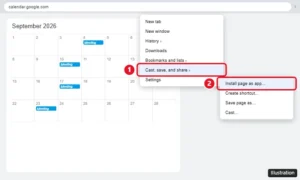
Chrome menu open on Google Calendar with Cast, save, and share expanded and Install page as app highlighted

How to Add Google Calendar to Your Windows 11 Desktop

November 10, 2026June 12, 2024 by Kermit Matthews

Add Google Calendar to your Windows 11 desktop by installing it as an app from Chrome or Edge, pinning it to the taskbar, or adding your account to Outlook. Continue Reading How to Add Google Calendar to Your Windows 11 Desktop

Categories Google Calendar, Windows 11
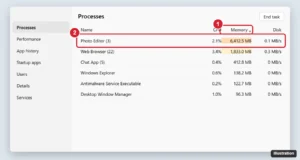
Windows 11 Task Manager Processes page sorted by Memory with one app using an unusually large amount of memory highlighted

How to Fix a Memory Leak in Windows 11

November 17, 2026June 12, 2024 by Kermit Matthews

Fix a memory leak in Windows 11: find the leaking app in Task Manager, restart it, update apps and drivers, trim startup apps, and test your RAM. Continue Reading How to Fix a Memory Leak in Windows 11

Categories Windows 11
Text editor with Japanese IME conversion candidates shown for a typed word and the taskbar input indicator showing the Hiragana mode highlighted

How to Add a Japanese Keyboard in Windows 11 and Type in Japanese

November 14, 2026June 12, 2024 by Kermit Matthews

Add the Japanese keyboard in Windows 11, switch between A and hiragana, type and convert kanji with the Microsoft IME, and fix common problems. Continue Reading How to Add a Japanese Keyboard in Windows 11 and Type in Japanese

Categories Windows 11

How to Sync Time on Windows 11: A Step-by-Step Guide

November 12, 2026June 12, 2024 by Kermit Matthews

Ensure your Windows 11 device keeps accurate time with our step-by-step guide! Learn how to sync your system clock effortlessly for optimal performance. Continue Reading How to Sync Time on Windows 11: A Step-by-Step Guide

Categories Windows 11

How to Make 7-Zip the Default in Windows 11

November 17, 2026June 11, 2024 by Kermit Matthews

Learn how to easily set 7zip as your default file archiver on Windows 11 with our step-by-step guide. Enhance your file management experience today! Continue Reading How to Make 7-Zip the Default in Windows 11

Categories Windows 11

How to Switch From Ethernet to Wi-Fi on Windows 11

November 10, 2026June 11, 2024 by Kermit Matthews

Learn how to switch from Ethernet to WiFi on Windows 11 with our easy step-by-step guide. Perfect for seamless transitions and staying connected wirelessly! Continue Reading How to Switch From Ethernet to Wi-Fi on Windows 11

Categories Windows 11
Controller polling rate test page showing the average polling rate and input latency results highlighted

Can You Overclock a Controller on Windows 11?

November 15, 2026June 11, 2024 by Kermit Matthews

Overclock a controller on Windows 11 by raising its polling rate: test the current rate, use safe built-in options, and know the risks of third-party tools. Continue Reading Can You Overclock a Controller on Windows 11?

Categories Windows 11
Browser three-dot menu open with Cast, save, and share expanded and the Install page as app option highlighted

How to Pin Google to the Taskbar in Windows 11 (Chrome and Edge)

November 10, 2026June 11, 2024 by Kermit Matthews

Pin Google to the Windows 11 taskbar with Chrome or Edge, create a shortcut that works with any browser, and make Google open when your browser starts. Continue Reading How to Pin Google to the Taskbar in Windows 11 (Chrome and Edge)

Categories Windows 11

How to Play Old PC Games on Windows 11: A Complete Guide

November 15, 2026June 11, 2024 by Kermit Matthews

Learn to play old PC games on Windows 11! This guide covers compatibility tools, emulators, and virtual machines to revive your classic gaming experience. Continue Reading How to Play Old PC Games on Windows 11: A Complete Guide

Categories Windows 11

How to Uninstall McAfee Security Scan Plus on Windows 11

November 17, 2026June 11, 2024 by Kermit Matthews

Learn how to easily uninstall McAfee Security Scan Plus from your Windows 11 PC with our concise step-by-step guide. Free up your system today! Continue Reading How to Uninstall McAfee Security Scan Plus on Windows 11

Categories Windows 11

How to Turn On Spatial Sound in Windows 11

November 12, 2026June 11, 2024 by Kermit Matthews

Unlock immersive audio: Learn how to enable Spatial Sound in Windows 11 with our easy step-by-step guide. Elevate your listening experience today! Continue Reading How to Turn On Spatial Sound in Windows 11

Categories Windows 11
Windows 11 folder Properties dialog on the Customize tab with the Change Icon button highlighted and the Change Icon picker open showing system icons

How to Make Custom Folder Icons in Windows 11

November 10, 2026June 10, 2024 by Kermit Matthews

Change folder icons in Windows 11 from Properties > Customize, use extra built-in icons or your own picture as an .ico, and fix icons that will not update. Continue Reading How to Make Custom Folder Icons in Windows 11

Categories Windows 11

How to Check Wireless Mouse Battery on Windows 11

November 16, 2026June 10, 2024 by Kermit Matthews

Check your wireless mouse battery on Windows 11 in Settings, Bluetooth and devices, or with maker apps like Logi Options+ for USB receiver mice. Continue Reading How to Check Wireless Mouse Battery on Windows 11

Categories Windows 11
Task View with desktop thumbnails and the close button on Desktop 2

How to Close Virtual Desktops on Windows 11

November 14, 2026June 10, 2024 by Kermit Matthews

Close a virtual desktop in Windows 11 from Task View (Windows + Tab) or with Windows + Ctrl + F4. Open apps move to the next desktop. Continue Reading How to Close Virtual Desktops on Windows 11

Categories Windows 11

How to Fix SYSTEM_SERVICE_EXCEPTION in Windows 11

November 10, 2026June 10, 2024 by Kermit Matthews

Learn how to fix the System Service Exception error in Windows 11 with our comprehensive step-by-step guide. Troubleshoot and resolve the issue efficiently! Continue Reading How to Fix SYSTEM_SERVICE_EXCEPTION in Windows 11

Categories Windows 11
Device Manager with Sound, video and game controllers expanded and the Uninstall device dialog with Attempt to remove the driver checked

How to Uninstall and Reinstall Audio Drivers in Windows 11

November 17, 2026June 10, 2024 by Kermit Matthews

Uninstall your audio driver in Device Manager, restart to reinstall it, or get the latest from your PC maker. Plus rollback steps and fixes for no sound. Continue Reading How to Uninstall and Reinstall Audio Drivers in Windows 11

Categories Windows 11
Windows Settings Mouse page with the Mouse pointer speed slider highlighted

How to Change Mouse Speed in Windows 11 and 10

November 16, 2026June 10, 2024 by Kermit Matthews

Change mouse speed in Windows 11 with the Mouse pointer speed slider, Enhance pointer precision and your mouse DPI settings. Continue Reading How to Change Mouse Speed in Windows 11 and 10

Categories Windows 11
Text editor Save As dialog with the file name set to settings.ini and Save as type set to All files highlighted, behind it INI sections and keys

How to Create an INI File on Windows 11

November 11, 2026June 10, 2024 by Kermit Matthews

Create an INI file on Windows 11 with Notepad or File Explorer, learn the section and key=value format, choose the right encoding, and fix common mistakes. Continue Reading How to Create an INI File on Windows 11

Categories Windows 11
Older posts
Newer posts
← Previous Page1 … Page7 Page8 Page9 … Page11 Next →

Join Our Free Newsletter

Featured guides and deals

You may opt out at any time.
Read our Privacy Policy

Live2Tech

Plain-English, step-by-step guides for the devices and apps you use every day.

Apple

  • iPhone
  • iPad
  • Mac
  • Apple Watch

Windows

  • Windows 11
  • Windows 10

Microsoft Office

  • Word
  • Excel
  • Powerpoint
  • Outlook

Google

  • Google Docs
  • Google Sheets
  • Google Slides
  • Gmail
  • Chrome
  • Google Drive
  • About Us
  • Contact
  • Disclaimer
  • Privacy Policy
© Live2Tech.com 2026
  • iPhone
  • Windows
    • Windows 11
    • Windows 10
  • Office
    • Word
    • Excel
    • Powerpoint
    • Outlook
  • Google
    • Google Docs
    • Google Sheets
    • Google Slides
    • Gmail
    • Chrome
    • Google Drive
  • Mac & Apple
    • Mac
    • iPad
    • Apple Watch
  • All Tutorials