How to Fix Keyboard Delay in Windows 11
Experiencing keyboard delays on Windows 11? Our guide offers simple solutions and tips to enhance your typing experience and fix lag issues efficiently. Continue Reading How to Fix Keyboard Delay in Windows 11
Guides for Windows 11: settings, security, activation, troubleshooting, and more.
Experiencing keyboard delays on Windows 11? Our guide offers simple solutions and tips to enhance your typing experience and fix lag issues efficiently. Continue Reading How to Fix Keyboard Delay in Windows 11

Set your mouse to 800 DPI in Windows 11 with its DPI button or maker software, keep Windows pointer speed at default, and turn off acceleration. Continue Reading How to Change Mouse DPI to 800 in Windows 11
Learn how to open ports in Windows 11 with our easy step-by-step guide. Perfect for beginners looking to improve their network settings and security. Continue Reading How to Open Ports in Windows 11 (Firewall and PowerShell)

Show This PC (My Computer) on the Windows 11 desktop via Settings > Personalization > Themes > Desktop icon settings, plus other quick ways to open it. Continue Reading How to Show This PC (My Computer) on the Desktop in Windows 11

Set up a new SSD in Windows 11: initialize it as GPT, create and format a volume in Disk Management or Settings, and fix an SSD that does not show up. Continue Reading How to Set Up (Activate) a New SSD in Windows 11

Hide apps on Windows 11 from Start, All apps, the taskbar, and the desktop, turn off recent and most used apps, and use separate accounts for real privacy. Continue Reading How to Keep Apps Out of Sight on Windows 11
Learn how to repair Windows 11 using a USB drive with our step-by-step guide. Follow these simple steps to troubleshoot and fix common problems effectively. Continue Reading How to Repair Windows 11 From a USB Drive
Learn how to install IntelliJ on Windows 11 with this step-by-step guide. From downloading to configuring, we’ve got you covered for a smooth setup. Continue Reading How to Install IntelliJ IDEA on Windows 11

Change DPI in Windows 11 with display scaling: pick a Scale percentage, set custom scaling, fix blurry apps with high DPI settings, and adjust mouse DPI. Continue Reading How to Change DPI (Display Scaling) in Windows 11

Turn on an HP touch screen in Windows 11 by enabling HID-compliant touch screen in Device Manager, updating drivers, calibrating and checking the BIOS. Continue Reading How to Turn On the Touch Screen on an HP Laptop in Windows 11
Learn how to run Startup Repair on Windows 11 with our comprehensive step-by-step guide to quickly resolve boot issues and get your system back on track. Continue Reading How to Run Startup Repair in Windows 11
Learn how to remove a printer from Windows 11 effortlessly with our step-by-step guide, ensuring a clutter-free and efficient workspace. Continue Reading How to Remove a Printer From Windows 11 (Even When It Won’t Delete)

Remove certificates from Windows 11 with certmgr.msc, certlm.msc, PowerShell, or certutil, back them up first, and handle browser, VPN, and work certificates. Continue Reading How to Remove Certificates From Windows 11 (Delete, Disable or Restore)

Map a Synology NAS shared folder as a network drive in Windows 11: enable SMB in DSM, find the NAS address, use Map network drive, and fix errors. Continue Reading How to Map a Synology Drive on Windows 11 (Network Drive Guide)
Easily connect your Wii Remote to a Windows 11 PC with our step-by-step guide. Sync, configure, and start gaming in no time with these simple instructions! Continue Reading How to Connect a Wii Remote to a PC on Windows 11

Install Active Directory Users and Computers (ADUC) on Windows 11 with Optional features, PowerShell, or DISM, open it with dsa.msc, and fix RSAT errors. Continue Reading How to Install ADUC on Windows 11 (and Fix a Failed Install)

Windows 11 has no direct setting for desktop icon font color. Use the drop shadow option, a custom contrast theme, a new wallpaper or bigger text instead. Continue Reading How to Change the Font Color of Desktop Icons in Windows 11
Learn how to install programs on Windows 11 with our easy step-by-step guide for beginners. Simplify your setup and enjoy your new software quickly! Continue Reading How to Install Programs on Windows 11: A Beginner’s Guide

Reinstall the Wi-Fi driver in Windows 11 by uninstalling the adapter in Device Manager and restarting, or install the maker’s driver and roll back bad updates. Continue Reading How to Reinstall the Wi-Fi Driver in Windows 11
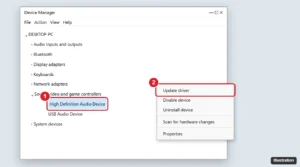
Install audio drivers on Windows 11 with Windows Update, Device Manager, or your PC maker’s website, reinstall a driver, and fix sound that still won’t work. Continue Reading Where to Get and Install Audio Drivers in Windows 11
Disable a second monitor in Windows 11 with Windows key + P or Display settings, turn it back on, and fix ghost monitors that won’t go away. Continue Reading How to Disable a Second Monitor in Windows 11

New to Windows 11? Learn Start and search, the taskbar, File Explorer, Settings, Snap, key shortcuts, updates and Get Help, sorted by the task you want to do. Continue Reading Windows 11 for Beginners: How to Learn the Basics

Remove app icons from your Windows 11 desktop without uninstalling: delete the shortcut, hide all icons, or hide system icons like Recycle Bin. Continue Reading How to Remove Desktop Icons in Windows 11 but Keep the Apps

Change the system locale in Windows 11 to fix garbled text in older programs, using Settings or PowerShell, plus when to use the UTF-8 beta option. Continue Reading How to Change the System Locale in Windows 11 (Fix Garbled Text)

Switch from Legacy BIOS to UEFI for Windows 11: check your mode, convert MBR to GPT with MBR2GPT, change firmware settings and enable Secure Boot. Continue Reading How to Change BIOS Mode From Legacy to UEFI in Windows 11
Learn how to resolve Driver Verifier DMA Violation errors in Windows 11 with our step-by-step guide. Ensure system stability and performance effortlessly! Continue Reading How to Fix DRIVER_VERIFIER_DMA_VIOLATION on Windows 11

Windows 11 has no built-in Guest account. Create a local Standard account named Visitor instead in Settings, Accounts, Other users. Continue Reading How to Add a Guest Account on Windows 11
Discover how to check your graphics driver in Windows 11 with this step-by-step guide. Ensure your system runs smoothly and efficiently by verifying your driver. Continue Reading How to Check Your Graphics Driver in Windows 11

Extract ZIP, RAR, 7z, and TAR files on Windows 11 with Extract All, drag and drop, or PowerShell, and fix errors, blocked files, and protected archives. Continue Reading How to Extract Files on Windows 11 (ZIP, RAR, 7z and More)

Open IMG files in Windows 11 by mounting them in File Explorer, extracting with 7-Zip, or writing OS images to USB, plus fixes for mount errors. Continue Reading How to Open an IMG File in Windows 11
Learn how to bypass the admin password on Windows 11 with our step-by-step guide. Follow these instructions to regain access to your computer. Continue Reading Locked Out of Your Windows 11 Admin Account? Get Back In

Add widgets in Windows 11 from the Widgets board, customize and pin them, and learn your options for putting widgets directly on the desktop. Continue Reading How to Add Widgets to Your Desktop in Windows 11

Update Discord on Windows 11 from the system tray or with Ctrl+R, force an update by restarting or reinstalling, and fix a stuck update loop. Continue Reading How to Update Discord on Windows 11 (and Fix Update Loops)

Reset keyboard settings in Windows 11: remove extra layouts, stop automatic switching, turn off Sticky and Filter keys, and reinstall the driver. Continue Reading How to Reset Keyboard Settings in Windows 11

Windows 11 network credentials are the other PC’s account name and password. Here is what to enter, how to find saved ones in Credential Manager, and fixes. Continue Reading How to Find Your Network Username and Password in Windows 11
Discover the easiest ways to find installed programs in Windows 11 with our step-by-step guide, ensuring a smooth experience in managing your applications. Continue Reading How to Find Installed Programs in Windows 11 (5 Ways)
Learn how to securely bypass the PIN on Windows 11 with our detailed step-by-step guide. Ensure safe access without compromising your system’s integrity. Continue Reading Forgot Your Windows 11 PIN? How to Reset It and Sign In

OneDrive gone from File Explorer? Check the cloud icon, start or sign in to OneDrive, restart Explorer, then reset or reinstall the app. Your files stay safe. Continue Reading OneDrive Missing From File Explorer? How to Get It Back

Update DirectX on Windows 11 through Windows Update, check your version with dxdiag, install the End-User Runtime for older games, and fix missing DLL errors. Continue Reading How to Update DirectX on Windows 11

Stop Windows 11 updates by pausing for 5 weeks, blocking feature updates, or disabling automatic updates with Group Policy or the registry, and the risks. Continue Reading How to Stop Windows 11 Updates (Pause, Block, or Disable)
Discover how to effortlessly add weather updates to your Windows 11 taskbar with this step-by-step guide. Stay informed with the latest weather right on your desktop! Continue Reading How to Add Weather to the Taskbar in Windows 11

Check if BitLocker is on in Windows 11: run manage-bde -status, check Settings > Privacy & security > Device encryption, or look for a drive padlock. Continue Reading How to Tell if BitLocker Is Enabled on Windows 11

Windows 11 has no built-in EPUB reader. Install free Thorium Reader or calibre, then right-click the file and choose Open with. Plus DRM and default app tips. Continue Reading How to Open an EPUB File on Windows 11

Downloads pause in sleep. Keep them running on Windows 11 by setting sleep to Never when plugged in; letting the screen turn off is fine. Continue Reading How to Keep Downloading When a Windows 11 PC Would Sleep
Learn how to increase virtual memory in Windows 11 with our step-by-step guide. Boost performance and prevent slowdowns with these easy instructions. Continue Reading How to Increase Virtual Memory (Page File) in Windows 11

Put Windows 11 to sleep from the Start menu or keyboard, set the power button or lid to sleep, and fix a missing Sleep option. Continue Reading How to Put Windows 11 to Sleep
Learn to switch from a Microsoft to a local account on Windows 11 with our easy-to-follow guide. Enhance privacy and control in just a few steps! Continue Reading Convert a Windows 11 Microsoft Sign-In to a Local Account
Learn how to turn off “Add a Device” notifications in Windows 11 with our simple, step-by-step guide. Say goodbye to unnecessary pop-ups! Continue Reading How to Turn Off “Add a Device” Notifications in Windows 11

Lower RAM usage in Windows 11: find memory-heavy apps in Task Manager, disable startup apps, tame your browser, and know when to add more RAM. Continue Reading How to Lower RAM Usage in Windows 11 (What Actually Works)

Factory reset a Dell laptop without a password on Windows 11 using Shift+Restart from the sign-in screen, Dell SupportAssist OS Recovery, or a recovery USB. Continue Reading How to Factory Reset a Dell Laptop Without a Password (Windows 11)