Skip to content
Live2Tech
  • iPhone
  • Windows
    • Windows 11
    • Windows 10
  • Office
    • Word
    • Excel
    • Powerpoint
    • Outlook
  • Google
    • Google Docs
    • Google Sheets
    • Google Slides
    • Gmail
    • Chrome
    • Google Drive
  • Mac & Apple
    • Mac
    • iPad
    • Apple Watch
  • All Tutorials

Windows 11

Guides for Windows 11: settings, security, activation, troubleshooting, and more.

Windows Security Private network settings page with the Firewall switch for the active network highlighted

How to Disable the Firewall on Windows 11 (and Turn It Back On)

November 10, 2026May 31, 2024 by Kermit Matthews

Turn off the Windows 11 firewall in Windows Security, Control Panel, or with netsh, allow a single app instead, and turn protection back on. Continue Reading How to Disable the Firewall on Windows 11 (and Turn It Back On)

Categories Windows 11
Windows 11 File Explorer with an ISO file right-clicked and the Mount option highlighted, plus the mounted DVD drive in the sidebar

How to Open an ISO File in Windows 11

November 12, 2026May 31, 2024 by Kermit Matthews

Open an ISO file in Windows 11 by double-clicking it or choosing Mount. Plus how to eject it, extract files, make a bootable USB, and fix a missing Mount. Continue Reading How to Open an ISO File in Windows 11

Categories Windows 11
Wi-Fi adapter Properties dialog on the Advanced tab with Preferred Band selected and its value set to Prefer 5GHz band highlighted

How to Increase Wi-Fi Speed on a Windows 11 Laptop: 7 Fixes

November 14, 2026May 31, 2024 by Kermit Matthews

Speed up Wi-Fi on a Windows 11 laptop: switch to 5 GHz, update drivers, change power settings, stop background downloads, and tune adapter settings. Continue Reading How to Increase Wi-Fi Speed on a Windows 11 Laptop: 7 Fixes

Categories Windows 11
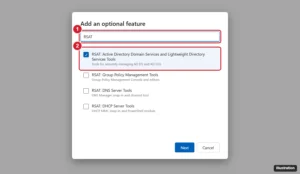
Windows 11 Add an optional feature window with a search for RSAT and the Active Directory tools checked

How to Access Active Directory on Windows 11 (Install RSAT)

November 10, 2026May 31, 2024 by Kermit Matthews

Access Active Directory on Windows 11 by installing RSAT from Optional features or PowerShell, then open Active Directory Users and Computers. Continue Reading How to Access Active Directory on Windows 11 (Install RSAT)

Categories Windows 11
Windows Security scan options with the offline scan option selected and Scan now highlighted

How to Remove a Trojan Virus From Windows 11

November 10, 2026May 31, 2024 by Kermit Matthews

Remove a trojan from Windows 11 with Windows Security: update protection, run a Full scan and the offline scan, then change passwords from a clean device. Continue Reading How to Remove a Trojan Virus From Windows 11

Categories Windows 11
Windows 11 Start search result for a desktop app with Open file location highlighted in the right pane

How to Open File Location in Windows 11

November 15, 2026May 31, 2024 by Kermit Matthews

Open a file or app’s location on Windows 11 from Start search, a shortcut, or Task Manager, copy its full path, and see why the option is sometimes missing. Continue Reading How to Open File Location in Windows 11

Categories Windows 11
Windows 11 media player app showing an audio CD track list with the Rip CD button highlighted

How to Rip a CD on Windows 11

November 9, 2026May 31, 2024 by Kermit Matthews

Rip a CD on Windows 11 with the built-in Media Player or Windows Media Player Legacy, choose MP3, AAC or FLAC, and fix CDs that will not rip. Continue Reading How to Rip a CD on Windows 11

Categories Windows 11
Windows 11 Settings Apps Startup page with the Discord startup switch highlighted

How to Stop Discord From Opening on Startup in Windows 11

November 17, 2026May 31, 2024 by Kermit Matthews

Stop Discord from opening at startup: turn off Open Discord in User Settings > Windows Settings, or switch it off in Settings > Apps > Startup. Continue Reading How to Stop Discord From Opening on Startup in Windows 11

Categories Windows 11

How to Extract Multiple ZIP Files at Once on Windows 11

November 17, 2026May 31, 2024 by Kermit Matthews

Learn how to quickly extract multiple ZIP files at once on Windows 11 with our step-by-step guide. Simplify your workflow and save time effortlessly! Continue Reading How to Extract Multiple ZIP Files at Once on Windows 11

Categories Windows 11
Terminal window installing OpenSSL with winget and then running openssl version, with the install command and the version output highlighted

How to Install OpenSSL on Windows 11 (winget, Installer, or Git)

November 10, 2026May 31, 2024 by Kermit Matthews

Install OpenSSL on Windows 11 with winget or a trusted installer, add it to PATH, verify with openssl version, and try common certificate commands. Continue Reading How to Install OpenSSL on Windows 11 (winget, Installer, or Git)

Categories Windows 11

How to Reset BIOS in Windows 11: A Step-by-Step Guide

November 10, 2026May 31, 2024 by Kermit Matthews

Learn how to reset BIOS on Windows 11 with our detailed step-by-step guide, ensuring your system runs smoothly. Perfect for both beginners and experts! Continue Reading How to Reset BIOS in Windows 11: A Step-by-Step Guide

Categories Windows 11
Windows 11 Start search showing the Copilot app as the best match with Open and Pin to taskbar highlighted

How to Get Copilot on Windows 11 (Install, Open, and Fix Missing Copilot)

November 11, 2026May 31, 2024 by Kermit Matthews

Get Copilot on Windows 11: check if it is installed, get the free app from the Microsoft Store, open it with Windows+C, and fix it if Copilot is missing. Continue Reading How to Get Copilot on Windows 11 (Install, Open, and Fix Missing Copilot)

Categories Windows 11

Forgot Your Windows 11 Administrator Password?

November 15, 2026May 31, 2024 by Kermit Matthews

Windows 11 can’t show a stored password, but you can reset it. Options for Microsoft and local accounts, PINs, other admins, IT, and a last-resort reset. Continue Reading Forgot Your Windows 11 Administrator Password?

Categories Windows 11

How to Uninstall Norton on Windows 11

November 17, 2026May 31, 2024 by Kermit Matthews

Remove Norton from Windows 11 with Settings, Control Panel or the Norton 360 Remover tool, then turn on Defender and cancel auto-renewal. Continue Reading How to Uninstall Norton on Windows 11

Categories Windows 11
Windows 11 Gaming settings Game Bar page with the Gaming menu item and the controller shortcut toggle highlighted

How to Open Xbox Game Bar on Windows 11 (and Fix It)

November 15, 2026May 30, 2024 by Kermit Matthews

Open Xbox Game Bar on Windows 11 with Windows + G or a controller, enable it in Gaming settings, use its widgets, and fix it when it will not open. Continue Reading How to Open Xbox Game Bar on Windows 11 (and Fix It)

Categories Windows 11
User Account Control Settings window with the notification slider and the OK button highlighted

How to Disable UAC in Windows 11 (and Safer Alternatives)

November 10, 2026May 30, 2024 by Kermit Matthews

Turn off or reduce User Account Control prompts in Windows 11, understand each UAC level and the risks, and stop prompts for one app without disabling UAC. Continue Reading How to Disable UAC in Windows 11 (and Safer Alternatives)

Categories Windows 11
Windows 11 file right-click menu with the icon row and the Show more options item highlighted

How to Change Right-Click Options in Windows 11

November 10, 2026May 30, 2024 by Kermit Matthews

Change right-click options in Windows 11: bring back the classic menu, remove entries added by apps, customize Send to, and understand the new menu. Continue Reading How to Change Right-Click Options in Windows 11

Categories Windows 11
Windows 11 Storage Spaces settings creating a storage space with Two-way mirror resiliency selected across two drives

How to Set Up RAID on Windows 11 (Storage Spaces and BIOS RAID)

November 10, 2026May 30, 2024 by Kermit Matthews

Set up RAID on Windows 11 with Storage Spaces mirror or parity, or motherboard RAID in the BIOS. Compare options and remember RAID is not a backup. Continue Reading How to Set Up RAID on Windows 11 (Storage Spaces and BIOS RAID)

Categories Windows 11
Power Options System Settings with the Turn on fast startup checkbox highlighted

How to Disable Fast Boot and Fast Startup in Windows 11

November 15, 2026May 30, 2024 by Kermit Matthews

Turn off Windows Fast startup in Power Options or firmware Fast Boot in UEFI on Windows 11, and know which one you need. Continue Reading How to Disable Fast Boot and Fast Startup in Windows 11

Categories Windows 11
Internet Protocol Version 4 properties with a static IP address of 192.168.10.1 and subnet mask 255.255.255.0 highlighted

How to Transfer Files Between PCs With an Ethernet Cable in Windows 11

November 10, 2026May 30, 2024 by Kermit Matthews

Connect two Windows 11 PCs with an Ethernet cable, set static IPs, turn on sharing, and copy files over the network. Includes fixes. Continue Reading How to Transfer Files Between PCs With an Ethernet Cable in Windows 11

Categories Windows 11
Windows 11 Device Manager with Network adapters expanded and a device showing a yellow warning icon

How to Open Device Manager in Windows 11 (8 Ways)

November 17, 2026May 30, 2024 by Kermit Matthews

Open Device Manager in Windows 11 with Windows + X, devmgmt.msc, search, Settings, or Control Panel, then update drivers and fix warning icons. Continue Reading How to Open Device Manager in Windows 11 (8 Ways)

Categories Windows 11
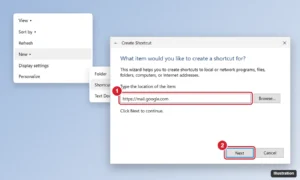
Windows 11 Create Shortcut wizard with a web mail address typed in the location box and the Next button highlighted

Install Gmail as a Desktop App in Windows 11

November 16, 2026May 30, 2024 by Kermit Matthews

Add a Gmail icon to your Windows 11 desktop by installing Gmail as an app in Chrome or Edge or creating a shortcut, then pin it to the taskbar and Start menu. Continue Reading Install Gmail as a Desktop App in Windows 11

Categories Gmail, Windows 11
Initialize Disk dialog with the GPT partition style highlighted

How to Initialize an SSD in Windows 11 and Windows 10

November 15, 2026May 29, 2024 by Kermit Matthews

Initialize a new SSD in Windows 11 Disk Management as GPT, then create a New Simple Volume so it appears in File Explorer. Continue Reading How to Initialize an SSD in Windows 11 and Windows 10

Categories Windows 11
Screen recording toolbar with record mode selected, microphone and system audio toggles turned on and the Start button highlighted

How to Screen Record on Windows 11 With Audio (and Record Audio Only)

November 13, 2026May 29, 2024 by Kermit Matthews

Record your Windows 11 screen with mic and system audio using Snipping Tool, Xbox Game Bar, Clipchamp or OBS, and fix recordings with no sound. Continue Reading How to Screen Record on Windows 11 With Audio (and Record Audio Only)

Categories Windows 11
Word processor Home tab with messy formatted text selected and the Clear All Formatting button highlighted in the Font group

How to Remove Recent Files in Windows 11

November 12, 2026May 29, 2024 by Kermit Matthews

Remove recent files in Windows 11: right-click > Remove from Recent, or File Explorer Options > Clear, and turn off recent items in Start settings. Continue Reading How to Remove Recent Files in Windows 11

Categories Windows 11

How to Connect a PS4 Controller to a Windows 11 PC (USB or Bluetooth)

November 15, 2026May 28, 2024 by Kermit Matthews

Learn how to effortlessly connect your PS4 controller to a Windows 11 PC with our easy, step-by-step guide for a seamless gaming experience. Continue Reading How to Connect a PS4 Controller to a Windows 11 PC (USB or Bluetooth)

Categories Windows 11
Command Prompt running mklink J to link the phone backup folder to an external drive, with the command and the Junction created message highlighted

How to Back Up an iPhone to an External Hard Drive on Windows 11

November 10, 2026May 28, 2024 by Kermit Matthews

Back up your iPhone to an external hard drive on Windows 11 by redirecting the Apple Devices or iTunes backup folder with a junction, or copy only photos. Continue Reading How to Back Up an iPhone to an External Hard Drive on Windows 11

Categories Windows 11
Windows System Information showing BIOS Mode UEFI and Secure Boot State highlighted

How to Turn On Secure Boot in Windows 11

November 14, 2026May 28, 2024 by Kermit Matthews

Check msinfo32 for BIOS Mode UEFI, then open UEFI Firmware Settings from Advanced startup and set Secure Boot to Enabled. Steps by PC brand and fixes. Continue Reading How to Turn On Secure Boot in Windows 11

Categories Windows 11
Windows Settings Mouse pointer and touch page with pointer style options highlighted

How to Change the Cursor in Windows 11 (Style, Size and Color)

November 10, 2026May 28, 2024 by Kermit Matthews

Change the Windows 11 mouse cursor style, color and size in Accessibility settings, or pick a new pointer scheme. Continue Reading How to Change the Cursor in Windows 11 (Style, Size and Color)

Categories Windows 11
Windows 11 Settings Optional updates page with Driver updates expanded and Download and install highlighted

How to Install Drivers on Windows 11

November 17, 2026May 28, 2024 by Kermit Matthews

Install drivers on Windows 11 with Windows Update’s optional updates, the manufacturer’s website, or Device Manager, and roll back bad drivers. Continue Reading How to Install Drivers on Windows 11

Categories Windows 11

How to Move Games to Another Drive in Windows 11: A Step-by-Step Guide

November 11, 2026May 28, 2024 by Kermit Matthews

Learn how to seamlessly move your games to another drive on Windows 11 with our step-by-step guide, ensuring you keep your data safe and your system optimized. Continue Reading How to Move Games to Another Drive in Windows 11: A Step-by-Step Guide

Categories Windows 11
Windows 11 New System Variable dialog with JAVA_HOME as the variable name and the JDK folder as the value

How to Install Java on Windows 11: JDK, JAVA_HOME, and PATH Setup

November 10, 2026May 28, 2024 by Kermit Matthews

Install Java on Windows 11 with an installer or winget, choose the right JDK, set JAVA_HOME and PATH, and fix the java is not recognized error. Continue Reading How to Install Java on Windows 11: JDK, JAVA_HOME, and PATH Setup

Categories Windows 11
Windows 11 Settings Fonts page with the drag and drop install area and the list of available fonts, with Segoe UI highlighted

How to Change the Font in Windows 11 (System Font, Size, and More)

November 10, 2026May 28, 2024 by Kermit Matthews

Change the font in Windows 11: adjust text size, install new fonts, change the system font with a registry file, and restore the default Segoe UI. Continue Reading How to Change the Font in Windows 11 (System Font, Size, and More)

Categories Windows 11
Windows Memory Diagnostic dialog with the Restart now and check for problems option highlighted

How to Run System Diagnostics on Windows 11 (Which Test for Which Symptom)

November 10, 2026May 28, 2024 by Kermit Matthews

Run system diagnostics on Windows 11 with the perfmon report, Reliability Monitor, Memory Diagnostic, SFC and DISM, CHKDSK, battery reports, and maker tools. Continue Reading How to Run System Diagnostics on Windows 11 (Which Test for Which Symptom)

Categories Windows 11
Windows 11 Registry Editor WindowMetrics key with the IconSpacing and IconVerticalSpacing values highlighted

Desktop Icons Too Far Apart in Windows 11? What You Can Do

November 14, 2026May 28, 2024 by Kermit Matthews

Reduce the space between desktop icons in Windows 11 by making icons smaller or by lowering IconSpacing and IconVerticalSpacing in the registry. Continue Reading Desktop Icons Too Far Apart in Windows 11? What You Can Do

Categories Windows 11
Windows 11 File Explorer cloud storage folder with files selected and the right-click menu showing Always keep on this device highlighted

Download OneDrive Files to Your PC and Stop Cloud Syncing

November 17, 2026May 28, 2024 by Kermit Matthews

Move files from OneDrive to your Windows 11 PC safely: download them, move them out of the OneDrive folder, stop folder backup, and avoid deleting files. Continue Reading Download OneDrive Files to Your PC and Stop Cloud Syncing

Categories Windows 11
Hardware monitoring app sensor list with the CPU Package temperature row showing current, minimum, and maximum values highlighted

How to Check CPU Temp on Windows 11: 3 Methods That Work

November 13, 2026May 24, 2024 by Kermit Matthews

Windows 11 has no built-in CPU temperature display. Here is how to check it with free monitoring apps or the BIOS, plus what temperatures are normal. Continue Reading How to Check CPU Temp on Windows 11: 3 Methods That Work

Categories Windows 11
Windows 11 Quick Settings panel open from the taskbar with the brightness slider highlighted

How to Change Brightness on Windows 11 (Laptop and Monitor)

November 12, 2026May 24, 2024 by Kermit Matthews

Change screen brightness on Windows 11 with Quick Settings, the Settings app, or keyboard keys, control auto brightness, and fix a missing slider. Continue Reading How to Change Brightness on Windows 11 (Laptop and Monitor)

Categories Windows 11
Windows 11 Settings Storage Temporary files page with cache categories checked and the Remove files button highlighted

How to Clear Your Computer’s Cache in Windows 11

November 12, 2026May 23, 2024 by Kermit Matthews

Clear cache on Windows 11: temporary files, browser cache, DNS cache, Microsoft Store and Windows Update caches, and File Explorer history. Continue Reading How to Clear Your Computer’s Cache in Windows 11

Categories Windows 11
Windows sign-in screen with the I forgot my password link highlighted

How to Reset a Forgotten Windows 11 Password Without Logging In

November 15, 2026May 23, 2024 by Kermit Matthews

Reset a forgotten Windows 11 password for your own account from the sign-in screen: Microsoft account reset, security questions, reset disk or another admin. Continue Reading How to Reset a Forgotten Windows 11 Password Without Logging In

Categories Windows 11

How to Dual Boot Windows 11 and Ubuntu (Step-by-Step)

November 14, 2026May 23, 2024 by Kermit Matthews

Learn to dual boot Windows 11 and Ubuntu with our step-by-step guide. Master the process for a seamless switch between operating systems on your PC. Continue Reading How to Dual Boot Windows 11 and Ubuntu (Step-by-Step)

Categories Windows 11
Graphics card app Drivers page with the Download button highlighted

How to Update NVIDIA Drivers on Windows 11 and 10

November 13, 2026May 23, 2024 by Kermit Matthews

Update NVIDIA drivers on Windows 11 with the NVIDIA app, a manual download or Windows Update, and fix failed installs. Continue Reading How to Update NVIDIA Drivers on Windows 11 and 10

Categories Windows 11
Windows 11 Settings Activation page with Upgrade your edition of Windows expanded and the Change product key and Upgrade options highlighted

How to Upgrade Windows 11 Home to Pro Without Reinstalling

November 12, 2026May 23, 2024 by Kermit Matthews

Upgrade Windows 11 Home to Pro without losing files by buying it in the Microsoft Store or entering a Pro product key, see what Pro adds, and fix errors. Continue Reading How to Upgrade Windows 11 Home to Pro Without Reinstalling

Categories Windows 11
Settings Storage Temporary files page with file categories checked and the Remove files button highlighted

How to Clear Temp Files in Windows 11

November 12, 2026May 23, 2024 by Kermit Matthews

Clear temporary files in Windows 11 from Settings, the Temp folder, Storage Sense, or Disk Cleanup, and learn which categories are safe to delete. Continue Reading How to Clear Temp Files in Windows 11

Categories Windows 11
Windows 11 Run dialog with the AppData path typed and File Explorer showing the AppData folder with Local, LocalLow, and Roaming

How to Find the AppData Folder in Windows 11 (4 Easy Ways)

November 17, 2026May 22, 2024 by Kermit Matthews

Find the AppData folder in Windows 11 with %appdata%, the Run dialog, or hidden items, and learn what Local, LocalLow, and Roaming hold. Continue Reading How to Find the AppData Folder in Windows 11 (4 Easy Ways)

Categories Windows 11

How to Change Function Key (Fn) Settings in Windows 11
November 17, 2026May 22, 2024 by Kermit Matthews

Learn how to easily change Fn key settings on Windows 11 with our step-by-step guide. Customize your function keys to suit your needs in just a few clicks! Continue Reading How to Change Function Key (Fn) Settings in Windows 11

Categories Windows 11
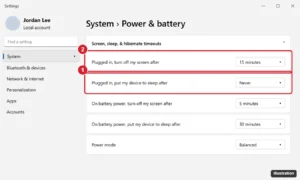
Windows 11 Settings Power and battery page with Screen, sleep and hibernate timeouts expanded and the plugged-in sleep option set to Never highlighted

How to Stop Your Computer From Sleeping in Windows 11

November 15, 2026May 22, 2024 by Kermit Matthews

Stop your Windows 11 PC from sleeping in Settings or with a powercfg command, keep a laptop awake with the lid closed, and use PowerToys Awake temporarily. Continue Reading How to Stop Your Computer From Sleeping in Windows 11

Categories Windows 11
Windows 11 Credential Manager with Web Credentials selected and a saved sign-in expanded to show the Show password link

How to Find Stored Passwords on Windows 11

November 17, 2026May 21, 2024 by Kermit Matthews

Find stored passwords on Windows 11 in Credential Manager, your browser’s password manager, and Wi-Fi settings, and see how to keep saved passwords secure. Continue Reading How to Find Stored Passwords on Windows 11

Categories Windows 11
Windows 11 Change account type dialog over the Other users page with Administrator selected

How to Give an Account Administrator Rights in Windows 11

November 13, 2026May 21, 2024 by Kermit Matthews

An existing admin can make any Windows 11 account an administrator in Settings > Accounts > Other users. Also see Run as administrator and managed PCs. Continue Reading How to Give an Account Administrator Rights in Windows 11

Categories Windows 11
Windows 11 Taskbar behaviors settings with Taskbar alignment and Automatically hide the taskbar options

How to Unlock the Taskbar in Windows 11 (and What You Can Change)

November 15, 2026May 21, 2024 by Kermit Matthews

Windows 11 has no lock or unlock taskbar option. See what you can change in Taskbar behaviors, and how to fix a frozen taskbar by restarting Explorer. Continue Reading How to Unlock the Taskbar in Windows 11 (and What You Can Change)

Categories Windows 11
Older posts
Newer posts
← Previous Page1 … Page9 Page10 Page11 Next →

Join Our Free Newsletter

Featured guides and deals

You may opt out at any time.
Read our Privacy Policy

Live2Tech

Plain-English, step-by-step guides for the devices and apps you use every day.

Apple

  • iPhone
  • iPad
  • Mac
  • Apple Watch

Windows

  • Windows 11
  • Windows 10

Microsoft Office

  • Word
  • Excel
  • Powerpoint
  • Outlook

Google

  • Google Docs
  • Google Sheets
  • Google Slides
  • Gmail
  • Chrome
  • Google Drive
  • About Us
  • Contact
  • Disclaimer
  • Privacy Policy
© Live2Tech.com 2026
  • iPhone
  • Windows
    • Windows 11
    • Windows 10
  • Office
    • Word
    • Excel
    • Powerpoint
    • Outlook
  • Google
    • Google Docs
    • Google Sheets
    • Google Slides
    • Gmail
    • Chrome
    • Google Drive
  • Mac & Apple
    • Mac
    • iPad
    • Apple Watch
  • All Tutorials