
How to Change the Boot Drive in Windows 11
Change the boot drive in Windows 11 from UEFI firmware settings, boot once from USB with the boot menu key, and set the default on dual-boot PCs. Continue Reading How to Change the Boot Drive in Windows 11
Guides for Windows 11: settings, security, activation, troubleshooting, and more.
Change the boot drive in Windows 11 from UEFI firmware settings, boot once from USB with the boot menu key, and set the default on dual-boot PCs. Continue Reading How to Change the Boot Drive in Windows 11

Scan for malware on Windows 11 with Windows Security: quick, full, custom and offline scans, and what to do if threats remain. Continue Reading How to Check for Malware and Viruses on Windows 11

Go full screen on Windows 11 with F11, Windows+Shift+Enter, or Alt+Enter in browsers, File Explorer, Store apps, games, and videos, and exit it easily. Continue Reading How to Make Apps Full Screen on Windows 11 (Every Shortcut)
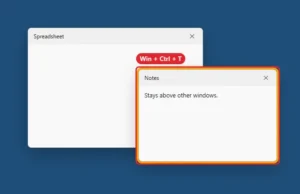
Keep a window always on top in Windows 11 with PowerToys Always On Top (Windows+Ctrl+T) or an app’s own keep-on-top option. Continue Reading How to Pin a Window on Top in Windows 11
Learn how to efficiently move files in Windows 11 with our beginner-friendly guide. Follow these simple steps to organize and manage your files effortlessly. Continue Reading How to Move Files in Windows 11: A Step-by-Step Guide for Beginners
Learn to seamlessly merge two drives in Windows 11 with our step-by-step guide. Simplify storage and optimize space in just a few clicks! Continue Reading How to Merge Two Drives in Windows 11

Save files to your PC instead of OneDrive in Windows 11: turn off folder backup, make Office save locally, move files back from OneDrive, or unlink OneDrive. Continue Reading How to Save to Your PC Instead of OneDrive in Windows 11

Lock or block apps in Windows 11 with separate accounts, Family Safety, Group Policy, AppLocker or in-app locks, and learn each method’s limits. Continue Reading How to Lock or Restrict Apps in Windows 11 (Built-In Ways)

Turn off Fn Lock in Windows 11 with Fn + Esc, brand-specific shortcuts, BIOS function key settings, or your laptop maker’s app. Includes fixes. Continue Reading How to Turn Off Fn Lock on a Windows 11 Laptop

Remotely access IoT devices from Windows 11 safely: use a private VPN, then connect with built-in SSH, Remote Desktop or VNC. Plus security tips. Continue Reading How to Remotely Access IoT Devices From Windows 11
Having trouble with WSL on Windows 11? Our step-by-step guide will show you how to reboot and get back to coding in no time! Continue Reading How to Restart WSL on Windows 11

Fix a Windows 11 screen that is sideways, zoomed in, stretched, black and white, or stuck in full screen, with shortcuts and display settings. Continue Reading How to Return Your Screen to Normal in Windows 11

Canon has no Windows 11 driver for the LBP2900B, but the 64-bit CAPT R1.50 driver works. Here is how to install it, add it manually, and fix common errors. Continue Reading How to Install the Canon LBP2900B Driver on Windows 11

Windows 11 has no Launchpad, but the Start menu does the same job. See all your apps and match Mac shortcuts to their Windows 11 equivalents. Continue Reading Launchpad on Windows 11: Start Menu Shortcuts for Mac Users
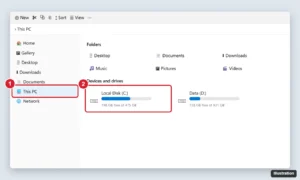
Open the C drive on Windows 11 from File Explorer > This PC > Local Disk (C:), or type C:\ in the Run box. Plus what’s inside and fixes if it’s missing. Continue Reading How to Access the C Drive on Windows 11

Turn off the Acer Predator boot sound and logo animation in the BIOS by pressing F2 and disabling Boot Sound on the Main tab, or check PredatorSense. Continue Reading How to Turn Off the Acer Predator Boot Sound and Animation
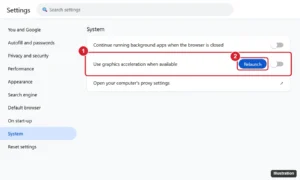
Turn off hardware acceleration in Chrome, Edge, Firefox, Discord, Spotify, Slack, Steam, and Office to fix flickering, black screens, and crashes. Continue Reading How to Turn Off Hardware Acceleration in Chrome, Edge, Firefox, Discord, and More