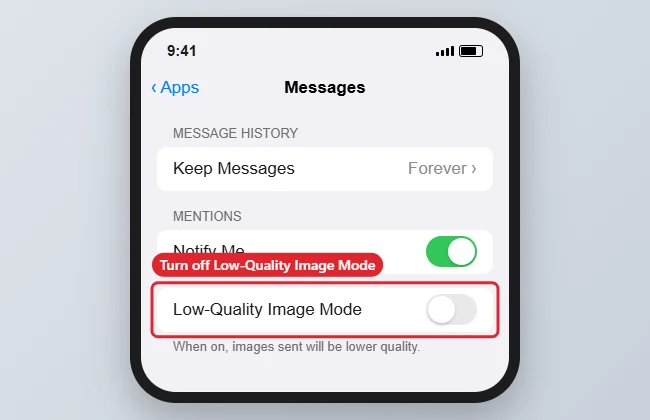
To turn off Low Quality Image Mode on an iPhone 7, open Settings > Messages, scroll to the bottom and switch off Low Quality Image Mode. Photos you send in Messages then go at full quality instead of being compressed to save data. On iOS 18 and later, the setting is under Settings > Apps > Messages. If images still look compressed, check whether Low Data Mode is on for mobile data or Wi-Fi.
Quick Answer
Settings > Messages > Low Quality Image Mode: Off.
Steps to Turn It Off
- Open Settings.
- Tap Messages (Apps > Messages on newer iOS versions).
- Scroll to the bottom.
- Turn off Low Quality Image Mode.
Settings That Affect Image Quality
| Setting | Where | Effect |
|---|---|---|
| Low Quality Image Mode | Settings > Messages | Compresses photos you send |
| Low Data Mode (mobile) | Settings > Mobile Data > Mobile Data Options | Reduces data use across apps |
| Low Data Mode (Wi-Fi) | Settings > Wi-Fi > (i) next to the network | Same, on that network |
| Recipient’s settings and network | Their device | Can reduce quality on their side |
Troubleshooting
- Photos still blurry: Turn off Low Data Mode; see turning off Low Data Mode.
- Sending to non-Apple phones: SMS/MMS compresses images heavily; share a link or use email for full quality.
- iMessage issues: See turning on iMessage.
Frequently Asked Questions
Does this use more data?
Yes. Full-quality photos are larger, so they use more mobile data.
Does it affect photos I receive?
It mainly affects what you send. Received quality depends on the sender’s settings.
Is the setting on newer iPhones too?
Yes, in Messages settings.
Summary
- Open Settings > Messages.
- Scroll to the bottom.
- Turn off Low Quality Image Mode.
- Check Low Data Mode if images still look compressed.

Kermit Matthews is a freelance writer based in Philadelphia, Pennsylvania with more than a decade of experience writing technology guides. He has a Bachelor’s and Master’s degree in Computer Science and has spent much of his professional career in IT management.
He specializes in writing content about iPhones, Android devices, Microsoft Office, and many other popular applications and devices.