Skip to content
Live2Tech
  • iPhone
  • Windows
    • Windows 11
    • Windows 10
  • Office
    • Word
    • Excel
    • Powerpoint
    • Outlook
  • Google
    • Google Docs
    • Google Sheets
    • Google Slides
    • Gmail
    • Chrome
    • Google Drive
  • Mac & Apple
    • Mac
    • iPad
    • Apple Watch
  • All Tutorials

Word

How-to guides and tutorials to help you perform specific tasks and use the Microsoft Word word-processing application.

Word Font dialog Advanced tab with Character Spacing set to Expanded by 2 pt and the Spacing and By boxes highlighted

How to Change Character Spacing in Word (Expand or Condense)

November 10, 2026July 8, 2024 by Kermit Matthews

Change character spacing in Microsoft Word by expanding or condensing letters in the Font dialog, and use scale, kerning, and styles for polished text. Continue Reading How to Change Character Spacing in Word (Expand or Condense)
Categories Word

How to Set A4 Size in Word

November 17, 2026July 8, 2024 by Kermit Matthews

Learn how to set A4 size in Word with our step-by-step guide. Ensure perfect formatting for your documents and professional presentation every time. Continue Reading How to Set A4 Size in Word

Categories Word
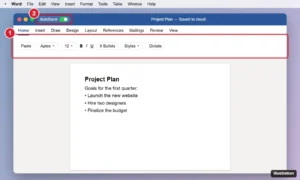
Word for Mac window showing the macOS menu bar, the ribbon Home tab, and the AutoSave switch highlighted

How to Use Microsoft Word on a Mac (Beginner’s Guide)

November 13, 2026July 8, 2024 by Kermit Matthews

Learn Microsoft Word on a Mac: install and sign in, navigate the ribbon and menus, create and save documents, use Mac shortcuts, share files, and export PDFs. Continue Reading How to Use Microsoft Word on a Mac (Beginner’s Guide)

Categories Mac, Word
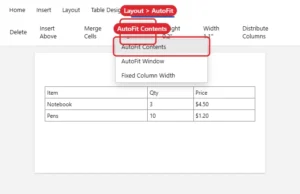
Table Layout tab AutoFit menu with AutoFit Contents and AutoFit Window options

How to Shrink a Table in Word

November 12, 2026July 8, 2024 by Kermit Matthews

Shrink a table in Word with AutoFit Contents, drag the corner handle, set exact widths, or reduce font size and cell margins. Continue Reading How to Shrink a Table in Word

Categories Word
Word Font dialog with the Small caps effect checkbox and the OK button highlighted, and a preview in small capitals

How to Use Small Caps in Word (Windows, Mac, and Shortcuts)

November 10, 2026July 8, 2024 by Kermit Matthews

Apply small caps in Microsoft Word with Ctrl+Shift+K or the Font dialog on Windows and Mac, add it to a style, and learn how small caps differ from All caps. Continue Reading How to Use Small Caps in Word (Windows, Mac, and Shortcuts)

Categories Word

How to Align Paragraphs in Word (Left, Center, Right, Justify)

November 12, 2026July 8, 2024 by Kermit Matthews

Learn how to align paragraphs in Word with our step-by-step guide. Master formatting techniques to enhance your documents’ readability and professionalism. Continue Reading How to Align Paragraphs in Word (Left, Center, Right, Justify)

Categories Word

How to Make a Diagram in Word

November 12, 2026July 5, 2024 by Kermit Matthews

Make a diagram in Word with SmartArt or with shapes and connectors in a drawing canvas, plus tips for text, alignment, Mac, web and Visio. Continue Reading How to Make a Diagram in Word

Categories Word
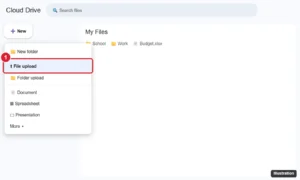
Cloud storage web page with the New menu open and File upload highlighted for uploading a word processor document

How to Save a Word Document to Google Drive

November 15, 2026July 5, 2024 by Kermit Matthews

Save a Word document to Google Drive by uploading it in your browser or saving from Word with Google Drive for desktop, then keep it as .docx or convert it. Continue Reading How to Save a Word Document to Google Drive

Categories Google, Word
Word style Layout tab with the Breaks menu open and the Text Wrapping break option highlighted, beside a document showing line break and paragraph marks

How to Insert a Line Break in Word (Shift+Enter and More)

November 13, 2026July 5, 2024 by Kermit Matthews

Insert a line break in Word with Shift+Enter or Layout > Breaks, learn how it differs from page and section breaks, and remove line breaks with ^l. Continue Reading How to Insert a Line Break in Word (Shift+Enter and More)

Categories Word
Word for Mac Find and Replace pane with the Replace field and Replace All button highlighted

How to Find and Replace in Word on a Mac

November 13, 2026July 5, 2024 by Kermit Matthews

Find and replace in Word for Mac with Control + H or Edit > Find > Replace, use advanced options, and replace formatting or special characters. Continue Reading How to Find and Replace in Word on a Mac

Categories Word
Define New Bullet dialog with the Font button highlighted and a Font dialog showing the font color set to blue

How to Change Bullet Color in Word

November 16, 2026July 5, 2024 by Kermit Matthews

Change bullet color in Word without changing the text using Define New Bullet, recolor a single bullet, or set colors for every level in a multilevel list. Continue Reading How to Change Bullet Color in Word

Categories Word
Word Picture Format Crop menu with Crop to Shape open and the Oval shape highlighted

How to Crop a Picture into a Circle in Word

November 12, 2026July 5, 2024 by Kermit Matthews

Crop a picture into a perfect circle in Word with Aspect Ratio 1:1 and Crop to Shape, adjust the photo, add a border, or use a circle shape. Continue Reading How to Crop a Picture into a Circle in Word

Categories Word
Word Find and Replace dialog with ^m in the Find what box and the Replace All button highlighted

How to Remove All Page Breaks in Word

November 17, 2026July 5, 2024 by Kermit Matthews

Press Ctrl + H, type ^m in Find what, leave Replace with empty, and click Replace All. How to remove section breaks and fix paragraph break settings too. Continue Reading How to Remove All Page Breaks in Word

Categories Word
Word document with a text box rotated upside down and the Shape Format Rotate menu with More Rotation Options highlighted

How to Flip Text Upside Down in Word

November 13, 2026July 5, 2024 by Kermit Matthews

Flip text upside down in Word by rotating a text box 180 degrees, make mirror text with 3-D Rotation, and create folded place cards with upside-down names. Continue Reading How to Flip Text Upside Down in Word

Categories Word
Font dialog with Times New Roman selected and the Set As Default button

How to Set Times New Roman as the Default Font in Word

November 17, 2026July 5, 2024 by Kermit Matthews

Make Times New Roman the default font in Word: press Ctrl + D, pick the font and size, click Set As Default and apply it to the Normal template. Continue Reading How to Set Times New Roman as the Default Font in Word

Categories Word

How to Insert a Caption in Word (Desktop, Mac and Web)

November 14, 2026July 5, 2024 by Kermit Matthews

Learn how to easily insert captions in Microsoft Word with our step-by-step guide. Enhance your document’s clarity and professionalism. Continue Reading How to Insert a Caption in Word (Desktop, Mac and Web)

Categories Word
Word processor Picture Format tab with the Rotate menu open showing Rotate Right 90, Rotate Left 90, Flip Vertical, Flip Horizontal and More Rotation Options, highlighted

How to Rotate an Image in Word (and Flip It)

November 12, 2026July 5, 2024 by Kermit Matthews

Rotate an image in Word with the rotation handle, 90-degree Rotate and Flip options, or an exact angle, and fix pictures that will not rotate. Continue Reading How to Rotate an Image in Word (and Flip It)

Categories Word

How to Insert a Checkbox in Word (Clickable and Printable)

November 10, 2026July 5, 2024 by Kermit Matthews

Learn how to easily insert checkboxes in Word documents with our comprehensive step-by-step guide, perfect for users of all levels. Continue Reading How to Insert a Checkbox in Word (Clickable and Printable)

Categories Word
Microsoft Word Review tab with the Delete comment menu open and Delete All Comments in Document highlighted

How to Delete All Comments in Word at Once

November 15, 2026July 5, 2024 by Kermit Matthews

Remove all comments in Word at once with Delete All Comments in Document, delete one reviewer’s comments, and clean up hidden info before sharing. Continue Reading How to Delete All Comments in Word at Once

Categories Word
Word File Account page with Update Options open and Update Now highlighted

How to Update Microsoft Word on a Laptop

November 10, 2026July 5, 2024 by Kermit Matthews

Update Microsoft Word on a laptop from File > Account > Update Options > Update Now, or Help > Check for Updates on a Mac, and fix missing updates. Continue Reading How to Update Microsoft Word on a Laptop

Categories Word
Word Options Proofing page with the Check spelling as you type option and the Hide spelling errors in this document only option highlighted

How to Remove Red Lines in Word (Spelling Underlines and Track Changes)

November 17, 2026July 5, 2024 by Kermit Matthews

Remove the red squiggly lines in Word by fixing or ignoring words, hiding spelling errors in one document, skipping text, or turning off spell check. Continue Reading How to Remove Red Lines in Word (Spelling Underlines and Track Changes)

Categories Word
Word document with Show/Hide turned on and the paragraph mark between two tables highlighted

How to Combine Two Tables in Word

November 10, 2026July 5, 2024 by Kermit Matthews

Combine two tables in Word by deleting the paragraph mark between them, matching columns, or dragging tables together. Plus fixes when they won’t merge. Continue Reading How to Combine Two Tables in Word

Categories Word

How to Resolve Comments in Word

November 15, 2026July 5, 2024 by Kermit Matthews

Learn to resolve comments in Word with this step-by-step guide. Streamline your editing process and keep your documents clutter-free effortlessly. Continue Reading How to Resolve Comments in Word

Categories Word

How to Insert Background in Word: A Step-by-Step Guide to Customize Your Documents

November 12, 2026July 5, 2024 by Kermit Matthews

Learn how to insert a background in Word with our step-by-step guide. Customize your documents effortlessly and add a professional touch in minutes! Continue Reading How to Insert Background in Word: A Step-by-Step Guide to Customize Your Documents

Categories Word

How to Make Custom-Size Labels in Word

November 17, 2026July 5, 2024 by Kermit Matthews

Make labels in Word when your sheet isn’t listed: measure margins and pitch, enter them in New Label, test on plain paper and reuse the custom size later. Continue Reading How to Make Custom-Size Labels in Word

Categories Word
Word document showing an equation typed with the hash number syntax and the resulting right-aligned equation number

How to Number Equations in Word

November 14, 2026July 3, 2024 by Kermit Matthews

Number equations in Word by typing #(1) after an equation and pressing Enter, or use Insert Caption for automatic numbers. Plus cross-references. Continue Reading How to Number Equations in Word

Categories Word
Save As dialog with the document template (.dotx) file type chosen

How to Save a Word Document as a Template

November 17, 2026July 3, 2024 by Kermit Matthews

Save a Word document as a template with File > Save As > Word Template (.dotx), then start new files from File > New > Personal. Continue Reading How to Save a Word Document as a Template

Categories Word

How to Insert an Em Dash in Word

November 10, 2026July 3, 2024 by Kermit Matthews

Learn how to effortlessly insert an em dash in Word with our simple guide. Enhance your typing skills and streamline your documents with this essential tip. Continue Reading How to Insert an Em Dash in Word

Categories Word
Word Borders and Shading dialog on the Shading tab with a light fill color chosen and Apply to set to Paragraph highlighted

How to Apply Paragraph Shading in Word

November 14, 2026July 3, 2024 by Kermit Matthews

Apply paragraph shading in Word with the Shading button or Borders and Shading, shade the whole paragraph instead of just text, and remove shading. Continue Reading How to Apply Paragraph Shading in Word

Categories Word
Word document with labels and colons aligned using a tab stop, and the Tabs dialog with a left tab stop set

How to Align Colons in Word (Tab Stops or a Table)

November 12, 2026July 3, 2024 by Kermit Matthews

Line up colons in Word with a left tab stop or a borderless table instead of spaces. Step-by-step instructions, variations, and fixes for lines that won’t align. Continue Reading How to Align Colons in Word (Tab Stops or a Table)

Categories Word
Word Layout dialog on the Position tab with Move object with text unchecked and Lock anchor checked highlighted

How to Lock an Image in Word (Position and Protection)

November 13, 2026July 3, 2024 by Kermit Matthews

Lock an image in Word so it stays in place with Fix position on page and Lock anchor, or protect it from edits with Restrict Editing or a content control. Continue Reading How to Lock an Image in Word (Position and Protection)

Categories Word

How to Convert a Word Document to JPEG (Windows and Mac)

November 17, 2026July 3, 2024 by Kermit Matthews

Learn how to convert a Word document to JPEG effortlessly with our step-by-step guide. Perfect for sharing, printing, or archiving your docs. Continue Reading How to Convert a Word Document to JPEG (Windows and Mac)

Categories Word
Word style document with an underlined word, a writing assistant suggestion card offering a correction, and the assistant widget button in the corner highlighted

How to Enable Grammarly in Word (Windows, Mac, and Web)

November 10, 2026July 3, 2024 by Kermit Matthews

Enable Grammarly in Microsoft Word with the Grammarly desktop app or the Word add-in, turn it on or off, and fix Grammarly not showing in Word. Continue Reading How to Enable Grammarly in Word (Windows, Mac, and Web)

Categories Word
Online design editor Share panel on the Download screen with File type set to PDF Standard and the Download button highlighted

How to Convert a Canva Design to a Word Document

November 16, 2026July 3, 2024 by Kermit Matthews

Convert a Canva design to an editable Word document by downloading a PDF and opening it in Word, plus Google Docs and image-based alternatives. Continue Reading How to Convert a Canva Design to a Word Document

Categories Word

How to Change Indents in Word (Left, Right, First Line and Hanging)

November 16, 2026July 3, 2024 by Kermit Matthews

Learn how to easily change indents in Word with our step-by-step guide. Perfect for beginners looking to format their documents like a pro! Continue Reading How to Change Indents in Word (Left, Right, First Line and Hanging)

Categories Word

Fit Everything on One Page in Word: Shrink, Margins, Spacing

November 17, 2026July 3, 2024 by Kermit Matthews

Learn how to fit all your content on a single page in Word with these essential tips and tricks, from adjusting margins to tweaking font sizes and optimizing layouts. Continue Reading Fit Everything on One Page in Word: Shrink, Margins, Spacing

Categories Word
Word processor Language dialog listing languages with English (United States) selected and the Do not check spelling or grammar checkbox highlighted

How to Turn Off Proofing in Word (and Turn It Back On)

November 10, 2026July 3, 2024 by Kermit Matthews

Turn off proofing in Word for selected text, one document, or all documents, turn spelling and grammar checks back on, and fix proofing that stopped working. Continue Reading How to Turn Off Proofing in Word (and Turn It Back On)

Categories Word

How to Make a Running Header in Word (Including APA 7 Rules)

November 10, 2026July 3, 2024 by Kermit Matthews

Make a running header in Word: add header text, page numbers, a different first page, and section-specific headers. Includes current APA 7 rules. Continue Reading How to Make a Running Header in Word (Including APA 7 Rules)

Categories Word
Word processor Home tab with the Superscript button highlighted and an exponent selected in the document

How to Write Exponents in Word (5 Easy Methods)

November 14, 2026July 3, 2024 by Kermit Matthews

Write exponents in Word with the Ctrl + Shift + = superscript shortcut, the Superscript button, the equation editor, or symbols. Windows and Mac. Continue Reading How to Write Exponents in Word (5 Easy Methods)

Categories Word
Word document showing a DISPLAYBARCODE field code and the QR code it produces

How to Create a QR Code in Word (Built-In Field, Add-ins, and More)

November 10, 2026July 3, 2024 by Kermit Matthews

Create a QR code in Microsoft Word with the built-in DISPLAYBARCODE field, an add-in, or an image, with sizing tips and fixes for codes that won’t scan. Continue Reading How to Create a QR Code in Word (Built-In Field, Add-ins, and More)

Categories Word

How to Split a Page in Half in Word

November 17, 2026July 2, 2024 by Kermit Matthews

Split a Word page in half with two columns, a 1×2 table, top and bottom halves, or 2 pages per sheet. Plus how View, Split differs. Continue Reading How to Split a Page in Half in Word

Categories Word
Word processor title bar with the AutoSave switch turned off and the document saved to this PC

How to Turn Off AutoSave in Word

November 10, 2026July 2, 2024 by Kermit Matthews

Turn off AutoSave in Word for one document or by default, stop new files from saving to OneDrive, and keep AutoRecover as a backup. Continue Reading How to Turn Off AutoSave in Word

Categories Word
Word Home tab Line and Paragraph Spacing menu with 1.0 and Remove Space After Paragraph highlighted

How to Remove Space Between Lines and Paragraphs in Word

November 17, 2026July 2, 2024 by Kermit Matthews

Remove space between lines in Word with single line spacing, Remove Space After Paragraph, the Paragraph dialog, or No Paragraph Space for the whole document. Continue Reading How to Remove Space Between Lines and Paragraphs in Word

Categories Word
Language dialog with English (United Kingdom) selected and the Set As Default button

How to Change Word to UK English

November 12, 2026July 2, 2024 by Kermit Matthews

Change Word to UK English with Review > Language > Set Proofing Language > English (United Kingdom), then Set As Default and set it in Options. Continue Reading How to Change Word to UK English

Categories Word
Word processor with the header open for editing and the Header and Footer tab showing Header from Top set to 0.3 inches, highlighted, above a compact one-line header

How to Make a Header Smaller in Word

November 14, 2026July 2, 2024 by Kermit Matthews

Make a Word header smaller: lower Header from Top, delete blank lines, set spacing to 0 pt, shrink text and logos, then reduce the top margin. Continue Reading How to Make a Header Smaller in Word

Categories Word
List right-click menu with Continue Numbering highlighted

How to Continue Numbering in Word

November 16, 2026July 2, 2024 by Kermit Matthews

Continue a numbered list in Word by right-clicking the number and choosing Continue Numbering, or set any value with Set Numbering Value. Continue Reading How to Continue Numbering in Word

Categories Word

How to Add Superscript in Word (and Subscript)

November 14, 2026July 2, 2024 by Kermit Matthews

Learn how to easily add superscripts in Word with this simple step-by-step guide, perfect for enhancing your documents with mathematical notations and references. Continue Reading How to Add Superscript in Word (and Subscript)

Categories Word
Word Symbol dialog on the Special Characters tab with the Section symbol selected and the Insert button highlighted

How to Divide a Word Document Into Sections

November 17, 2026July 2, 2024 by Kermit Matthews

Create sections in Word with section breaks from Layout > Breaks, choose the right break, give sections their own headers and page numbers, and remove breaks. Continue Reading How to Divide a Word Document Into Sections

Categories Word
Shape Format tab with the Group menu open and Group highlighted

How to Group Objects in Word

November 10, 2026July 2, 2024 by Kermit Matthews

Group shapes, text boxes and pictures in Word: select them with Shift or Ctrl, then choose Shape Format, Group, Group. Includes fixes when Group is greyed out. Continue Reading How to Group Objects in Word

Categories Word
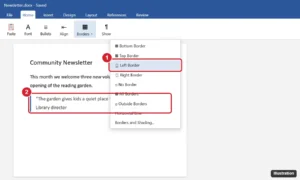
Word processor Home tab Borders menu open with Left Border highlighted, and a paragraph showing a vertical line along its left edge

How to Insert a Vertical Line in Word (5 Easy Ways)

November 13, 2026July 2, 2024 by Kermit Matthews

Insert a vertical line in Word with a paragraph border, a line shape, a line between columns, a table border, or a bar tab, and remove stray lines. Continue Reading How to Insert a Vertical Line in Word (5 Easy Ways)

Categories Word
Older posts
Newer posts
← Previous Page1 … Page4 Page5 Page6 … Page8 Next →

Join Our Free Newsletter

Featured guides and deals

You may opt out at any time.
Read our Privacy Policy

Live2Tech

Plain-English, step-by-step guides for the devices and apps you use every day.

Apple

  • iPhone
  • iPad
  • Mac
  • Apple Watch

Windows

  • Windows 11
  • Windows 10

Microsoft Office

  • Word
  • Excel
  • Powerpoint
  • Outlook

Google

  • Google Docs
  • Google Sheets
  • Google Slides
  • Gmail
  • Chrome
  • Google Drive
  • About Us
  • Contact
  • Disclaimer
  • Privacy Policy
© Live2Tech.com 2026
  • iPhone
  • Windows
    • Windows 11
    • Windows 10
  • Office
    • Word
    • Excel
    • Powerpoint
    • Outlook
  • Google
    • Google Docs
    • Google Sheets
    • Google Slides
    • Gmail
    • Chrome
    • Google Drive
  • Mac & Apple
    • Mac
    • iPad
    • Apple Watch
  • All Tutorials