Skip to content
Live2Tech
  • iPhone
  • Windows
    • Windows 11
    • Windows 10
  • Office
    • Word
    • Excel
    • Powerpoint
    • Outlook
  • Google
    • Google Docs
    • Google Sheets
    • Google Slides
    • Gmail
    • Chrome
    • Google Drive
  • Mac & Apple
    • Mac
    • iPad
    • Apple Watch
  • All Tutorials

Word

How-to guides and tutorials to help you perform specific tasks and use the Microsoft Word word-processing application.

Find and Replace dialog replacing double paragraph marks with a single one

How to Delete Blank Lines in Word

November 17, 2026July 11, 2024 by Kermit Matthews

Delete blank lines in Word with Find and Replace: replace ^p^p with ^p, use ^l for line breaks, or a wildcard to remove runs of empty lines. Continue Reading How to Delete Blank Lines in Word

Categories Word
Page Setup dialog Layout tab with Vertical alignment set to Center for this section

How to Center a Title Page in Word

November 17, 2026July 11, 2024 by Kermit Matthews

Center a Word title page: add a Next Page section break, then Page Setup > Layout > Vertical alignment: Center for this section, and Ctrl + E. Continue Reading How to Center a Title Page in Word

Categories Word
Word processor Object dialog on the Create from File tab with a presentation file selected and the Link to file and Display as icon options, highlighted

How to Insert PowerPoint Into Word (4 Methods)

November 10, 2026July 11, 2024 by Kermit Matthews

Insert PowerPoint into Word by embedding the whole presentation, pasting a single slide, adding slides as pictures, or creating handouts with notes. Continue Reading How to Insert PowerPoint Into Word (4 Methods)

Categories Powerpoint, Word
Table Layout tab with the Distribute Columns button highlighted and a selected table below

How to Make All Columns the Same Width in Word

November 17, 2026July 11, 2024 by Kermit Matthews

Make all columns the same width in Word with Distribute Columns, set an exact width, stop AutoFit from resizing, and even out text columns in Layout. Continue Reading How to Make All Columns the Same Width in Word

Categories Word
Word Options dialog on the Advanced page with Show text predictions while typing highlighted

How to Turn Off Predictive Text in Word (Text Predictions)

November 10, 2026July 11, 2024 by Kermit Matthews

Turn off predictive text in Word by unchecking Show text predictions while typing in Options or the status bar. Steps for Windows, Mac, and web. Continue Reading How to Turn Off Predictive Text in Word (Text Predictions)

Categories Word
Word document using check box content controls for a multiple-selection list, with the Developer tab check box control button highlighted

How to Create a Drop-Down List in Word with Multiple Selections

November 14, 2026July 11, 2024 by Kermit Matthews

Word drop-down lists allow one choice only. Learn to build multiple-selection lists in Word with check boxes, a combo box, or a simple VBA macro. Continue Reading How to Create a Drop-Down List in Word with Multiple Selections

Categories Word
Word processor Account screen with the Office Theme dropdown open and theme options highlighted

How to Change the Theme in Word (Light Mode, Dark Mode, and Document Themes)

November 10, 2026July 11, 2024 by Kermit Matthews

Change the theme in Word: switch between light and dark mode with Office Theme, or change your document fonts and colors with Design themes. Continue Reading How to Change the Theme in Word (Light Mode, Dark Mode, and Document Themes)

Categories Word
Word style document showing field codes in braces for the date, page number, and table of contents after pressing Alt+F9, with a keyboard shortcut callout highlighted

How to Display Field Codes in Word (Alt+F9 and More)

November 10, 2026July 11, 2024 by Kermit Matthews

Display field codes in Word with Alt+F9 or Shift+F9, show them permanently in Options, read common codes like PAGE and TOC, and edit or update fields. Continue Reading How to Display Field Codes in Word (Alt+F9 and More)

Categories Word
Word processor Mailings tab with Address Block inserted in the first label of a label sheet and the Update Labels button highlighted, next to Preview Results and Finish and Merge

How to Mail Merge Avery Labels in Word (From an Excel List)

November 17, 2026July 11, 2024 by Kermit Matthews

Mail merge Avery labels in Word: Mailings > Start Mail Merge > Labels, pick the Avery product, connect Excel, add Address Block, Update Labels. Continue Reading How to Mail Merge Avery Labels in Word (From an Excel List)

Categories Word
Word processor Table Properties dialog on the Table tab with Center alignment selected

How to Align Tables in Word

November 17, 2026July 11, 2024 by Kermit Matthews

Center or align a whole table in Word with Table Properties or Ctrl + E, and align text inside cells with the table Layout tab alignment buttons. Continue Reading How to Align Tables in Word

Categories Word
Word processor Tabs dialog with a decimal tab stop at 5 inches selected and highlighted, beside a list of prices lined up on their decimal points

How to Align Numbers in Word

November 12, 2026July 11, 2024 by Kermit Matthews

Align numbers in Word with a decimal tab stop, right or decimal alignment in tables, and Adjust List Indents for numbered lists. Continue Reading How to Align Numbers in Word

Categories Word

How to Show the Navigation Pane in Word

November 14, 2026July 11, 2024 by Kermit Matthews

Learn how to easily display the Navigation Pane in Microsoft Word with our step-by-step guide, and enhance your document navigation and editing experience. Continue Reading How to Show the Navigation Pane in Word

Categories Word
Layout dialog on the Size tab with Height and Width scale set to 180 percent and Lock aspect ratio checked

How to Resize a Picture to 180% in Word

November 10, 2026July 10, 2024 by Kermit Matthews

Resize a picture to exactly 180% in Word using the Scale boxes in the Layout dialog, keep the aspect ratio, and fix pictures that are too big. Continue Reading How to Resize a Picture to 180% in Word

Categories Word
Format Text Effects dialog on the Text Fill and Outline tab with Gradient fill selected and highlighted, showing gradient stops, beside a heading filled with a blue-to-purple gradient

How to Apply Fill to Text in Word (Solid and Gradient)

November 10, 2026July 10, 2024 by Kermit Matthews

Apply text fill in Word: select text, press Ctrl + D, click Text Effects, then choose Solid or Gradient fill under Text Fill. Plus outlines. Continue Reading How to Apply Fill to Text in Word (Solid and Gradient)

Categories Word

How to Apply a Template to an Existing Word Document

November 17, 2026July 10, 2024 by Kermit Matthews

Learn how to easily apply a template to your existing Word document with our step-by-step guide. Enhance your document’s appearance in just minutes! Continue Reading How to Apply a Template to an Existing Word Document

Categories Word
Word processor Picture Format tab with the Align menu open showing Align Left, Align Center, Align Right, Align Top, Align Middle, Align Bottom and Align Selected Objects

How to Align Pictures in Word (In Line, Floating and Side by Side)

November 13, 2026July 10, 2024 by Kermit Matthews

Align pictures in Word with the Home alignment buttons, the Picture Format Align menu for floating images, tables for side-by-side layouts, and exact positions. Continue Reading How to Align Pictures in Word (In Line, Floating and Side by Side)

Categories Word
Word Compare Documents dialog with Original document and Revised document fields highlighted

How to Run a Redline Comparison in Word

November 13, 2026July 10, 2024 by Kermit Matthews

Run a redline comparison in Word with Review > Compare to see every difference between two versions as tracked changes, then save or share it. Continue Reading How to Run a Redline Comparison in Word

Categories Word

How to Type the Delta Symbol in Word

November 12, 2026July 10, 2024 by Kermit Matthews

Learn how to effortlessly insert the Delta symbol in Microsoft Word with our simple step-by-step guide. Enhance your documents with this essential mathematical symbol. Continue Reading How to Type the Delta Symbol in Word

Categories Word

How to Convert LaTeX to Word (Pandoc, Equations and Online Tools)

November 10, 2026July 10, 2024 by Kermit Matthews

Discover how to effortlessly convert LaTeX documents to Word format with our step-by-step guide, ensuring a smooth and efficient transition for all your projects. Continue Reading How to Convert LaTeX to Word (Pandoc, Equations and Online Tools)

Categories Word
Word processor Tabs dialog with several tab stop positions listed, Right alignment and a dot leader selected

How to Set Multiple Tabs in Word (Ruler and Tabs Dialog)

November 14, 2026July 10, 2024 by Kermit Matthews

Set multiple tab stops in Word with the ruler or Tabs dialog, choose left, center, right or decimal tabs, add dot leaders, and clear or move tabs. Continue Reading How to Set Multiple Tabs in Word (Ruler and Tabs Dialog)

Categories Word

How to Use Microsoft Word on iPad (Including Free Options)

November 10, 2026July 10, 2024 by Kermit Matthews

Learn how to navigate Microsoft Word on your iPad with ease. This guide covers essential features, tips, and tricks for beginners to get started efficiently. Continue Reading How to Use Microsoft Word on iPad (Including Free Options)

Categories Word

How to Change Bullet Size in Word (Without Changing the Text)

November 16, 2026July 10, 2024 by Kermit Matthews

Learn how to effortlessly change bullet sizes in Word with our step-by-step guide. Follow these simple instructions to customize your document’s look. Continue Reading How to Change Bullet Size in Word (Without Changing the Text)

Categories Word
Run dialog with the winword /safe command to open the word processor in Safe Mode

How to Open Word in Safe Mode

November 15, 2026July 9, 2024 by Kermit Matthews

Start Word in Safe Mode by holding Ctrl or running winword /safe, then find the add-in causing crashes and repair Office if needed. Continue Reading How to Open Word in Safe Mode

Categories Word
Word Home tab with the Center alignment button in the Paragraph group highlighted and centered title text

How to Center Align in Word (Text, Pages, Pictures, and Tables)

November 15, 2026July 9, 2024 by Kermit Matthews

Center text in Word with Ctrl + E or the Center button, center text vertically on a page, and center pictures, tables, and table cell text. Continue Reading How to Center Align in Word (Text, Pages, Pictures, and Tables)

Categories Word
Word processor with a misspelled word underlined in red and a grammar issue underlined in blue, and the Editor pane listing Spelling and Grammar corrections

How to Check Spelling and Grammar in Word (Windows, Mac, Web)

November 15, 2026July 9, 2024 by Kermit Matthews

Check spelling and grammar in Microsoft Word with F7 or the Editor pane, understand the underlines, customize proofing, and fix a spell check that stopped. Continue Reading How to Check Spelling and Grammar in Word (Windows, Mac, Web)

Categories Word

How to Insert Symbols and Special Characters in Word

November 14, 2026July 9, 2024 by Kermit Matthews

Learn how to easily insert symbols in Word with our step-by-step guide designed for beginners. Enhance your documents with special characters effortlessly! Continue Reading How to Insert Symbols and Special Characters in Word
Categories Word
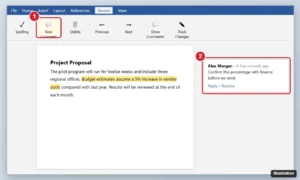
Word processor Review tab with New Comment highlighted and a comment note shown in the right margin beside the highlighted text

How to Add Notes on the Side of a Word Document

November 10, 2026July 9, 2024 by Kermit Matthews

Add side notes in Word with comments (Ctrl+Alt+M), footnotes, margin text boxes or ink. Reply, resolve, hide, print or delete notes in any Word version. Continue Reading How to Add Notes on the Side of a Word Document

Categories Word
Word processor Header and Footer tab with Link to Previous highlighted and a header area showing company name and page number

How to Copy a Header and Footer in Word (4 Ways)

November 12, 2026July 9, 2024 by Kermit Matthews

Copy a header and footer in Word by pasting its contents, saving it to the Header Gallery, linking sections, or using a template. Keep logos and page numbers. Continue Reading How to Copy a Header and Footer in Word (4 Ways)

Categories Word
Word processor Print screen with the Print All Pages drop-down open, Print Markup checked and highlighted, and a preview showing comment balloons in the margin

How to Print Comments in Word

November 15, 2026July 9, 2024 by Kermit Matthews

Print comments in Word: File > Print, open the first drop-down and check Print Markup, or choose List of Markup to print only the comments. Continue Reading How to Print Comments in Word

Categories Word
Word Options Advanced page with the Show measurements in units of list set to Centimeters in the Display section

How to Change Inches to Centimeters in Word

November 10, 2026July 9, 2024 by Kermit Matthews

Change Word from inches to centimeters in File > Options > Advanced > Display, set it on Mac, or type cm after any value to enter metric sizes. Continue Reading How to Change Inches to Centimeters in Word

Categories Word
Word processor File Info screen with the Properties panel and editable Title, Tags and Author fields

How to Change Document Properties in Word

November 10, 2026July 9, 2024 by Kermit Matthews

Change Word document properties in File > Info: edit Title, Tags and Author, use Advanced Properties for custom fields, and Inspect Document before sharing. Continue Reading How to Change Document Properties in Word

Categories Word
Office document window showing Product Activation Failed in the title bar and the Account page with Activate Product highlighted

How to Fix “Product Activation Failed” in Microsoft Word (7 Fixes)

November 15, 2026July 9, 2024 by Kermit Matthews

Fix “Product Activation Failed” in Word: sign in with the right account, check your subscription, remove extra Office copies, repair Office, and more. Continue Reading How to Fix “Product Activation Failed” in Microsoft Word (7 Fixes)

Categories Word

How to Insert Text in Word

November 10, 2026July 9, 2024 by Kermit Matthews

Learn how to insert text in Word easily with our beginner-friendly, step-by-step guide. Master the basics and enhance your document creation skills. Continue Reading How to Insert Text in Word

Categories Word
Field dialog with FileName selected and the Add path to filename option checked

How to Insert the File Path in Word

November 10, 2026July 9, 2024 by Kermit Matthews

Insert a document file path in Word with the FileName field and Add path to filename, and update it with F9 after moving the file. Continue Reading How to Insert the File Path in Word

Categories Word
Word processor mail merge letter with field codes shown and a date format switch added to the MERGEFIELD for the date

How to Change the Date Format in a Word Mail Merge

November 10, 2026July 9, 2024 by Kermit Matthews

Fix date formats in a Word mail merge with a field switch such as MMMM d, yyyy, format currency and numbers, or convert dates to text in Excel. Continue Reading How to Change the Date Format in a Word Mail Merge

Categories Word

How to Replace a Word With Another Word in Microsoft Word

November 15, 2026July 9, 2024 by Kermit Matthews

Change one word to another throughout a Word document with Find and Replace (Ctrl+H), plus Match case, whole words, wildcards, Mac and web steps. Continue Reading How to Replace a Word With Another Word in Microsoft Word

Categories Word

How to Copy a Table From a PDF to Word (4 Ways That Keep the Columns)

November 17, 2026July 9, 2024 by Kermit Matthews

Learn how to seamlessly copy a table from a PDF to Word with our detailed step-by-step guide. Simplify your workflow and enhance productivity. Continue Reading How to Copy a Table From a PDF to Word (4 Ways That Keep the Columns)

Categories Word
Word processor bibliography field selected with the Update Citations and Bibliography button on its tab

How to Update a Bibliography in Word

November 10, 2026July 9, 2024 by Kermit Matthews

Update a bibliography in Word: click it and choose Update Citations and Bibliography or press F9. Edit sources in Manage Sources and change style. Continue Reading How to Update a Bibliography in Word

Categories Word
Word processor Home tab with the highlight colour menu open and No Color selected over pasted text

How to Remove Background Color in Word After Pasting Text

November 13, 2026July 9, 2024 by Kermit Matthews

Remove background colour from pasted text in Word: set Highlight to No Color, then Shading to No Color, or clear formatting. Paste as Keep Text Only. Continue Reading How to Remove Background Color in Word After Pasting Text
Categories Word
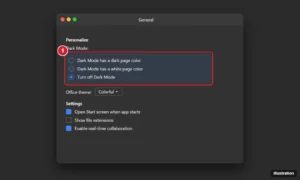
Mac word processor General settings with the Personalize section showing options to turn off dark mode and set a white page color

How to Use Dark Mode in Word on a Mac

November 14, 2026July 9, 2024 by Kermit Matthews

Turn on dark mode in Word for Mac through macOS Appearance, then choose a dark or white page or turn it off in Word > Settings > General. Continue Reading How to Use Dark Mode in Word on a Mac

Categories Mac, Word
Word Options Advanced page with the Use CTRL + Click to follow hyperlink checkbox cleared and highlighted

Fix a Shared Word Link That Others Can’t Open

November 17, 2026July 9, 2024 by Kermit Matthews

When someone can’t open a Word document you shared, match their message to the cause: link audience, view-only permission, moved files, expiry or a password. Continue Reading Fix a Shared Word Link That Others Can’t Open

Categories Word
iPad screen with two app windows and the window control buttons for Close, Minimize and full screen at the top-left of one window

How to Insert Pages From Another Document in Word

November 11, 2026July 9, 2024 by Kermit Matthews

Insert another document into Word with Insert, Object, Text from File, or copy a single page across. Includes tips for keeping formatting. Continue Reading How to Insert Pages From Another Document in Word

Categories Word
Word processor Review tab with the Track Changes button turned on and highlighted, All Markup selected, and a document showing inserted text underlined and deleted text struck through

Track Changes in Word, Then Accept or Reject Each Edit

November 15, 2026July 8, 2024 by Kermit Matthews

Track changes in Word: Review > Track Changes (Ctrl + Shift + E). Plus markup views, accepting and rejecting, locking, comparing and history. Continue Reading Track Changes in Word, Then Accept or Reject Each Edit

Categories Word

How to Move Paragraphs in Word

November 10, 2026July 8, 2024 by Kermit Matthews

Learn how to effortlessly rearrange your document with our step-by-step guide on moving paragraphs in Word. Achieve smoother and more efficient editing today! Continue Reading How to Move Paragraphs in Word

Categories Word

How to Put a Line Over a Letter in Word

November 10, 2026July 8, 2024 by Kermit Matthews

Learn how to put a line over a letter in Word with these easy steps. Enhance your document formatting skills effortlessly with our simple guide! Continue Reading How to Put a Line Over a Letter in Word

Categories Word
Word processor AutoCorrect dialog AutoFormat As You Type tab with Automatic numbered lists unchecked

How to Fix Numbering in Word: Restart, Continue or Set the Value

November 16, 2026July 8, 2024 by Kermit Matthews

Fix numbering in Word: right-click a number to Restart at 1, Continue Numbering or Set Numbering Value, and fix list levels, indents and fonts. Continue Reading How to Fix Numbering in Word: Restart, Continue or Set the Value

Categories Word
Home ribbon Font group with the Strikethrough button highlighted and crossed-out text in the document

How to Cross Out a Word (Strikethrough) in Any App

November 16, 2026July 8, 2024 by Kermit Matthews

Cross out text with strikethrough in Word, Google Docs, Excel, Sheets and chat apps, with the button or shortcut for each. Continue Reading How to Cross Out a Word (Strikethrough) in Any App

Categories Word

How to Edit a Table in Word: Rows, Columns, Cells and Styles

November 17, 2026July 8, 2024 by Kermit Matthews

Learn how to effortlessly edit tables in Word with our beginner-friendly guide. Follow these easy steps to format, resize, and customize your tables. Continue Reading How to Edit a Table in Word: Rows, Columns, Cells and Styles

Categories Word

How to Insert an Equation in Word (5 Ways)

November 14, 2026July 8, 2024 by Kermit Matthews

Learn how to easily insert equations in Microsoft Word with our step-by-step guide, perfect for beginners looking to enhance their documents. Continue Reading How to Insert an Equation in Word (5 Ways)

Categories Word
Word processor Symbol dialog with the Latin-1 Supplement subset shown, the Middle Dot character selected and character code 00B7 highlighted

How to Put a Dot Between Words in Word (· and •)

November 10, 2026July 8, 2024 by Kermit Matthews

Put a middle dot or bullet between words in Word with Alt + X codes, Alt codes, Insert Symbol, or AutoCorrect, and hide the dots Word shows for spaces. Continue Reading How to Put a Dot Between Words in Word (· and •)

Categories Word
Older posts
Newer posts
← Previous Page1 … Page3 Page4 Page5 … Page8 Next →

Join Our Free Newsletter

Featured guides and deals

You may opt out at any time.
Read our Privacy Policy

Live2Tech

Plain-English, step-by-step guides for the devices and apps you use every day.

Apple

  • iPhone
  • iPad
  • Mac
  • Apple Watch

Windows

  • Windows 11
  • Windows 10

Microsoft Office

  • Word
  • Excel
  • Powerpoint
  • Outlook

Google

  • Google Docs
  • Google Sheets
  • Google Slides
  • Gmail
  • Chrome
  • Google Drive
  • About Us
  • Contact
  • Disclaimer
  • Privacy Policy
© Live2Tech.com 2026
  • iPhone
  • Windows
    • Windows 11
    • Windows 10
  • Office
    • Word
    • Excel
    • Powerpoint
    • Outlook
  • Google
    • Google Docs
    • Google Sheets
    • Google Slides
    • Gmail
    • Chrome
    • Google Drive
  • Mac & Apple
    • Mac
    • iPad
    • Apple Watch
  • All Tutorials