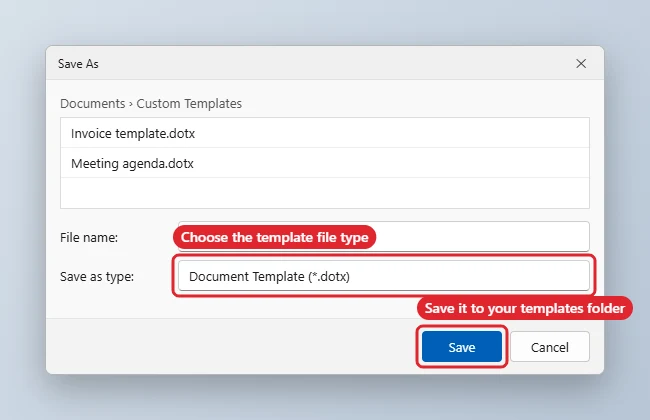
To save a Word document as a template, go to File > Save As, choose a location, and set Save as type to Word Template (*.dotx), or Word Macro-Enabled Template (*.dotm) if it contains macros. Word suggests the Custom Office Templates folder in Documents, and templates saved there appear under File > New > Personal.
Quick Answer
File > Save As > Browse > Save as type: Word Template (*.dotx) > Save. Then open File > New > Personal to start new documents from it.
Steps to Create a Template
- Build the document: styles, headers and footers, logo, margins and any placeholder text.
- Remove anything specific to one use, such as names or dates.
- Choose File > Save As > Browse (or press F12).
- In Save as type, pick Word Template (*.dotx). Word switches to the Custom Office Templates folder.
- Name the template and click Save.
Use the Template
- Go to File > New.
- Click Personal (or Custom in some versions).
- Pick your template. Word opens a new, untitled document based on it, so the template itself stays unchanged.
Template File Types
| Type | Extension | Use when |
|---|---|---|
| Word Template | .dotx | Most templates |
| Word Macro-Enabled Template | .dotm | The template includes macros |
| Word 97-2003 Template | .dot | Only for very old versions of Word |
Troubleshooting
- Personal tab is missing: Set a folder in File > Options > Save > Default personal templates location, and save templates there.
- Editing the template itself: Right-click it in File Explorer and choose Open, rather than double-clicking, which creates a new document.
- Want a different default font or layout instead? See changing the default font.
- Adding a branded header: See custom headers and footers.
Related: Apply a template to an existing Word document.
Related: How to edit a resume in Word.
Related: Create a user manual in Word.
Related: Make a certificate in Word.
A memo is a good first template to build, and setting up a memo layout in Word shows the heading table worth saving.
Frequently Asked Questions
What’s the difference between .docx and .dotx?
Opening a .docx edits that file. Opening a .dotx from File > New creates a new document, leaving the template untouched.
Can I share a template?
Yes. Send the .dotx file; the recipient saves it in their own templates folder.
Does this work on a Mac?
Yes. Choose File > Save as Template, and find it later under File > New from Template.
Summary
- Set up the document the way you want every copy to start.
- Save As with the type Word Template (*.dotx).
- Keep it in the Custom Office Templates folder.
- Start new files from File > New > Personal.

Kermit Matthews runs Live2Tech from just outside Philadelphia. He is an IT specialist with over 20 years of experience, from a university help desk to small-business IT, IT management and his own consulting practice, and has written tech guides full time since 2020. Steps are checked against the current software on a real device or the maker’s official documentation. More about Kermit.