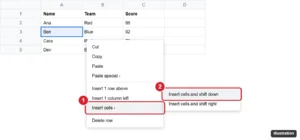
How to Move Cells in Google Sheets Without Overwriting Data
Move cells in Google Sheets without overwriting data by inserting cells and shifting down or right, then cutting and pasting, or by dragging whole rows.
How-to guides and tutorials to help you perform specific tasks and use applications and devices made by Google.
Move cells in Google Sheets without overwriting data by inserting cells and shifting down or right, then cutting and pasting, or by dragging whole rows.
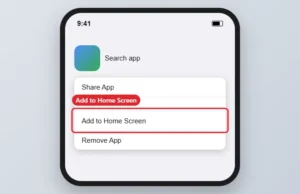
Add the Google app to your iPhone or Android home screen from the App Library or app drawer, or add the Google search widget on Android.
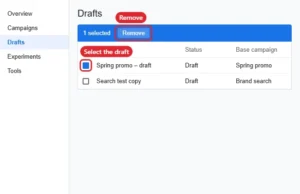
Delete Google Ads draft campaigns from the Drafts or Campaigns page with Remove, or discard them from the Overview page.
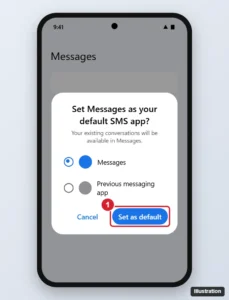
Samsung Messages ended in the US in July 2026. Switch to Google Messages and your texts transfer automatically. Here is how, plus RCS and backup tips.
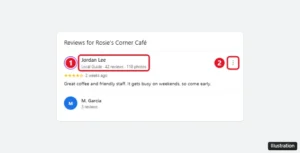
See who left a Google review by checking the reviewer’s name and public profile. Google never shares emails or phone numbers. How to report fake reviews too.
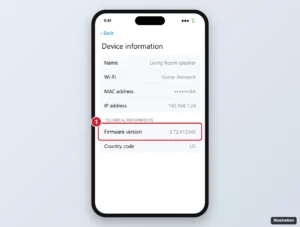
Google Nest devices update automatically. Check the firmware version in the Google Home app, prompt an update with a restart, and fix a Nest that won’t update.
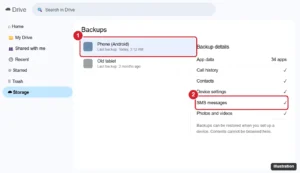
You cannot read SMS backups in Google Drive, but you can confirm they exist, restore them to a phone, or create a readable text backup. Here is how.
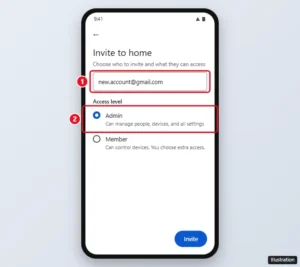
Move a Google Home to another Google Account by inviting it as an Admin, accepting, and leaving with the old account. Plus what you need to set up again.

Get your Google Fi port-out account number and transfer PIN from Manage plan, give them to your new carrier, and avoid canceling first.
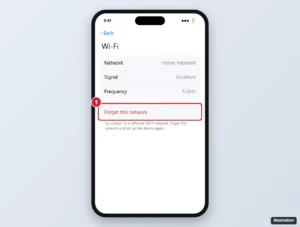
Connect a Chromecast to Wi-Fi with the Google Home app, change networks on Google TV and older models, and fix a Chromecast that will not connect.
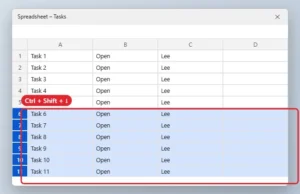
Select every row below a point in Google Sheets with Ctrl + Shift + Down Arrow or Shift-click, then delete, hide, or format them at once.

Insert a page break in Google Docs with Insert, Break, Page break or Ctrl+Enter, and fix a greyed-out option in Pageless documents.
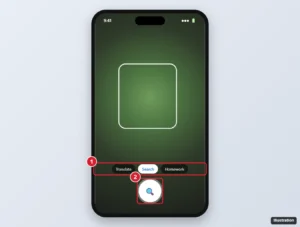
Use Google Lens on Android, iPhone, and computers to identify objects, translate text, copy text, get homework help, and shop, plus tips for better results.
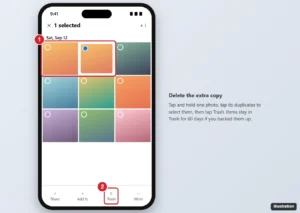
Google Photos has no one-tap duplicate remover. Here is how to find and delete duplicates on phone or computer, why they happen, and how to prevent them.
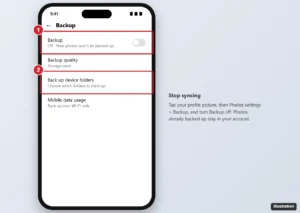
In Google Photos, tap your profile > Photos settings > Backup and turn Backup off. How to skip folders, pause backup, and stop syncing from a computer.
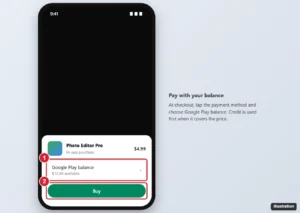
At checkout in Google Play, choose Google Play balance as the payment method. How to check your balance, pay for subscriptions, and what it can’t buy.
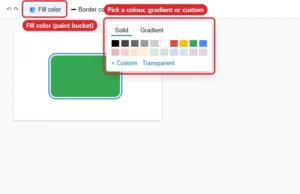
Change a shape colour in Google Slides with Fill color, set exact hex codes, gradients or transparency, and change the outline with Border color.
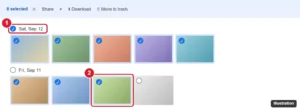
Select many photos at once in Google Photos with Shift-click, date checkmarks, or long-press and drag in the app, plus how to download or delete all.
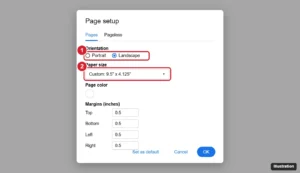
Print an envelope in Google Docs by setting the page to envelope size, positioning addresses, and printing with the right settings, or use an add-on.
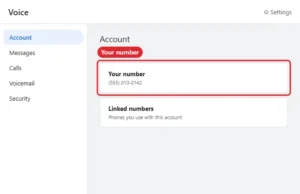
Find your Google Voice number on the web, Android or iPhone, tell it apart from linked numbers, and reclaim a number that was removed or deleted.
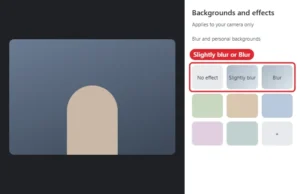
Blur your background in Google Meet before or during a call with Apply visual effects, on computer or phone.
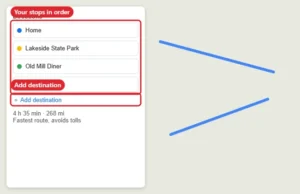
Plan a road trip in Google Maps: add stops, reorder them, avoid tolls or highways, save places to lists and download offline maps.
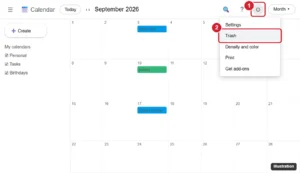
See deleted events on Google Calendar in the Trash, restore them within 30 days, and learn what to do when an event is missing or you are on mobile.
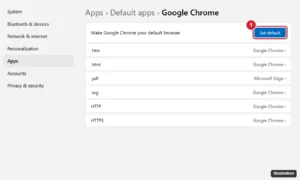
Install Chrome on Windows 11: open Edge, go to google.com/chrome, download and run the installer, then set Chrome as default in Settings > Apps.
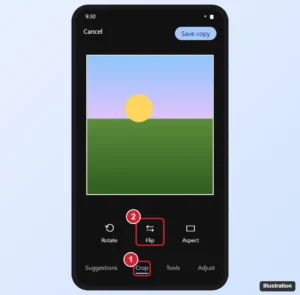
Flip a photo in Google Photos on Android: Edit > Crop > Flip. Plus workarounds for iPhone and computers, how to rotate, and fixing mirrored selfies.
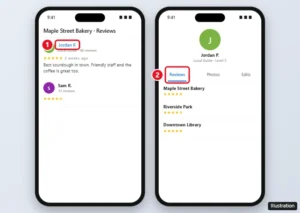
Find all of someone’s Google reviews by opening their Google Maps profile from any review, see your own reviews, and learn why some profiles are hidden.

Search flexible dates on Google Flights with the price calendar, Date grid, Price graph, Explore, and price tracking to find the cheapest days to fly.
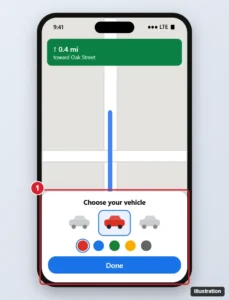
Customize Google Messages with themes, wallpaper-matched bubble colors, chat backgrounds, notification sounds, swipe actions and RCS chat features.
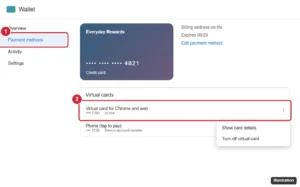
See what card numbers Google Pay and Google Wallet show, view a full virtual card number on the web, and where to find your physical card number.

See estimated toll prices on Google Maps before you drive, add your toll pass for more accurate prices, and avoid tolls on Android and iPhone.
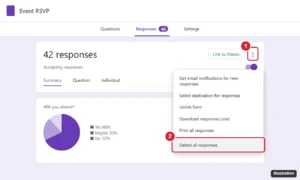
Delete one response or all responses in Google Forms, clean up the linked Google Sheet, back up answers first, and reset a form to use it again.
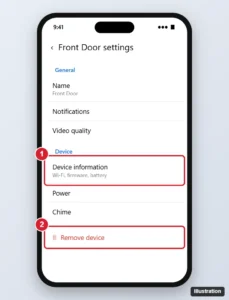
Reset a Google Nest Doorbell by removing it from the Google Home app and holding the reset button, then set it up again. Covers common models.
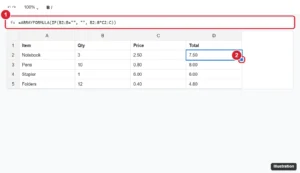
Apply a formula to an entire column in Google Sheets with the fill handle, ARRAYFORMULA, Ctrl+Enter, or Ctrl+D, and fix #REF! and fill problems.
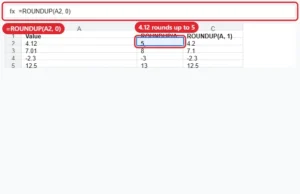
Round up in Google Sheets with ROUNDUP(value, places), or CEILING for multiples. Examples for decimals, tens, negatives and quantities.
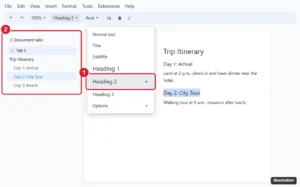
Add a heading to the Google Docs outline: select text and choose Heading 1, 2 or 3 from the style menu, then open View > Show tabs & outlines.
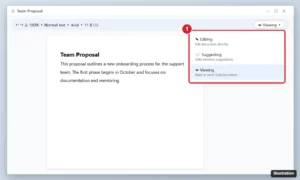
Hide comments in Google Docs with Viewing mode, resolve them, share a clean copy, or print and export without them. Steps for computer and mobile.
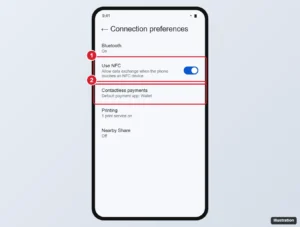
Turn off Google Pay tap-to-pay on Android by disabling NFC, changing the default payment app, removing cards from Google Wallet, or uninstalling it.
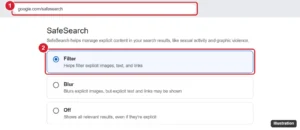
Block explicit Google searches with SafeSearch, lock it with Family Link, enforce it on your network, and block specific sites or suggestions.

Add Google Photos to Facebook by sharing from the phone app, downloading and uploading on a computer, or posting a Google Photos link.
Find saved places on Google Maps in the You tab on your phone or the Saved menu on a computer, and learn to organize lists, share them, and fix missing saves.
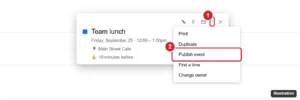
Share a Google Calendar event link with Options > Publish event, or invite guests instead. Learn the difference and how to share from your phone.
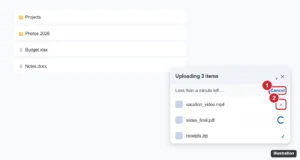
Cancel a Google Drive upload from the upload panel on the web, in the Drive app, or in Drive for desktop, and delete any files that already uploaded.
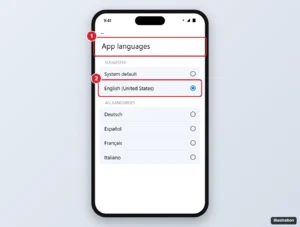
Change the language of Google weather notifications by changing the Google app’s language on Android or iPhone, plus fixes, units, and notification settings.
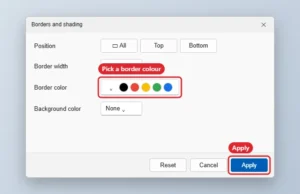
Change border colour in Google Docs: Borders and shading for paragraphs, the Border color button for tables and images, plus a one-cell table page border.
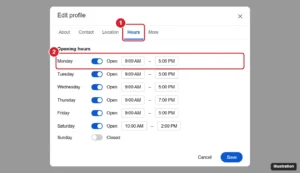
Update your business hours on Google from Search or the Maps app, add holiday and special hours, and fix hours that won’t show up.
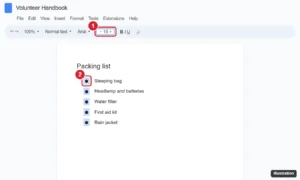
Change bullet point size in Google Docs without changing your text: click a bullet to select them all, resize, and adjust color, style, and spacing.
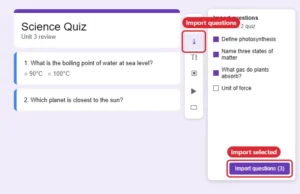
Import questions from another Google Form with the Import questions button, and see options for bringing in questions from Docs, Word, or Sheets.
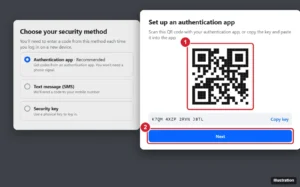
Set up Google Authenticator for Facebook: Accounts Center > Password and security > Two-factor authentication > Authentication app, then scan.
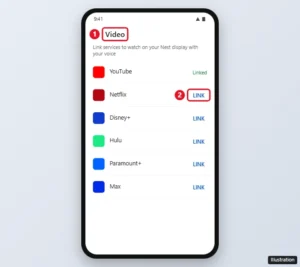
Google Nest Hub has no app store, but you can link Netflix, Disney+, Spotify, and more in the Google Home app, or cast from your phone. Here is how.
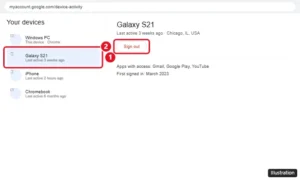
Remove a device from your Google Account on a computer, Android, or iPhone, secure your account if a phone is lost, and remove devices that won’t sign out.