Cached copies of pages are no longer something Google Search shows, so the old Cached link and the cache: search no longer work. What Google offers now is background on a source through its About this result panel, not a stored copy of the page, so for an older version of a page the practical replacement is the Internet Archive’s Wayback Machine.
What Google says happened to cached pages
Google’s cached pages were copies of web pages saved when Google crawled them, reachable from a Cached link in the results or by searching cache: plus an address. Google retired both, and its own Search Central documentation updates record the end in two entries:
- September 24, 2024: “The cache: search operator no longer works in Google Search.”
- October 2, 2024: “The cached link feature is no longer available in Google Search results.”
Google’s current search operators page lists only filetype:, imagesize:, site: and src:, with no cache:. Anything that relied on Google’s stored copies has nothing current to show.
Pick the replacement that fits what you need
People reached for the cache for several different reasons, and each now has a different answer.
| What you need | Use this now |
|---|---|
| An older version of a page that changed or disappeared | Wayback Machine captures from earlier dates |
| A page that won’t load right now | The most recent Wayback Machine capture, then try the live site again later |
| A record of what a page said on a given date | A Wayback capture (its address carries the date and time), or Save Page Now before the page changes |
| How Google sees a page on your own site | URL Inspection in Search Console |
| Background on an unfamiliar website | About this result in Google Search |
Look up an older copy in the Wayback Machine
The Internet Archive’s Wayback Machine help describes the lookup this way: enter a domain or URL and press the Browse History button. The steps below follow it.
- Open web.archive.org in any browser, on a computer or a phone.
- Type or paste the page address, such as example.com/pricing, into the search box at the top and run the search.
- Pick a highlighted date in the calendar of captures, and choose a capture time if more than one is listed; the archived copy opens.
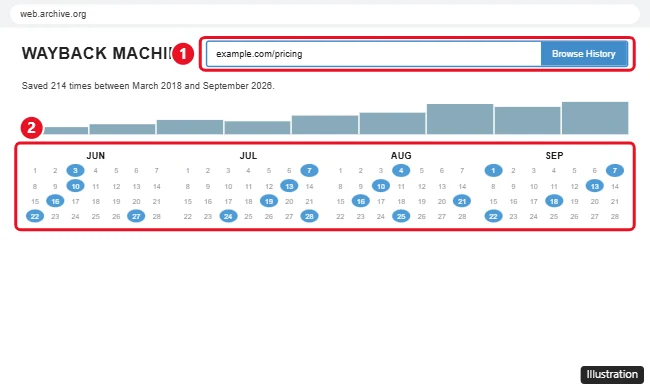
The dot colors tell you what the archive’s crawler got back, which saves clicks:
- Blue: a good capture (a 2nn result code from the web server).
- Green: a redirect (3nn), so the capture may send you to a different address.
- Orange: a client error (4nn), such as a page that was missing at the time.
- Red: a server error (5nn), when the site itself was failing.
The long number in an archived address is the capture time, written as yyyymmddhhmmss, so 20000229123340 means February 29, 2000, at 12:33:40. To list every capture for a whole site, the help page gives the pattern web.archive.org/*/www.example.com/* with your own domain in place of the example.
Save a page now so you can see it later
If the page you care about is still live, capture it before it changes. On the web.archive.org home page, find Save Page Now, enter the address and click the SAVE PAGE button. The Internet Archive describes it as a way to “save a specific page one time,” and its help adds two limits worth planning around:
- It does not add the address to future crawls, so later changes are captured only if you, or the archive’s regular crawlers, save it again.
- It saves one page, not a list of pages, a folder or a whole site.
When the Wayback Machine has no copy
An empty calendar doesn’t mean you typed the address wrong. The Internet Archive’s help lists the usual reasons a page isn’t there:
- The crawlers didn’t know the page existed when they crawled, which often happens with pages that nothing links to.
- The page was password protected, blocked by the site’s robots.txt file, or otherwise out of reach.
- The site owner asked to have the site excluded.
Try a shorter address too, such as the site’s home page or the section the page lived in, since a parent page may have been captured even when the exact page wasn’t.
Learn about a source from a Google result
Google’s help page Learn more about a web page describes the About this result panel. After the URL for a search result, select More, and the panel shows whatever Google has, such as when the source was first seen, the Wikipedia description of the source and a generated description. Google notes that “This feature is only available in some regions.” The panel is useful for judging an unfamiliar site, but Google’s help doesn’t describe it as a way to see an old copy of a page, so use the Wayback Machine for that.
Check what Google stored for your own site
Site owners used the cache to see what Googlebot picked up. The replacement is the URL Inspection tool in Search Console, documented on Google’s URL Inspection tool help.
- Open Search Console and select the property the page belongs to; the URL must be in the property you have open.
- Type the full URL into the inspection search bar at the top of any Search Console screen.
- Select View crawled page to see the raw HTML Google got, the HTTP headers, JavaScript console output and the page resources it loaded. Google offers this only when the status is “URL is on Google” or “URL is on Google, but has issues.”
- For a picture of the page, select Test live URL, then View tested page. Google says a screenshot of the rendered page is available only in a live test.
The crawled page shows what Google last fetched, while the live test shows what Google would get today, so compare the two when you are checking whether a fix has been seen. If a page matters to you, save it in the Wayback Machine as well, so you have an outside record of it on the dates you care about.
Google cache answers
Does any form of the cache: search still work?
No. Google’s own update says the operator no longer works in Google Search. Operators Google does document still help you find pages, such as searching a specific website on Google with site:, searching for PDFs on Google with filetype:, and excluding words from a Google search with a minus sign.
Why does an archived page look broken?
Some pages depend on scripts that fetch content from the original server while you browse. The Internet Archive’s help explains that if JavaScript needs to contact the originating server in order to work, it will fail when archived, so menus, comments or images loaded that way can be missing from the copy.
Can I still get a cached copy from an extension or viewer site?
Not from Google. Google no longer provides cached copies, so a tool that promises Google’s cache has nothing current to show you. Be careful with any site or extension that asks for permissions in exchange for “cached” pages, and use the Wayback Machine instead.

Kermit Matthews runs Live2Tech from just outside Philadelphia. He is an IT specialist with over 20 years of experience, from a university help desk to small-business IT, IT management and his own consulting practice, and has written tech guides full time since 2020. Steps are checked against the current software on a real device or the maker’s official documentation. More about Kermit.