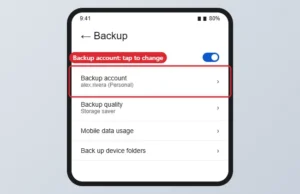
How to Change Your Google Photos Backup Account
Switch the Google Photos backup account in Photos settings > Backup, and learn what happens to photos already backed up. Continue Reading How to Change Your Google Photos Backup Account
 Kermit Matthews
Switch the Google Photos backup account in Photos settings > Backup, and learn what happens to photos already backed up. Continue Reading How to Change Your Google Photos Backup Account
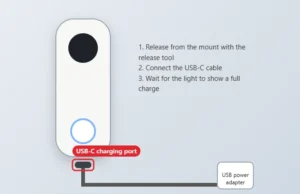
Charge a Nest Doorbell (battery): release it with the tool, charge indoors over USB-C, then remount. Battery life estimates and fixes included. Continue Reading How to Charge a Google Nest Doorbell (Battery)
Open Google Snake, learn the controls and settings, and use edge-hugging and zig-zag coiling strategies to raise your score and fill the board. Continue Reading How to Beat Google Snake: Tips for Higher Scores
Looking to narrow down your search to a specific site? Check out our step-by-step guide on using Google’s site search feature for precise results. Continue Reading How to Search a Specific Website on Google
Learn how to easily find elevation on Google Maps with our step-by-step guide. Never be caught off guard by steep inclines again! Continue Reading How to Find Elevation on Google Maps
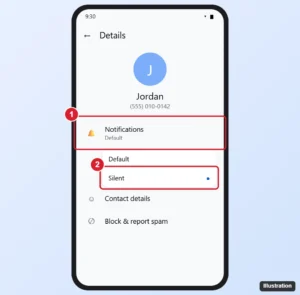
Mute a chat in Google Messages: press and hold it, tap More > Mute, or set it to Silent in Details. Plus how to unmute and mute group chats. Continue Reading How to Mute a Conversation in Google Messages
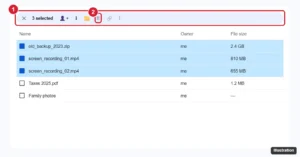
Delete multiple files in Google Drive at once with Ctrl, Shift, or Select all, find large and old files to remove, empty the trash, and restore mistakes. Continue Reading How to Delete Multiple Files in Google Drive
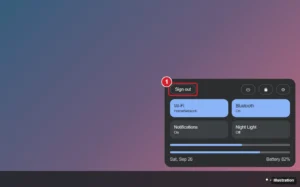
Sign out of a Chromebook from Quick Settings or with Ctrl + Shift + Q, remove an extra Google account, or remove a user from the sign-in screen. Continue Reading How to Sign Out of Your Google Account on a Chromebook

Use Google Pay on iPhone to pay online at checkout. Learn why tap-to-pay in stores needs Apple Pay and what Google Pay offers in your country. Continue Reading How to Use Google Pay on iPhone (What Works and What Doesn’t)
Learn how to make calls to your Google Home from your phone with this easy step-by-step guide. Stay connected with your smart home, anytime, anywhere. Continue Reading How to Call Your Google Home or Nest Speaker From Your Phone
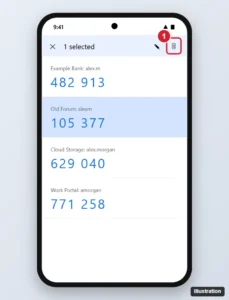
Remove an account from Google Authenticator on Android or iPhone without getting locked out: turn off 2FA first, then delete the code, plus recovery tips. Continue Reading How to Remove an Account From Google Authenticator
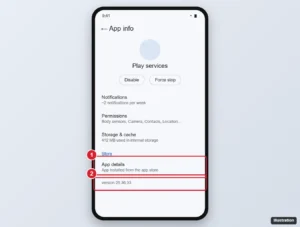
Update Google Play services from Android Settings, keep the Play Store and apps updating, find the Google Play system update, and fix updates that fail. Continue Reading How to Update Google Play Services
Struggling to locate a file in Google Drive? Our guide breaks down the steps to find the file path quickly and easily. Read on for tips! Continue Reading How to Find a File Path in Google Drive

Install a Google Nest Doorbell with the Google Home app: mount, wire (16-24 V AC for wired models) and connect to Wi-Fi. Continue Reading How to Install a Google Nest Doorbell

See which photos are backed up to Google Photos on the web or in the app, check backup status, and fix photos that are not backing up. Continue Reading How to See Backed-Up Photos in Google Photos
Missed a meeting? Don’t worry, access Google Meet recordings with ease. Follow our step-by-step guide to never miss a moment. Continue Reading How to Find and Access Google Meet Recordings
Add some flair to your presentations with our top tips for decorating Google Slides. From custom backgrounds to animations, we’ve got you covered! Continue Reading How to Decorate Google Slides (Themes, Backgrounds, Images and Fonts)
Learn how to easily add a vertical line to your Google Docs with this step-by-step guide. Perfect for organizing text and creating sections! Continue Reading How to Add a Vertical Line in Google Docs: 5 Easy Methods
Lost access to your old phone? No worries! Follow our step-by-step guide to easily recover your Google account without it. Continue Reading How to Recover a Google Account Without Your Old Phone
Discover the easy steps to earn Google Play Points and unlock exclusive rewards. Follow our guide and start earning points today! Continue Reading How to Get Google Play Points (and Use Them)
Clear your Facebook watch history from the Activity log on iPhone, Android, or a computer, remove single videos, and fix a missing clear button. Continue Reading How to Clear Your Facebook Watch History
Discover the key differences between earbuds and AirPods, and find out which one is the right fit for your listening needs. Continue Reading Earbuds vs. AirPods: What Is the Difference?
Ensure your Apple products are genuine with our guide to verification. Protect yourself from counterfeit goods and get peace of mind. Continue Reading How to Verify an Apple Product Is Genuine
Get the most out of your Airpods with these optimal Spotify Equalizer settings. Enhance your listening experience and enjoy every beat! Continue Reading Best Spotify Equalizer Settings for AirPods
Turn off double tap on iPhone: disable Back Tap, VoiceOver, Zoom, Reachability or the AssistiveTouch double tap in Settings > Accessibility. Continue Reading How to Turn Off Double Tap on iPhone

Find the microphones on the iPhone 15: bottom edge, near the rear cameras, and at the top front. Learn how to test, clean, and improve mic sound. Continue Reading Where Is the Microphone on the iPhone 15? (All Mic Locations)
Signing out of a Google account can be confusing. Follow our step-by-step guide to easily sign out of one account without affecting others. Continue Reading How to Sign Out of One Google Account
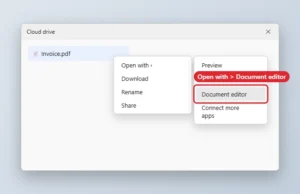
Open a PDF in Google Docs by uploading it to Drive and choosing Open with, Google Docs. Formatting may shift on complex PDFs. Continue Reading How to Open a PDF in Google Docs
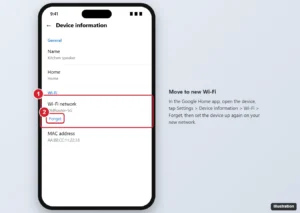
In the Google Home app, open the device, go to Settings > Device information > Wi-Fi > Forget, then set it up again on the new network. Plus a shortcut. Continue Reading How to Connect Google Home to a New Wi-Fi Network
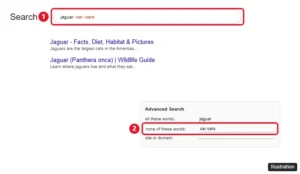
Exclude words from Google results with a minus sign, leave out exact phrases, use the Advanced Search none of these words box and avoid the spacing mistakes. Continue Reading How to Exclude Words From a Google Search
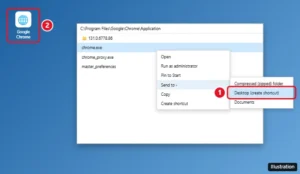
Create a Google Chrome desktop shortcut on Windows 10 or 11 by dragging it from Start or using Send to, and make shortcuts for websites or Chrome profiles. Continue Reading How to Create a Google Chrome Shortcut on Your Desktop
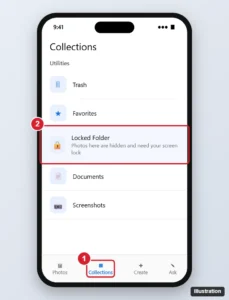
Open Locked Folder in Google Photos on Android, iPhone or a computer, move photos in, turn on Back up Locked Folder and avoid losing items on a new phone. Continue Reading How to Access Locked Folder in Google Photos
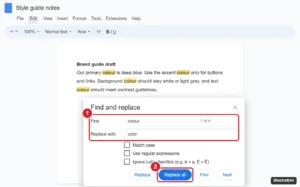
Replace words in Google Docs with Find and replace (Ctrl + H): use Match case, replace whole words with regular expressions, and do it on mobile. Continue Reading How to Replace Words in Google Docs (Find and Replace Guide)
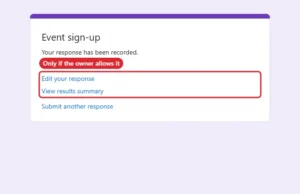
Google Forms has no submission history, but you can still find your answers through email copies, edit links, results summaries or the form owner. Continue Reading How to See Google Forms You Submitted
Learn how to easily transfer your photos from Google Drive to Google Photos with our step-by-step guide. Keep your memories safe and organized! Continue Reading How to Move Photos From Google Drive to Google Photos
Google Drive has no copy-folder button. Here’s how to copy a folder’s files, subfolders and shared drive content in the browser or with Drive for desktop. Continue Reading How to Duplicate a Folder in Google Drive (Copy an Entire Folder)
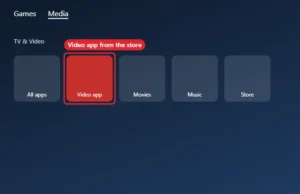
The PS5 has no browser app. Here’s how to use YouTube and other Google options on PS5, what the hidden browser can do, and how parents can block it. Continue Reading Can You Use Google on PS5? (Browser Options Explained)
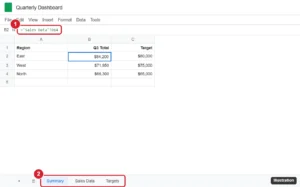
Pull data from another sheet in Google Sheets with cell references, XLOOKUP, FILTER, and QUERY, or from another file with IMPORTRANGE. Continue Reading How to Pull Data From Another Tab or File in Google Sheets
Struggling to connect your Google Nest to WiFi? Follow our easy step-by-step guide to get your smart device up and running in no time. Continue Reading How to Connect Google Nest to WiFi: A Step-by-Step Guide
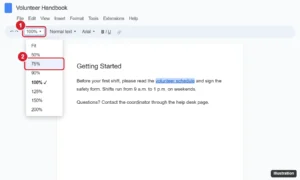
Zoom out or in on Google Docs with the toolbar zoom box, browser shortcuts like Ctrl + minus, or pinch zoom on mobile, plus fixes for zoom problems. Continue Reading How to Zoom In and Out in Google Docs (Computer and Mobile)
Customize your Google Slides with new fonts! Our step-by-step guide shows you how to add and use unique fonts for eye-catching presentations. Continue Reading How to Add Fonts to Google Slides
Want a cleaner home screen? Learn how to easily remove the Google search bar with our simple step-by-step guide. Continue Reading How to Remove the Google Search Bar From Your Home Screen
Keep your memories safe with our easy guide on backing up Google Photos. Follow our step-by-step instructions to protect your precious photos. Continue Reading How to Back Up Google Photos (Phone, Computer and Full Library)
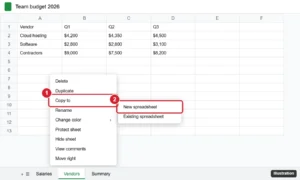
Google Sheets can’t share a single tab, but you can copy it to a new spreadsheet, share a live copy with IMPORTRANGE, or publish one sheet to the web. Continue Reading How to Share Only One Sheet in Google Sheets
Learn how to easily store, organize and share your photos with our step-by-step guide to using Google Photos for beginners. Continue Reading How to Use Google Photos: A Beginner’s Guide
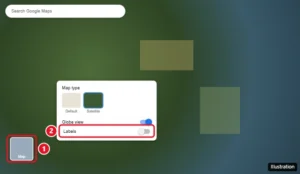
Turn off labels in Google Maps on a computer in Satellite view, plus label-free options in Google Earth and My Maps, and what works on the mobile app. Continue Reading Can You Turn Off Labels in Google Maps?
Closing all tabs on your iPhone 15 can declutter your browser and help your device run more smoothly. It’s a simple process that involves just… Continue Reading How to Close All Tabs on iPhone 15: A Step-by-Step Guide
Learn how to easily draw a radius on Google Maps with this step-by-step guide. Perfect for planning routes, events, or finding nearby locations. Continue Reading How to Draw a Radius on Google Maps (4 Ways)
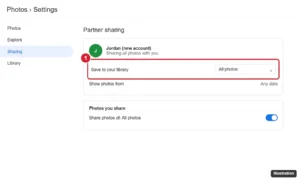
Transfer Google Photos between accounts with partner sharing, Google Takeout, or shared albums, keep original quality, and switch your backup account. Continue Reading How to Transfer Google Photos From One Account to Another
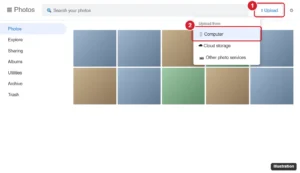
Upload photos to Google Photos with phone backup on Android or iPhone, Import photos or Back up folders on a computer, and check quality, limits and storage. Continue Reading How to Upload Photos to Google Photos