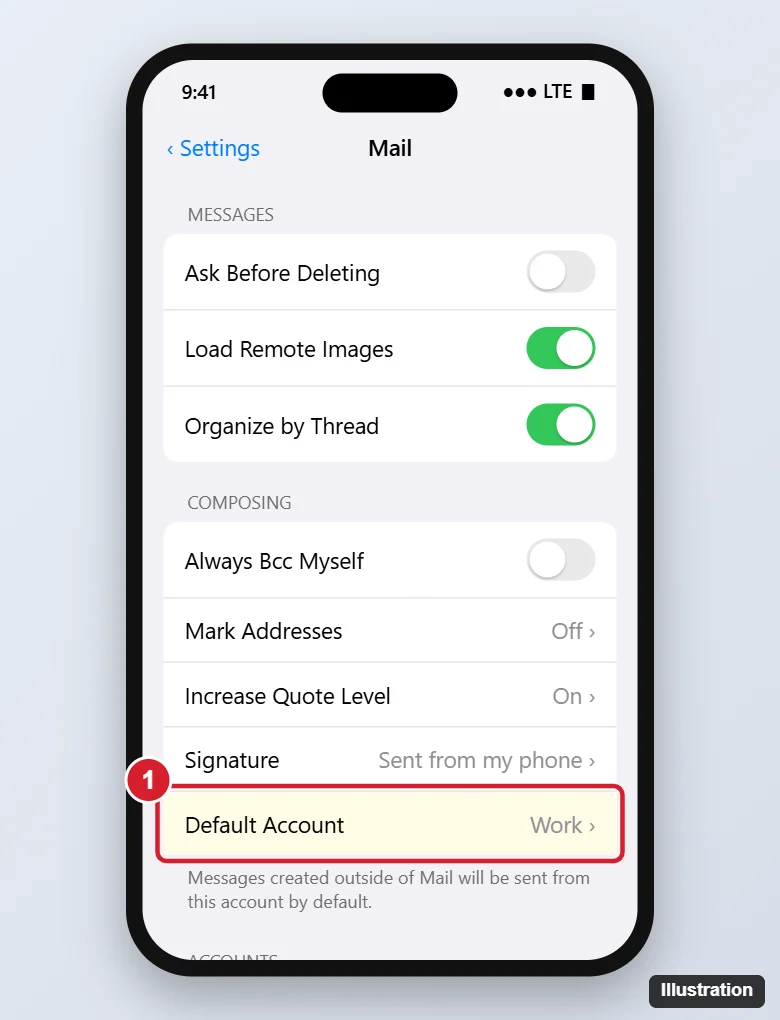
If you have more than one email account on your iPhone 7, the default account is the one used when you share a photo, tap an email link in Safari, or start a message outside the Mail app. To change it, go to Settings > Mail > Default Account and tap the account you want. On iOS 9 and earlier, look in Settings > Mail, Contacts, Calendars. You can also pick a different sender for one message or set another default email app.
With several accounts feeding one inbox, a compact list helps, and here is how to hide email previews so each row shows just the subject.
Change the Default Account in Mail
- Open Settings.
- Tap Mail. (On iOS 18 and later, tap Apps, then Mail. The iPhone 7 tops out at iOS 15, where Mail is in the main Settings list.)
- Scroll to Composing and tap Default Account.
- Tap the account you want. A check mark confirms it.
Default Account only appears when two or more accounts have Mail turned on.
Does the default account affect which inbox I see?
No. Mail still shows all inboxes. It only changes the sender for new messages outside Mail.
Can I change the default calendar too?
Yes, in Settings > Calendar > Default Calendar.
Send One Message From a Different Account
- In Mail, tap the compose icon.
- Tap the Cc/Bcc, From line, then tap From.
- Choose the account from the wheel or list.
When you reply, Mail uses the account the original message was sent to.
Change the Default Email App (iOS 14 and Later)
If you use Gmail, Outlook or another app instead of Mail:
- Install the app and sign in.
- Go to Settings, scroll down, and tap the app’s name.
- Tap Default Mail App and select it.
Email links in Safari and other apps then open in that app. The iPhone 7 supports this from iOS 14.
Add or Turn Off Accounts
- Add: Settings > Mail > Accounts > Add Account.
- Stop using one for mail: tap the account in Accounts and turn off Mail. It won’t appear in Default Account.
- Remove: tap the account and choose Delete Account.
Set Signatures Per Account
In Settings > Mail > Signature, choose Per Account to use a different signature for work and personal addresses.
Default Account Problems and Fixes
| Problem | Fix |
|---|---|
| No Default Account option | Only one account has Mail on; add or enable another |
| Messages still send from the wrong account | Check the From line; replies use the receiving account |
| Links open in Mail instead of Gmail | Set Default Mail App in the Gmail app’s Settings page |
| Account won’t send | Re-enter the password in Accounts, or remove and re-add the account |
Related: set the outgoing mail server on an iPhone.
The same setting can point at a Google calendar once the account is added, as shown in setting Google Calendar as the default calendar on iPhone.

Kermit Matthews runs Live2Tech from just outside Philadelphia. He is an IT specialist with over 20 years of experience, from a university help desk to small-business IT, IT management and his own consulting practice, and has written tech guides full time since 2020. Steps are checked against the current software on a real device or the maker’s official documentation. More about Kermit.