Filming something that only happens once, like a graduation or a wedding toast? The highest video resolution on any iPhone is 4K. What changes from model to model is the frame rate: recent Pro models record 4K at up to 120 fps, most other recent models top out at 4K 60 fps, and older models such as the original iPhone SE stop at 4K 30 fps, and some earlier models, such as the iPhone 6, top out at 1080p. No iPhone offers an 8K setting.
Highest video resolution by iPhone model
The table below uses only figures from Apple’s own tech specs pages. For a model that is not listed, find it on Apple’s iPhone manuals, specs and downloads page, open its tech specs and look under Video Recording.
| Model | Highest standard video | Other notes from Apple’s specs |
|---|---|---|
| iPhone 18 Pro | 4K at 24, 25, 30, 60, 100 or 120 fps (100 and 120 fps on the Fusion Main camera) | Cinematic mode up to 4K 60 fps; ProRes up to 4K 120 fps with external recording; Dual Capture up to 4K 30 fps |
| iPhone 17 Pro and iPhone 17 Pro Max | 4K at 24, 25, 30, 60, 100 or 120 fps (100 and 120 fps on the Fusion Main camera) | Cinematic mode up to 4K 30 fps; ProRes up to 4K 120 fps with external recording |
| iPhone 17 | 4K at 24, 25, 30 or 60 fps | Cinematic mode at 4K 30 fps; slow motion at 1080p 120 or 240 fps |
| iPhone Air | 4K at 24, 25, 30 or 60 fps | Check the specs page for mode limits |
| iPhone 17e | 4K at 24, 25, 30 or 60 fps | No Cinematic or Action mode line in its specs |
| iPhone SE (1st generation) | 4K at 30 fps | 1080p at 30 or 60 fps; 720p at 30 fps |
Two things stand out. First, every model in the table reaches 4K, so the real choice for most people is the frame rate. Second, Apple’s specs list the 100 and 120 fps options for the Fusion Main camera only, so switching to another lens may limit the frame rate.
Not sure which iPhone you have? Apple’s Identify your iPhone model page explains how to tell.
Check or change the resolution your iPhone uses
Apple lets you set a default in Settings and change it on the fly in the Camera app. The full walkthrough, with tips for picking 4K, is in this guide on recording 4K video on iPhone. The short version:
- Open the Settings app.

Older iOS version shown; current screens look different. - Tap Camera. On very old iOS versions this menu was called Photos & Camera.

Older iOS version shown (Photos & Camera); current iOS lists Camera. - Tap Record Video.
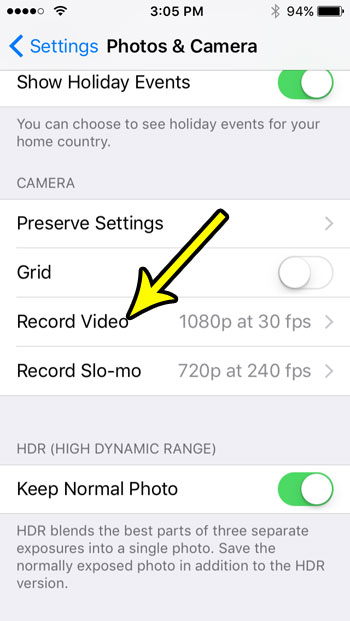
Older iOS version shown; current screens look different. - Pick a format from the list. Only the formats your model supports appear, so the top 4K entry is your phone’s maximum. The screen also shows Apple’s estimate of how much storage a minute of video uses at each setting.

Older iOS version and an iPhone SE shown; newer models list more options.
To switch without leaving the Camera app, choose Video mode and tap the resolution and frame rate values at the top of the screen. That change applies right away, which is useful when you want 4K 60 for the main event and something smaller for the rest of the day.
The list may include entries marked PAL, such as HD (PAL) and 4K (PAL). Those use 25 fps, a frame rate common for TV in many countries outside North America. If you are not editing alongside PAL footage, the regular options are the better fit.
Why your iPhone may offer less than its maximum
Seeing only 1080p, or no 120 fps option, does not always mean the phone cannot do more. Several camera modes have their own lower limits:
- Cinematic mode records at 1080p HD 30 fps by default. You can pick 4K 24 or 4K 30 under Settings > Camera > Record Cinematic, and Apple lists 4K 60 for the iPhone 18 Pro.
- Action mode captures at up to 2.8K, so it never reaches full 4K.
- Slow motion has its own setting at Settings > Camera > Record Slo-mo. Apple lists 1080p HD at 240 fps on the rear camera, and 4K at 120 fps on supported Pro models.
- Spatial video is listed at 1080p 30 fps in the iPhone 18 Pro specs.
If you still cannot find a setting that the table says your model supports, check that your iPhone is on a current version of iOS, then look again in Settings > Camera > Record Video.
What higher settings cost you
Apple notes that faster frame rates and higher resolutions produce larger files. For a once-only event, that trade-off usually favors quality, but plan for it:
- Free up space first. Long 4K clips fill a phone quickly. Check what is using space with these steps to check iPhone storage, and if room is tight, try these ways to free up storage on an iPhone.
- Pick the frame rate for the subject. 4K 24 fps gives a film look and smaller files. 4K 30 fps suits speeches and stage events. 4K 60 fps is smoother for sports, dancing or anything fast. 120 fps is mainly for slowing footage down later.
- Use the on-screen estimate. Rather than trusting third-party megabyte figures, look at the storage estimate Apple shows under Record Video for your exact model.
- Think about where it will play. Many iPhones save video in the space-saving HEVC format. If a Windows PC will not open the files, these steps to play iPhone HEVC videos on Windows can help.
Settings such as HDR Video, Auto FPS, Lock Camera and Enhanced Stabilization also sit under Record Video. They change how the video looks or behaves, not its resolution. Apple explains each one on its page about changing video recording settings.
ProRes: higher quality, same 4K ceiling
Pro models can also record Apple ProRes, a format meant for editing with less compression. It does not raise the resolution above 4K, but it keeps more detail and makes much larger files. Turn it on at Settings > Camera > Formats > Apple ProRes.
According to Apple’s page on recording ProRes video, ProRes records at up to 4K 30 fps on the phone itself. Higher frame rates need compatible external storage: up to 4K 60 fps on iPhone 15 Pro models, and up to 4K 120 fps on iPhone 16 Pro, 17 Pro and 18 Pro models. The 128 GB versions of iPhone 15 Pro and 16 Pro are limited to 1080p 30 fps when recording ProRes internally. ProRes is not available in Cinematic, Time-lapse or Slo-mo.
Video resolution questions
Can an iPhone record 8K video?
No. Apple’s tech specs pages list 4K as the highest video resolution, and the Record Video list stops at 4K.
Is screen recording the same resolution as the camera?
No, screen recording captures what is on the display and has nothing to do with the camera’s Record Video setting. For that task, see how to screen record on iPhone.
Should I record at the maximum for an event?
4K at 30 or 60 fps is a sensible choice for most events: it looks sharp on a large TV and leaves room to crop. Save 120 fps for moments you plan to slow down, and make sure you have plenty of free space before you start.
Will 4K video still look good when I send it to someone?
The original stays in your library at full quality. Some messaging and social apps may compress a clip when you send it, so for important footage it is worth sharing a link or transferring the original video to a PC instead.
Before the big day, record a short test clip at your chosen setting and play it back on the screen you plan to watch it on.

Kermit Matthews runs Live2Tech from just outside Philadelphia. He is an IT specialist with over 20 years of experience, from a university help desk to small-business IT, IT management and his own consulting practice, and has written tech guides full time since 2020. Steps are checked against the current software on a real device or the maker’s official documentation. More about Kermit.