To activate Windows with Command Prompt, open Terminal as an administrator and run slmgr /ipk followed by your 25-character product key, then slmgr /ato. Run slmgr /xpr afterward to confirm that Windows is activated. This works on Windows 11 and Windows 10, but only with a genuine product key that matches your edition.
Command Prompt can’t activate Windows for free. The “CMD activation” commands you’ll find elsewhere that point Windows at a public KMS server or use generic keys aren’t real licenses. They stop working, and some of the tools behind them carry malware. If your PC came with Windows or was upgraded for free, it probably has a digital license and doesn’t need a key at all. See how to activate Windows 11 or Windows 10 for that and every other option.
What you need before you start
- An account with administrator rights on the PC.
- A genuine 25-character product key for the same edition that’s installed. A Windows 11 Home key activates Home, not Pro.
- An internet connection. No internet? Use the offline method further down.
Step 1: Open Terminal or Command Prompt as an administrator
- Right-click the Start button.
- Select Terminal (Admin) on Windows 11, or Windows PowerShell (Admin) on Windows 10. You can also search for cmd, right-click Command Prompt, and choose Run as administrator.
- Select Yes in the User Account Control prompt.
The slmgr commands work the same way in Command Prompt, PowerShell, and Terminal. Each one opens a small Windows Script Host window with the result. Select OK to close it before you run the next command.
Step 2: Check your current activation status
- Type
slmgr /xprand press Enter. The window tells you whether Windows is permanently activated, activated until a date, or not activated. - For more detail, run
slmgr /dli. It shows the edition, the last five characters of the installed key, and the license status.
If /dli shows VOLUME_KMSCLIENT channel on a home PC, an unofficial activator was probably used. Remove the KMS activation first, then come back to Step 3.
Why does slmgr /xpr show an expiration date?
An expiration date means Windows is activated through KMS, which has to renew regularly. Retail and OEM activation is permanent. If you didn’t expect KMS, check whether an activator was used.
Step 3: Install your product key
- Type
slmgr /ipk XXXXX-XXXXX-XXXXX-XXXXX-XXXXX, replacing the Xs with your key, and press Enter. - Wait for the confirmation window. It should say the product key was installed successfully. Select OK.
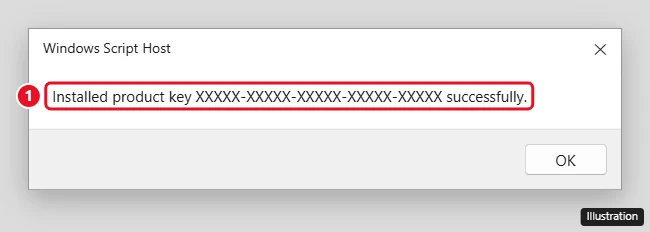
If you get an error instead, the key doesn’t match your edition or isn’t valid. Check the error code in the troubleshooting table below.
Step 4: Activate Windows
- Type
slmgr /atoand press Enter. - Windows contacts Microsoft’s activation servers. After a few seconds, the window should say Product activated successfully. Select OK.
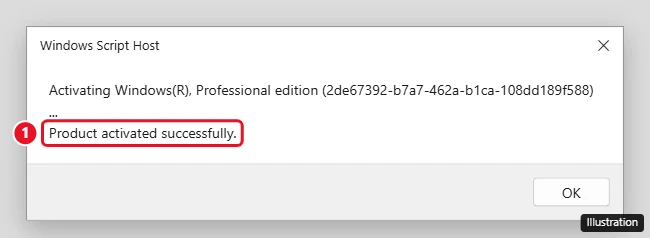
Step 5: Confirm that it worked
- Run
slmgr /xpragain. A retail or OEM key should report that the machine is permanently activated. - You can also check Settings > System > Activation. The Activation state row should say Active.
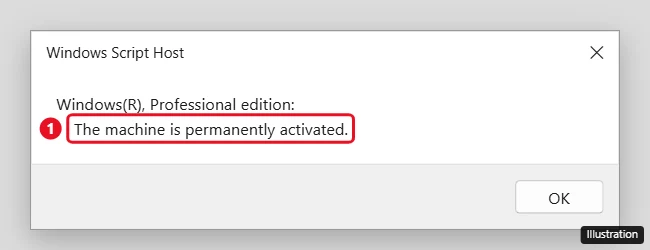
Restart the PC if the Activation page doesn’t update right away.
Find a product key that’s already built into your PC
Many PCs that came with Windows 8 or later have the key stored in the firmware. To read it, open Terminal (Admin) and run this PowerShell command:
(Get-CimInstance -ClassName SoftwareLicensingService).OA3xOriginalProductKey
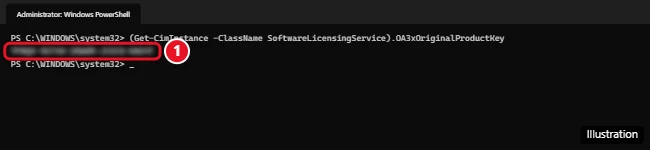
If nothing comes back, the PC doesn’t have an embedded key. That’s normal for PCs that were upgraded or built by hand. Older guides use wmic path softwarelicensingservice get OA3xOriginalProductKey, but Microsoft has deprecated WMIC and replaced it with PowerShell, and it may not be available on newer versions of Windows 11. For other places to look, see how to find your Windows product key.
Activate Windows offline (no internet)
If the PC can’t get online, activate by phone.
- Press Windows key + R, type
slui 4, and press Enter. - Choose your country or region.
- Call the number shown and follow the automated prompts. You’ll read out the installation ID shown on screen.
- Type the confirmation ID you’re given into the boxes, then select Activate.
Prefer the command line? Run slmgr /dti to display the installation ID. When you have the confirmation ID, run slmgr /atp followed by the confirmation ID (no spaces or dashes).
Activation error codes and fixes
| Error | What it means | What to do |
|---|---|---|
| 0xC004F074 | The key is for Windows Enterprise, but Home or Pro is installed. It also appears when a PC set up for KMS can’t reach a KMS server. | Use a key that matches your edition. On a home PC, remove the KMS setup first. |
| 0xC004C003 | The key isn’t valid, often because it’s already been used on other PCs. | Use a key that belongs to this PC, or buy one. |
| 0x803F7001 | No valid license was found for this PC. | Install a genuine key with slmgr /ipk, or buy one from the Microsoft Store. |
| 0xC004F211 | The hardware changed, for example a new motherboard. | Use the Activation troubleshooter in Settings. See reactivating after a hardware change. |
| Access denied | The window wasn’t opened as an administrator. | Close it and reopen Terminal with Run as administrator. |
slmgr command reference
| Command | What it does |
|---|---|
slmgr /xpr |
Shows whether Windows is activated and when activation expires. |
slmgr /dli |
Shows the edition, license status, and last 5 characters of the key. |
slmgr /dlv |
Shows detailed license information. |
slmgr /ipk <key> |
Installs or replaces the product key (admin required). |
slmgr /ato |
Activates Windows online with the installed key. |
slmgr /dti |
Shows the installation ID for offline activation. |
slmgr /atp <ID> |
Activates with a confirmation ID from phone activation. |
slmgr /upk |
Uninstalls the current product key. Windows becomes unlicensed after a restart. |
slmgr /cpky |
Clears the product key from the registry. |
slmgr /ckms |
Removes a KMS server setting and restores the default. |
Avoid slmgr /rearm unless you know you need it. It resets activation timers for system imaging and doesn’t activate Windows.
Is slmgr safe to use?
Yes. slmgr is Microsoft’s built-in Software License Manager script, stored in the Windows System32 folder. It only changes licensing settings, not your files.
Related: Get a Windows 10 license key.
Related: Legitimate ways to get Windows for free.
The Settings page gives a second confirmation, and checking Windows 10 activation status explains every message it can show.
To move a Home PC to Pro instead, follow the Home to Pro upgrade from the Activation page rather than slmgr.
Prefer Settings to a command window? Removing the Activate Windows watermark covers the same activation from the Activation page, plus Microsoft’s error codes.

Kermit Matthews runs Live2Tech from just outside Philadelphia. He is an IT specialist with over 20 years of experience, from a university help desk to small-business IT, IT management and his own consulting practice, and has written tech guides full time since 2020. Steps are checked against the current software on a real device or the maker’s official documentation. More about Kermit.