An “Activate Windows” watermark in the corner of the screen, or a used PC you just bought, are both good reasons to check. In Windows 10, open Settings > Update & Security > Activation and read the Activation line. For a second opinion, type slmgr /xpr in Command Prompt. Neither check needs administrator rights, and both work on Home and Pro.
Check activation in Settings
- Press Windows key + I to open Settings.
- Select Update & Security.
- Select Activation in the left pane.
- Under the Windows heading, read the Activation line. The Edition line above it shows Home, Pro or another edition.
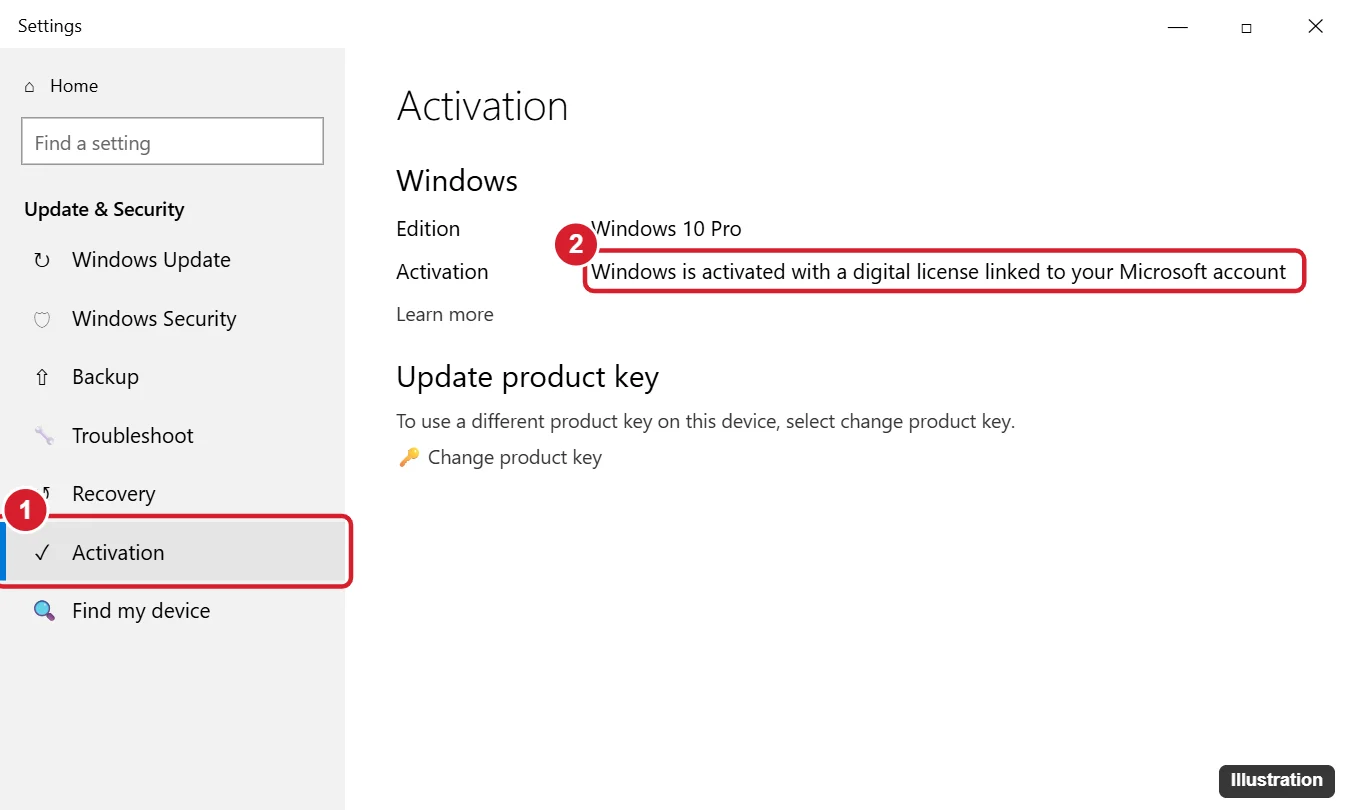
To jump straight there, press Windows key + R, type ms-settings:activation and press Enter.
On Windows 11 the page moved: go to Settings > System > Activation, where the status appears at the top of the page. The messages are the same.
What the activation message means
Microsoft’s Activate Windows page lists these status messages. A digital license (Windows 11 calls it a digital entitlement) is activation stored with Microsoft for your hardware, so there is no key to type in.
| Message | What it means | Do you need to act? |
|---|---|---|
| Windows is activated | Activated with a product key; no Microsoft account linked | No. Linking an account is optional. |
| Windows is activated with a digital license | Activated through a digital license that is not linked to an account | No, but linking helps after hardware changes. |
| Windows is activated with a digital license linked to your Microsoft account | Activated, and the license is tied to your account | No. |
| Windows is not activated | No valid license was found, or the key does not match the edition; an error code appears | Yes. See the fixes below. |
On a work or school PC, the message instead says Windows is activated through the organization, and questions about it go to the IT department.

For a used PC, the deciding line is the last one. An activated status with the edition you paid for means the license came with the machine. A “not activated” status means the seller did not include a valid license, which is worth raising with them before the return window closes.
Check activation with a command
The slmgr (Software License Manager) commands are handy when Settings will not open or you want the license channel. Microsoft’s slmgr options reference notes that these read-only options do not need elevated rights.
- Press Windows key + R, type cmd and press Enter (PowerShell works too).
- Type slmgr /xpr and press Enter.
- Read the Windows Script Host box. “The machine is permanently activated” means you are set.
If /xpr shows an expiration date instead, the PC probably uses volume (KMS) activation from an employer or school, which renews on a schedule. Microsoft notes that /xpr matters mostly for those KMS clients, because retail and MAK activation is permanent.
On a personal PC with no employer behind it, removing KMS activation and activating Windows legally covers the cleanup.
Two more commands give detail:
- slmgr /dli shows the edition, the last five characters of the product key, the license channel (such as RETAIL, OEM or VOLUME) and a License Status line, which should read Licensed. On some PCs, Microsoft notes, the five characters belong to a default key rather than the one stored in the firmware.
- slmgr /dlv shows the same plus more technical fields, such as the activation ID.
Those commands only read the status. To activate or change a key from the command line, use the steps in activating Windows with Command Prompt.
Older route: Control Panel System page
In earlier Windows 10 releases, Control Panel > System and Security > System showed a Windows activation section near the bottom. Current Windows 10 builds send that link to Settings > System > About, which shows your edition and version but not the activation status, so use the Activation page instead.
Other signs Windows is not activated
- A translucent Activate Windows watermark in the lower-right corner.
- Grayed-out Personalization settings, so you cannot change the wallpaper, colors or lock screen from Settings.
- Repeated reminders to activate.
The watermark is a reminder, not a security warning. Microsoft’s genuine Windows page says even non-genuine PCs still get critical security updates. Working around the watermark does not license the PC; hiding the Activate Windows message explains which fixes are legitimate.
If Windows 10 says it is not activated
- Get online. A digital license is checked with Microsoft’s servers, so a PC that has been offline can show as not activated until it connects.
- Run the troubleshooter. Sign in as an administrator first, then select Troubleshoot on the Activation page. After a motherboard swap, sign in with the Microsoft account the license was linked to and choose I changed hardware on this device recently.
- Match the edition. A Home key does not activate Pro. Compare the Edition line with what you bought.
- Enter a key. Select Change product key and type the 25 characters; changing the product key in Windows 10 covers errors. If you are not sure where the key is, finding your Windows product key lists every place it might be.
- Buy a license from Microsoft or an authorized retailer if none of the above applies.
Skip unofficial activation tools and very cheap key sellers. They can carry malware or supply keys that are later blocked. The complete set of legitimate routes is in activating Windows 11 or Windows 10.
Link the license to your Microsoft account
If the status says activated but not linked, link it now so the troubleshooter can reactivate the PC after a hardware change. Make sure your account is an administrator in Settings > Accounts > Your info, then return to the Activation page and select Add an account. Sign in, and the status should change to “linked to your Microsoft account.”
Windows 10 support and activation
Windows 10 reached end of support on October 14, 2025, and consumer Extended Security Updates run until October 12, 2027, according to Microsoft’s end of support notice. The same page says the free Windows 11 upgrade needs Windows 10 version 22H2 and hardware that meets the minimum requirements. Check Microsoft’s ESU page for its own enrollment conditions.
Activation status questions
Can I tell whether a key is genuine before I buy a used PC?
Ask the seller to open the Activation page while you watch. “Activated” with the right edition is the reassurance you need; a key printed on a sticker alone does not prove it is still valid on that PC.
Does reinstalling Windows 10 remove activation?
Usually not. A digital license reactivates automatically when you reinstall the same edition on the same hardware and go online.
For the setup side of a reinstall, see skipping the product key when you install Windows 10.
Will the PC stay activated after upgrading to Windows 11?
Normally, yes, because the digital license carries over. Confirm afterward in Settings > System > Activation.
Why does slmgr /dli show only part of the key?
The command shows only the last five characters by design. That is enough to compare with a sticker or receipt, but not to reinstall with.
If the Activation line reads activated, you are done. If not, start with the troubleshooter, since it fixes the common hardware-change cases.

Kermit Matthews runs Live2Tech from just outside Philadelphia. He is an IT specialist with over 20 years of experience, from a university help desk to small-business IT, IT management and his own consulting practice, and has written tech guides full time since 2020. Steps are checked against the current software on a real device or the maker’s official documentation. More about Kermit.