One of my favorite interactions between the Apple watch and my iPhone is how text messages are handled. The ability to glance down at your watch and read a text message when you feel the watch vibrate is incredibly convenient, and really minimizes the amount of times that you will need to check your phone for notifications during the course of a day.
But sometimes you may not feel the watch vibrate, meaning that you aren’t getting the information from the text message until the next time you check your watch or the Messages app on your phone. Fortunately you can increase the number of times that these alerts repeat on the watch, allowing you multiple opportunities to read the message.
How to Adjust the Number of Times Messages Notifications Repeat on Apple Watch
These steps were performed in the Watch app on an iPhone 7 Plus in iOS 10.3.3. The watch being affected by these changes is an Apple Watch 2 using the 3.2 version of WatchOS. By adjusting these settings you will change the number of times that you receive alerts from the Messages app on your watch. This will not affect the notification settings for the Messages app on your iPhone.
Step 1: Open the Watch app.
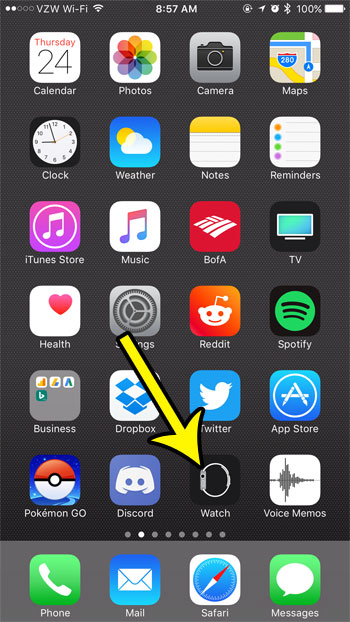
Step 2: Select the My Watch tab at the bottom of the screen.

Step 3: Scroll down and touch the Messages option.

Step 4: Touch the Repeat Alerts button.
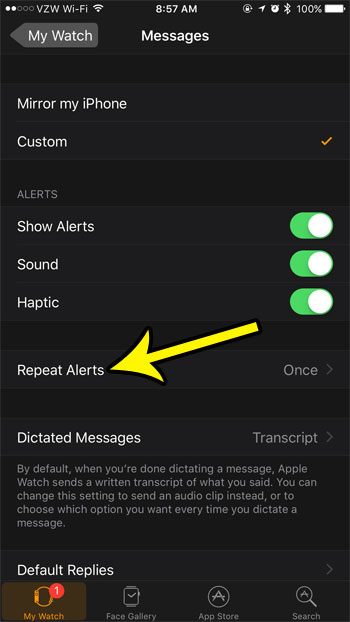
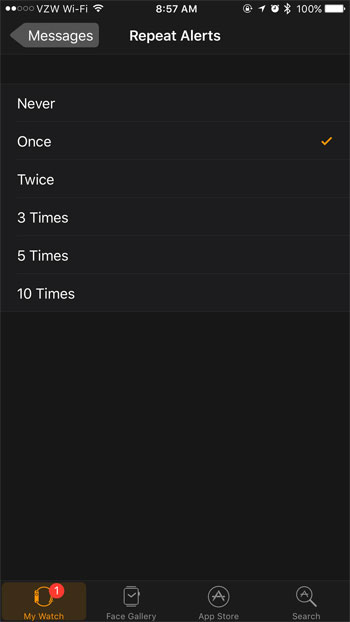
Step 5: Tap the option that indicates the number of times that you want your message alerts to repeat on your Apple Watch.
Getting the correct settings for your Apple watch notifications is an important part of making the watch as useful for you as possible. Learn how to turn off the reminders from the Breathe feature of the watch if you aren’t using it.

Kermit Matthews runs Live2Tech from just outside Philadelphia. He is an IT specialist with over 20 years of experience, from a university help desk to small-business IT, IT management and his own consulting practice, and has written tech guides full time since 2020. Steps are checked against the current software on a real device or the maker’s official documentation. More about Kermit.