To turn on group messaging on an iPhone 7, open Settings > Messages, turn on MMS Messaging, and then turn on Group Messaging. With both on, replies in a group text go to everyone in the group, even people who don’t have an iPhone. These steps are the same on every iPhone model and iOS version.
How to turn on group messaging
- Open the Settings app.
- Tap Messages. (On iOS 18 and later, it’s under Settings > Apps > Messages.)
- Under SMS/MMS, turn on MMS Messaging.
- Turn on Group Messaging.
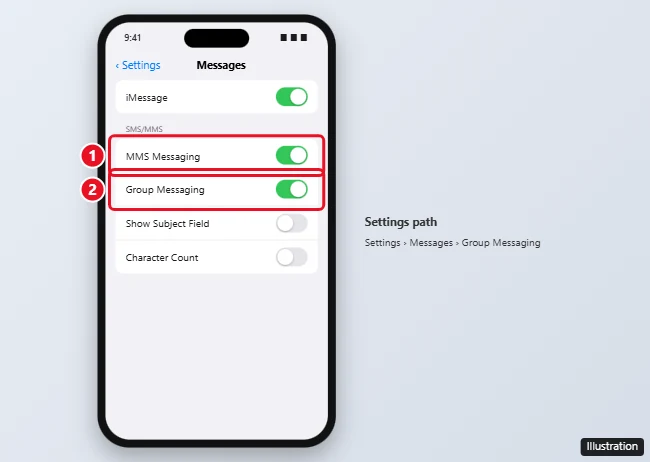
If you don’t see MMS Messaging or Group Messaging, your carrier may not support MMS on your plan. Contact your carrier to check.
How group texts work on iPhone
| Type | Who’s in it | Bubble color | Needs |
|---|---|---|---|
| Group iMessage | Everyone uses Apple devices with iMessage | Blue | Wi-Fi or cellular data |
| Group MMS | At least one person uses Android or another phone | Green | MMS Messaging and Group Messaging turned on, and a cellular plan with MMS |
| Group RCS | iPhones on iOS 18 and later with Android users, where carriers support it | Green | RCS turned on (not available on iPhone 7) |
If Group Messaging is off, replies from people in an MMS group may arrive as separate individual texts, so the conversation gets split up.
Start a group text
- Open Messages and tap the Compose button.
- Type the names or numbers of the people you want to add, or tap + to choose from Contacts.
- Type your message and tap Send.
Group messaging not working?
- Turn on cellular data. MMS needs cellular data, even when you’re on Wi-Fi.
- Check with your carrier. Some prepaid plans don’t include MMS.
- Reset network settings: Go to Settings > General > Reset > Reset Network Settings. This also clears saved Wi-Fi passwords.
- Update carrier settings: Go to Settings > General > About and wait a few seconds. If an update is available, you’ll be asked to install it.
- Restart your iPhone. On iPhone 7, you can force restart by holding Side and Volume Down until the Apple logo appears.
Frequently asked questions
Why can’t I see Group Messaging in Settings?
Turn on MMS Messaging first. If neither appears, your carrier or plan doesn’t support MMS.
Can I name a group chat on iPhone 7?
Yes, for group iMessages. Tap the group’s icons at the top of the conversation, tap Info or Change Name and Photo, and enter a name. MMS groups can’t be named.
How do I leave a group text?
In a group iMessage with four or more people, tap the group icons at the top and choose Leave this Conversation. For MMS groups, you can’t leave, but you can mute it with Hide Alerts.
Does group messaging cost extra?
Group iMessages use data. Group MMS messages count against your carrier’s messaging plan, which is unlimited on most plans.

Kermit Matthews is a freelance writer based in Philadelphia, Pennsylvania with more than a decade of experience writing technology guides. He has a Bachelor’s and Master’s degree in Computer Science and has spent much of his professional career in IT management.
He specializes in writing content about iPhones, Android devices, Microsoft Office, and many other popular applications and devices.