Netflix gives you two levels of control on an iPhone. To stop it from using cellular data at all, open Settings > Cellular and turn off the switch next to Netflix. If you still want to stream away from Wi-Fi, just with less data, change the Netflix app’s own Cellular Data Usage setting and turn on Wi-Fi Only for downloads instead. Both work on current versions of iOS, and both are easy to reverse.
Music apps can use a lot of data too, and Spotify has its own switch to keep Spotify downloads on Wi-Fi only.
Pick a cellular data level inside the Netflix app
This is the option to choose if you watch on the bus or at a relative’s house and only want to slow down how fast your plan drains. Netflix documents the path on its help page about controlling data usage:
- Open the Netflix app and tap My Netflix in the lower right.
- At the top, tap your profile name.
- Tap App Settings.
- Under Video Playback, tap Cellular Data Usage.
- Choose an option.
Netflix describes the choices like this:
| Option | What Netflix says it does |
|---|---|
| Automatic | Balances data and quality, at about 4 hours per GB |
| Wi-Fi Only | Streams only while connected to Wi-Fi |
| Save Data | Uses less data, at about 6 hours per GB |
| Maximum Data | Can use 1 GB per 20 minutes or more; Netflix recommends it only with an unlimited plan |
If the option you want is grayed out, Netflix says you can’t change it while Automatic is toggled on or while downloads are pending. Turn Automatic off, or cancel or finish the pending downloads, and try again.
There is also an account-wide cap. On the Netflix website, open your Account page, select Profiles, choose a profile and select Playback settings. Netflix says that if you set a data usage level there as well, streaming on mobile devices won’t exceed it. That is useful when several people share one plan and you want a ceiling that applies no matter which phone they use.
Block Netflix from cellular data in iPhone Settings
Use this when Netflix should never touch your plan. Apple’s guide to cellular data settings says that once an app’s switch is off, the iPhone uses only Wi-Fi for it.
- Open the Settings app.
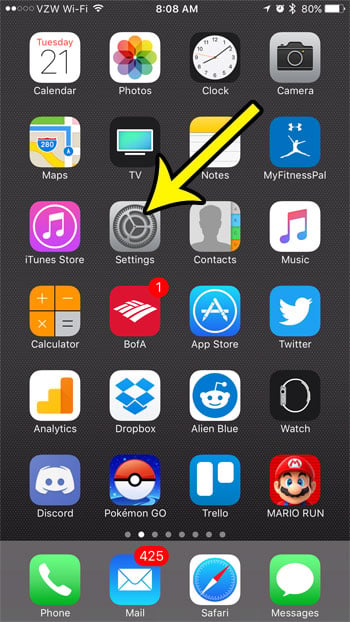
Older iOS version shown; current screens look different. - Tap Cellular. In some regions the menu is called Mobile Data.
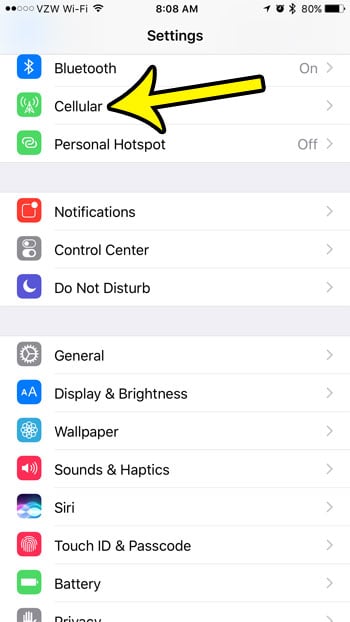
Older iOS version shown; current screens look different. - Scroll down to the list of apps and services. If Netflix isn’t listed, tap Show All.
- Turn off the switch next to Netflix.

Older iOS version shown; current screens look different.
Even though iOS 18 moved most app settings to Settings > Apps, Apple still documents this per-app switch under Cellular. The Cellular Data switch at the top of the same screen turns off cellular data for every app, so leave it on unless that is what you want. The same list works for other apps, too, such as the iPhone Mail app’s cellular data or the X app’s cellular data, which has its own data saver settings worth a look.
Download shows on Wi-Fi to watch offline
Blocking cellular doesn’t have to mean no Netflix on a trip. Download episodes while you’re on Wi-Fi, then watch them anywhere. To make sure downloads never start over cellular, open My Netflix, tap your profile name, tap App Settings, and turn on Wi-Fi Only under Downloads. Downloads take storage space, so the quality you pick matters; see how to change downloaded video quality in Netflix for that choice.
Check how much data Netflix has used
Go back to Settings > Cellular. Apple’s guide says that after you tap Show All, the amount each app used appears under its name. The total covers the current period, which starts when the statistics were last cleared. To start fresh, scroll to the bottom and tap Reset Statistics (more on resetting cellular data usage statistics). Apple notes your carrier’s count is the most accurate one. System Services sit above the app list and have their own breakdown, covered in seeing data used by iPhone system services.
Stop someone else from switching it back
On older iOS versions, Settings > General > Restrictions had a Cellular Data Use option set to Don’t Allow Changes. Restrictions no longer exists under General; parental limits now live in Screen Time > Content & Privacy Restrictions. Apple’s current parental controls page doesn’t list a cellular data lock there, so check whether your iPhone shows a cellular data changes option before relying on it, and set a Screen Time passcode the other person doesn’t know (see what a Restrictions passcode is).

Turn it back on or fix leftover data use
- Undo the block: return to Settings > Cellular and turn the Netflix switch back on. Netflix then follows whatever Cellular Data Usage level you chose in the app.
- Data still used on weak Wi-Fi: Apple’s cellular data support article explains that with Connectivity Assist on, cellular data is used along with Wi-Fi, and that you can turn Connectivity Assist off in Settings.
- Cut data across all apps: Settings > Cellular > Cellular Data Options > Data Mode > Low Data Mode reduces background use when you’re off Wi-Fi. Here is how to turn Low Data Mode off again later.
Netflix and cellular data questions
Will Netflix still play on Wi-Fi with the switch off?
Yes. The switch only stops cellular use; Netflix streams and downloads normally on Wi-Fi.
Does a downloaded episode use cellular data when I watch it?
Playing a finished download doesn’t stream the video again, which is why downloading on Wi-Fi is the data-free way to watch on the go.
Which should I pick, Save Data or the Settings switch?
Pick Save Data if you want to keep watching on cellular with less data. Pick the Settings switch if Netflix should never use cellular, for example on a child’s phone with a small plan.
If Netflix isn’t installed yet, start with setting up Netflix on an iPhone. And if battery life is the bigger worry, you can turn off Background App Refresh, a separate setting that affects how apps refresh in the background.

Kermit Matthews runs Live2Tech from just outside Philadelphia. He is an IT specialist with over 20 years of experience, from a university help desk to small-business IT, IT management and his own consulting practice, and has written tech guides full time since 2020. Steps are checked against the current software on a real device or the maker’s official documentation. More about Kermit.