The Songs list in the Music app doesn’t show an obvious total, so the quickest place to look is Settings: tap General, then About, and Apple lists the number of songs on the iPhone there. That figure can be lower than the library you see in Music, because songs you stream without downloading aren’t stored on the phone. The sections below cover both numbers.
Find the song count in Settings
Apple’s iPhone User Guide lists the number of songs, videos, photos and apps among the details on the About screen. Nothing needs to be installed and you don’t need a computer.
- Open the Settings app.
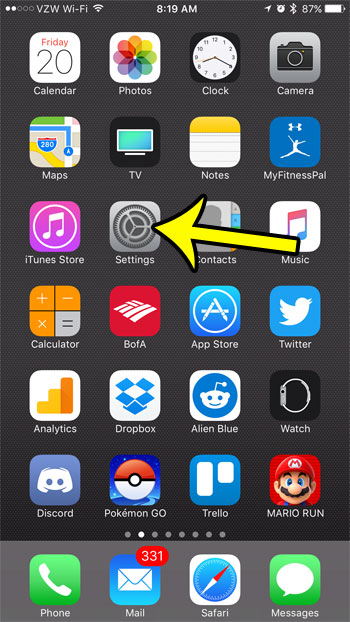
- Tap General.
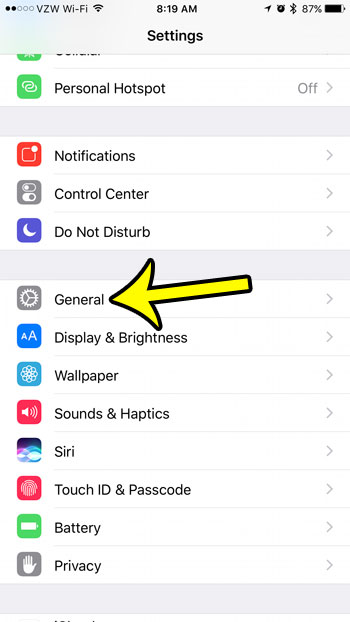
- Tap About, near the top of the General screen.
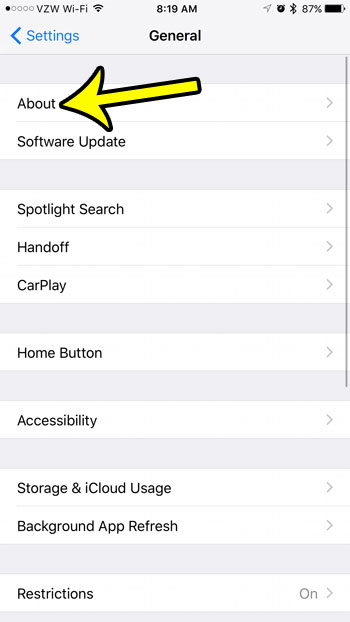
- Find the song count. On the older screen below it is the Songs row, with the number at the right. Apple doesn’t spell out the row names for current iOS, so look for the songs figure in the same group as videos, photos and apps.
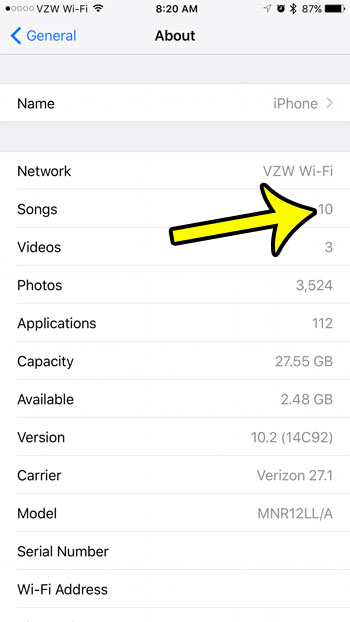
The About screen gives a number only, not a list. The same screen shows the app count too, explained in counting the apps on your iPhone, along with identifiers such as the serial number and the Wi-Fi and Bluetooth addresses. Blur those if you share a screenshot.
If you can’t find a songs figure on your About screen, use the Downloaded view described below to see which songs are stored on the phone.
Why the number doesn’t match your Music app
Apple doesn’t document exactly which items the About figure counts, so treat it as a count of music kept on the iPhone. Several things make the Music app look bigger or smaller than that number.
| Where the song is | Plays offline? | Stored on the iPhone? |
|---|---|---|
| Downloaded to the iPhone from Apple Music or the iTunes Store | Yes | Yes |
| Synced from a Mac or PC | Yes | Yes |
| In your library through Sync Library but not downloaded | No, it streams | No |
| Played from Apple Music without adding it to your library | No | No |
| Saved in another app, such as Spotify | Depends on that app | In that app, not in Music |
Apple doesn’t say which of these the About figure includes.
The biggest factor is Sync Library. According to Apple’s Sync Library support page, it lets you stream your music library on any device signed in with the same Apple Account you use for Apple Music. With it on, the Music app can list thousands of songs while the iPhone stores only the ones you downloaded. A student who adds 900 songs on a Mac and downloads 150 of them on the phone would see a large library in Music and a much smaller figure in About.
On current iOS, Sync Library is in Settings > Apps > Music. Older versions of iOS put it directly under Settings > Music. Apple also asks you to open the Music app, tap the photo icon, tap Account Settings and confirm you are signed in with the Apple Account that has the subscription. What happens to your library when you turn the setting off is covered in turning off iCloud Music Library.
Apple adds a warning worth repeating: Apple Music isn’t a backup service, so back up your music library before you change these settings.
See which songs are stored on the iPhone
The Music app can show just the music that is on the phone, which is the closest match to the About number.
- Open the Music app and tap the Library tab.
- Tap Downloaded. Apple uses this screen for downloaded music, including Downloading for songs still coming in.
- If you see category rows such as Songs, tap it to scroll through the downloaded tracks.
Apple doesn’t document a running total in the Music app, so if you need an exact count, the About screen is the reliable place. Inside a single playlist the list shows each track, which helps when you want to trim it; deleting a whole list is covered in removing a playlist from the Music app.
Check how much space your music uses
A song count says little about storage, because a few long albums can take more room than hundreds of short tracks. To see the space:
- Open Settings and tap General.
- Tap iPhone Storage (Apple’s steps call it [device] Storage).
- Look at the bar at the top. Apple groups music under Media, together with videos, podcasts, ringtones, artwork and voice memos. Scroll down and tap the Music app in the list for its details.
Apple’s guide to checking iPhone storage notes that cached and temporary data might not count as usage on this screen. For the wider picture of what fills the phone, see checking your iPhone storage.
To trim downloads, Apple’s steps are Settings > Apps > Music > Downloaded Music, then tap Edit and remove All Songs or individual artists. The same Music settings include Optimize Storage and Automatic Downloads. Full removal steps are in deleting music from your iPhone. Music you synced from a computer is different: Apple says you remove it by deselecting it on the computer and syncing again.
Count the whole library on a Mac or PC
When a computer is connected, Finder on a Mac or the Apple Devices app or iTunes on a PC shows the iPhone’s storage by type. Apple lists an Audio category there (songs, audio podcasts, audiobooks, voice memos and ringtones), which is space, not a number of songs. Apple also says cached music can show up as Other in that view.
For a song total across your whole library, Apple’s Music guides for Mac and Windows don’t describe a counter, so use the About screen for what is on the iPhone.
Song count puzzles
Does the About count include songs I only stream?
Streamed songs aren’t stored on the iPhone, so they shouldn’t add to a count of music on the device. Download them in the Music app if you want them on the phone and available offline.
Is there a limit to how many songs Sync Library holds?
Apple’s Music for Windows guide lists up to 100,000 songs, not including songs or music videos purchased from the iTunes Store.
How many songs can my iPhone hold?
There is no fixed number. It depends on free storage and on the length and quality of the tracks, so check the storage screen rather than a song count when space is tight.
Once you know the number and the space it takes, decide what to keep: download the albums you want on trips, and let the rest stream. Apple’s guide to adding music and listening offline covers downloads in more detail.

Kermit Matthews runs Live2Tech from just outside Philadelphia. He is an IT specialist with over 20 years of experience, from a university help desk to small-business IT, IT management and his own consulting practice, and has written tech guides full time since 2020. Steps are checked against the current software on a real device or the maker’s official documentation. More about Kermit.