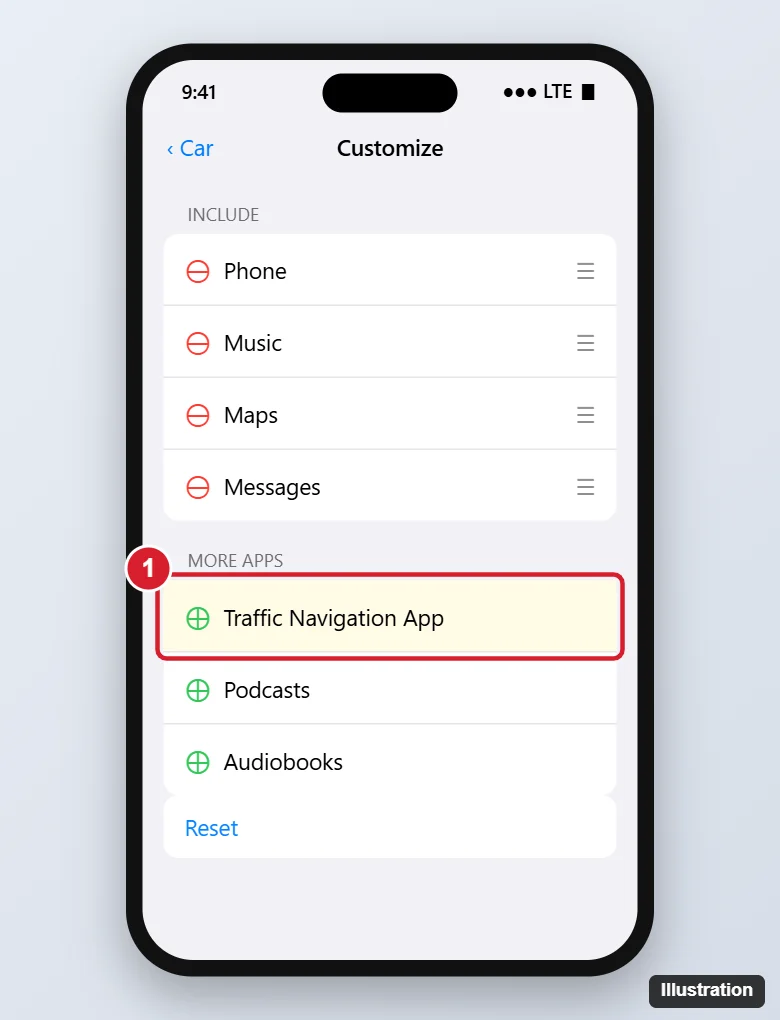
If Waze pops up every time you get in the car, it’s almost always because of CarPlay, which reopens the navigation app you used last when your iPhone connects. Before you park, end navigation in Waze and switch the CarPlay screen to another app. To stop Waze appearing at all, go to Settings > General > CarPlay, tap your car, tap Customize, and remove Waze (tap the red minus). Waze doesn’t have a “don’t auto-start” switch, so the fixes below cover the other causes.
Why Waze Opens Automatically
- CarPlay remembers the last app. If Waze was on screen when you turned off the car, it returns when you reconnect.
- An active route. If you didn’t end navigation, Waze may resume the drive.
- Planned drives and suggestions. Waze’s planned drives and iPhone’s Siri Suggestions can surface Waze when you connect to the car.
- Shortcuts automations that open Waze when connecting to CarPlay or Bluetooth.
Will Waze add an option to stop auto-launch?
Users have requested it, but CarPlay’s behavior of reopening the last app is controlled by Apple, not Waze.
Fix 1: End the Drive and Switch Apps Before Parking
- When you arrive, tap Stop or End drive in Waze.
- On the CarPlay screen, tap the Home/Dashboard button and open another app, such as Music or Apple Maps.
Next time you connect, CarPlay opens that app instead.
Fix 2: Remove Waze From CarPlay
- Open Settings > General > CarPlay.
- Tap your car.
- Tap Customize.
- Tap the red minus next to Waze to move it to More Apps.
Waze stays on your iPhone but won’t appear or launch in CarPlay. Add it back with the green plus when you need it.
Does deleting and reinstalling Waze help?
Rarely. The CarPlay settings above are more effective.
Fix 3: Turn Off Siri Suggestions for Waze
- Go to Settings > Apps > Waze (or Settings > Waze on iOS 17 and earlier).
- Tap Siri (or Siri & Search).
- Turn off Show App in CarPlay Suggestions if available, and the suggestion options.
Fix 4: Check Waze Settings
- In Waze, tap My Waze > Settings and review Planned drives and Notifications. Remove planned drives or turn off reminders that prompt Waze to open.
- Under Settings > Apps > Waze > Location, choosing While Using the App instead of Always limits what Waze does in the background.
- Turn off Background App Refresh for Waze in the same screen.
Fix 5: Check Shortcuts Automations
- Open the Shortcuts app and tap Automation.
- Look for automations triggered by CarPlay or Bluetooth that open Waze.
- Swipe left to delete them, or tap and turn them off.
Bluetooth-Only Cars
Without CarPlay, iPhone doesn’t open apps by itself when connecting to Bluetooth. If Waze appears, check Shortcuts automations and the Driving Focus (Settings > Focus > Driving), and make sure Waze isn’t still running with an active route. Swipe it away in the App Switcher when you’re done.

Kermit Matthews runs Live2Tech from just outside Philadelphia. He is an IT specialist with over 20 years of experience, from a university help desk to small-business IT, IT management and his own consulting practice, and has written tech guides full time since 2020. Steps are checked against the current software on a real device or the maker’s official documentation. More about Kermit.