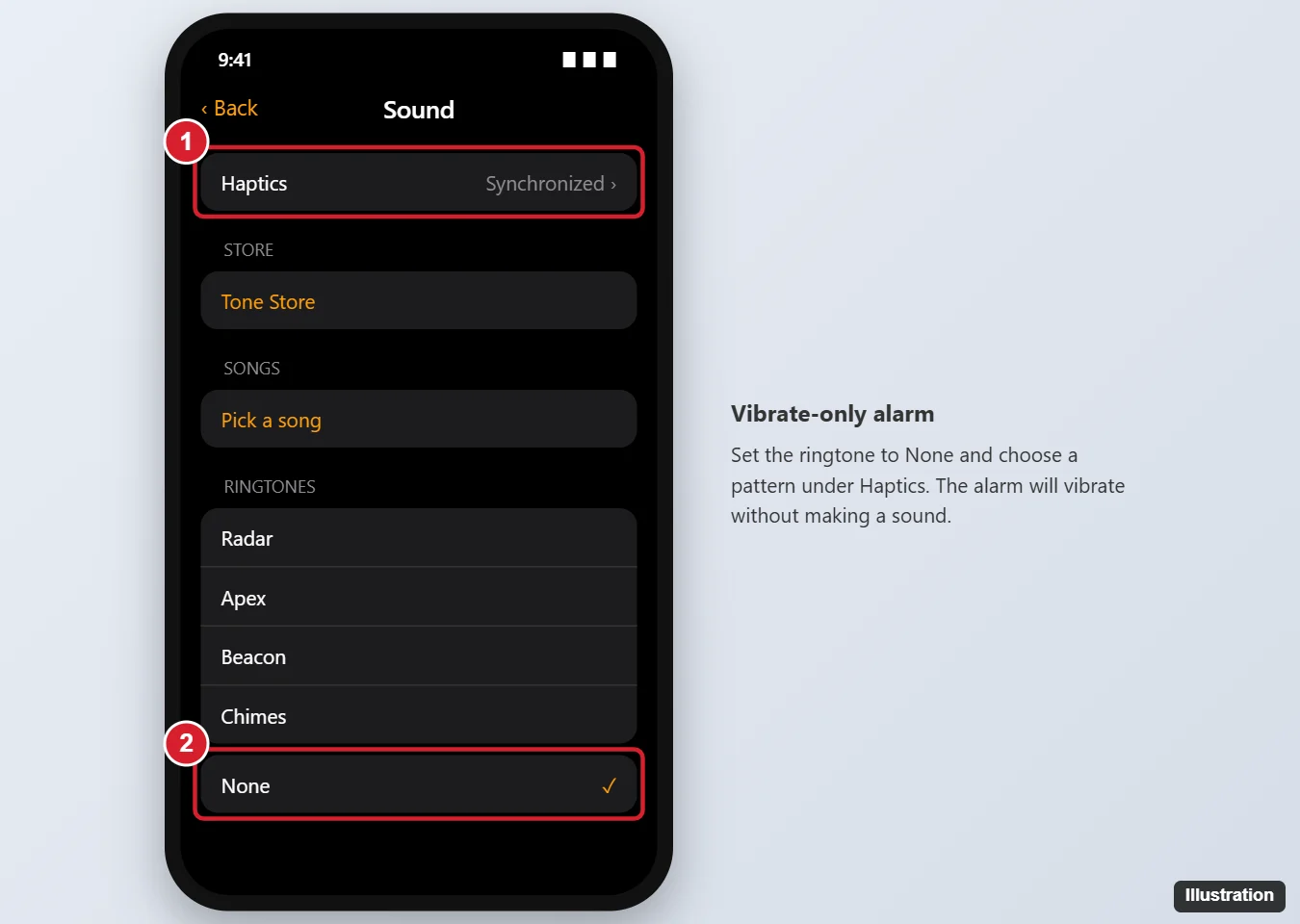
To set an iPhone alarm to vibrate, open the Clock app, tap Alarms, and tap the alarm you want to change. Tap Sound, then Haptics at the top, and pick a vibration pattern. For a vibrate-only alarm with no sound, go back to the Sound screen and choose None at the bottom of the ringtone list. Tap Back, then Save.
A vibrate-only alarm is great if you share a room, but it’s easy to sleep through. Here’s how to set it up, pick or create a stronger vibration, and make sure it actually goes off.
How to make an iPhone alarm vibrate
- Open the Clock app and tap Alarms.
- Tap an existing alarm, or tap + to create one.
- Tap Sound.
- Tap Haptics (called Vibration in older iOS versions) at the top.
- Choose a pattern, like Synchronized, Heartbeat, or Rapid. Make sure it isn’t set to None.
- Tap Back.
How to set a vibrate-only alarm (no sound)
- On the same Sound screen, scroll to the bottom of the Ringtones list.
- Tap None.
- Check that Haptics is still set to a pattern, not None.
- Tap Back, then tap Save (or the check mark).
How to create a stronger custom vibration
- On the Haptics screen, tap Create New Vibration.
- Tap the screen in the rhythm you want. Hold your finger down for longer vibrations.
- Tap Stop, then Play to test it.
- Tap Save and give it a name.
A long, continuous pattern is usually more noticeable than short taps. Custom vibrations appear under Custom on the Haptics screen.
Make sure your vibrate alarm works
- Vibration must be on. Go to Settings > Accessibility > Touch and make sure Vibration is turned on. If it’s off, alarms won’t vibrate.
- Silent mode is OK. The Ring/Silent switch or Action button doesn’t stop alarms from sounding or vibrating.
- Focus and Do Not Disturb don’t block Clock alarms.
- Keep the phone close. A vibrating phone on a mattress or pillow is much easier to feel than one on a nightstand.
- Test it. Set an alarm for two minutes from now to check the vibration.
Vibrate alarms and Apple Watch
If you wear an Apple Watch to bed and your iPhone is locked, alarms can play on the watch instead, with a tap on your wrist. For a silent wrist alarm, put the watch in Silent Mode from Control Center.
Related: Fix an iPhone alarm that is not working.
Frequently asked questions
Why doesn’t my iPhone alarm vibrate?
Check that Haptics isn’t set to None for that alarm, and that Vibration is on in Settings > Accessibility > Touch.
Can I set all alarms to vibrate at once?
No. Sound and haptics are set for each alarm separately, so edit each one.
Does the sleep schedule alarm vibrate?
Yes. Edit the wake-up alarm in your sleep schedule in the Health or Clock app, and choose Sounds & Haptics to change it.
Will a vibrate-only alarm wake me up?
It depends on how heavily you sleep. If you’re worried, choose a quiet ringtone with low volume instead of None, or wear an Apple Watch.

Matthew Burleigh is the head writer at solveyourtech.com, where he covers topics like the iPhone, Microsoft Office, and Google apps. He has a Bachelor’s and Master’s degree in Computer Science and has over 15 years of IT experience.
He has been writing online since 2008 and has published thousands of articles that have been read millions of times.