To set the default browser in Windows 7, click Start > Default Programs > Set your default programs. Select the browser you want from the list on the left, like Firefox, then click Set this program as default and OK. Links you click in email and other programs now open in that browser. Most browsers also offer to make themselves the default when you first open them.
Windows 7 is no longer supported, and current versions of major browsers no longer run on it, so read the note below before relying on it for everyday browsing.
Method 1: Use Default Programs
- Click Start and choose Default Programs. (Or open Control Panel > Default Programs.)
- Click Set your default programs.
- Select your browser in the Programs list on the left.
- Click Set this program as default.
- Click OK.
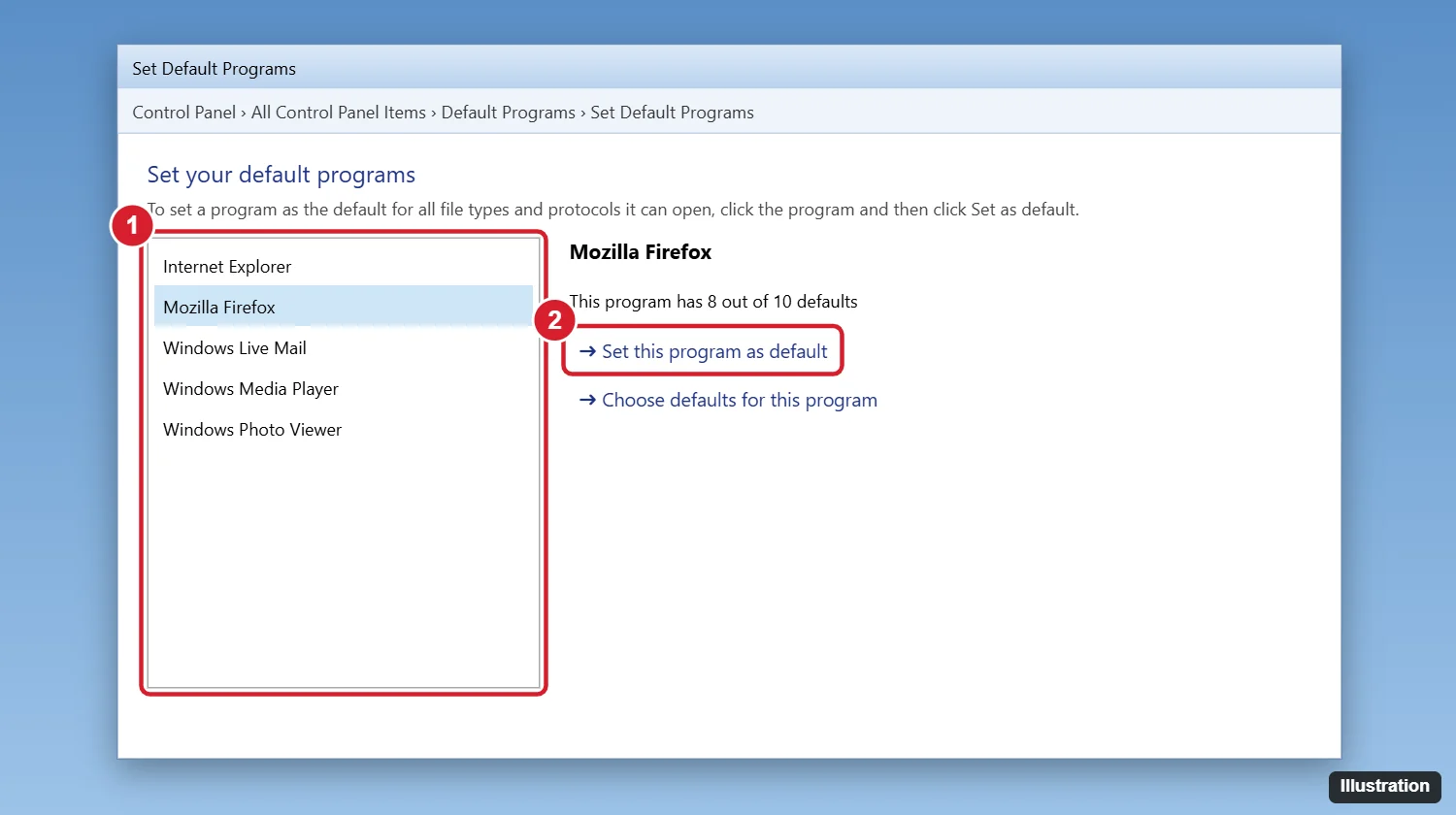
Method 2: Use the browser’s own setting
- Firefox: Click the menu > Options > General > Make Default.
- Chrome: Click the menu > Settings > Default browser > Make default.
- Internet Explorer: Click Tools > Internet options > Programs > Make default.
Choose defaults for specific file types
To open only certain things, like .html files or web links, in a browser, select it in Set your default programs and click Choose defaults for this program. Check the file types and protocols (like HTTP and HTTPS) you want, then click Save.
Important: Windows 7 and browser support
Microsoft ended support for Windows 7 in January 2020, and it no longer gets security updates. Google Chrome and Microsoft Edge stopped supporting Windows 7 in early 2023, and Firefox kept supporting it longer through an extended release that has since ended as well. Browsing with an outdated browser on an unsupported system is risky.
If you can, upgrade to a supported version of Windows. See what to buy instead of Windows 10 for current options.
Frequently asked questions
Why does my default browser keep changing?
Another program may be setting itself as the default during updates. Uncheck the “make default” option during installation, and reset it with the steps above.
Can I remove Internet Explorer from Windows 7?
You can turn it off in Control Panel > Programs and Features > Turn Windows features on or off, but it isn’t fully removed.
Which browser still works on Windows 7?
Older versions of major browsers still open, but they no longer receive security updates. Upgrading Windows is the safest option.
How do I set the default browser in Windows 10 or 11?
Go to Settings > Apps > Default apps, click your browser, and click Set default.

Kermit Matthews is a freelance writer based in Philadelphia, Pennsylvania with more than a decade of experience writing technology guides. He has a Bachelor’s and Master’s degree in Computer Science and has spent much of his professional career in IT management.
He specializes in writing content about iPhones, Android devices, Microsoft Office, and many other popular applications and devices.