Rolling back the Bluetooth driver returns Windows 10 to the driver version that worked before an update, and it’s quicker than a full reinstall. If Bluetooth stopped pairing, dropped connections or vanished right after Windows Update ran, open Device Manager, open your Bluetooth adapter’s Properties, and select Roll Back Driver on the Driver tab. Restart, test your device, and only reinstall if the rollback button is unavailable or doesn’t help.
Is a rollback the right fix?
Microsoft ended support for Windows 10 on October 14, 2025, and says it no longer provides free software updates from Windows Update, technical assistance or security fixes for Windows 10, so a driver that breaks now may not get a quick fix from Microsoft.
A rollback only helps when a newer driver caused the problem. Microsoft’s Bluetooth driver page puts it this way: if Bluetooth worked before a recent driver or Windows update, rolling back the driver might resolve the issue. Use this quick check:
| What you noticed | Best first move |
|---|---|
| Bluetooth worked yesterday, an update installed overnight, now it fails | Roll back the driver (below) |
| Bluetooth never worked on this PC | Install the PC maker’s driver instead |
| Bluetooth is missing from Settings but the adapter shows in Device Manager | Roll back, then check the Bluetooth toggle |
| Only one headset or mouse misbehaves | Remove and pair that device again before touching drivers |
If the Bluetooth switch is simply off, turning on Bluetooth in Windows is the faster fix.
Prepare in two minutes
- Use a wired mouse or the touchpad. If your only mouse or keyboard is Bluetooth, you could lose control of the PC partway through.
- Sign in with an administrator account. Driver changes need administrator rights.
- Create a restore point. It gives you a way back if something else goes wrong. See creating a restore point in Windows 10.
Roll back the Bluetooth driver
- Open Device Manager. Right-click Start and select Device Manager, or use one of the routes in opening Device Manager in Windows 10.
- Expand Bluetooth.
- Right-click your Bluetooth adapter (often named after the chip maker, with “Wireless Bluetooth” in the name) and select Properties.
- Select the Driver tab.
- Select Roll Back Driver.
- Windows may ask why you’re rolling back. Pick the reason that fits, then select Yes.
- Restart the PC when the rollback finishes.
Those steps follow Microsoft’s roll back instructions, which add “if available” after the button name. The next section explains what to do when it isn’t.
If Roll Back Driver is grayed out
A gray button usually means Windows has no earlier driver stored for that adapter, for example because the driver was installed fresh or an earlier version was already removed. You have three options, in this order:
- Check the Driver tab’s date and version. If the date is older than the update you blame, the driver isn’t the cause; look at the Bluetooth device itself or at Windows settings instead.
- Install the PC maker’s driver. Microsoft’s page suggests going to your PC manufacturer’s support website, searching by your model number, and installing the Bluetooth driver for Windows 10. A laptop maker’s driver is matched to your hardware.
- Reinstall the current driver. This is the fallback covered further down.
Confirm the rollback worked
- Reopen the adapter’s Properties > Driver tab and check that the driver date or version changed.
- Open Settings > Devices > Bluetooth & other devices and confirm the Bluetooth switch is there and on.
- Connect the headset, mouse or speaker that was failing and use it for a few minutes.
If a device still won’t connect, remove it from the Bluetooth list and pair it again. Old pairing data sometimes survives a driver change. For headphones in particular, connecting Bluetooth headphones to a Windows 10 PC covers the pairing steps.
Stop the same update from returning
Windows Update may offer the newer driver again later. Microsoft’s page doesn’t describe a way to block one specific driver for home users, so the practical approach is to watch for it:
- In Settings > Update & Security > Windows Update, look for driver updates listed under optional updates, and skip the Bluetooth one until your PC maker confirms a fix.
- If the broken driver comes back automatically, roll back again and check your PC maker’s support page for a newer, fixed version.
Fallback: reinstall the driver
When rollback isn’t available or doesn’t help, a reinstall replaces the driver files with a clean copy. Microsoft’s steps: open Device Manager, expand Bluetooth, right-click the adapter, select Uninstall device, and restart. Microsoft says Windows automatically reinstalls the Bluetooth driver after the restart.
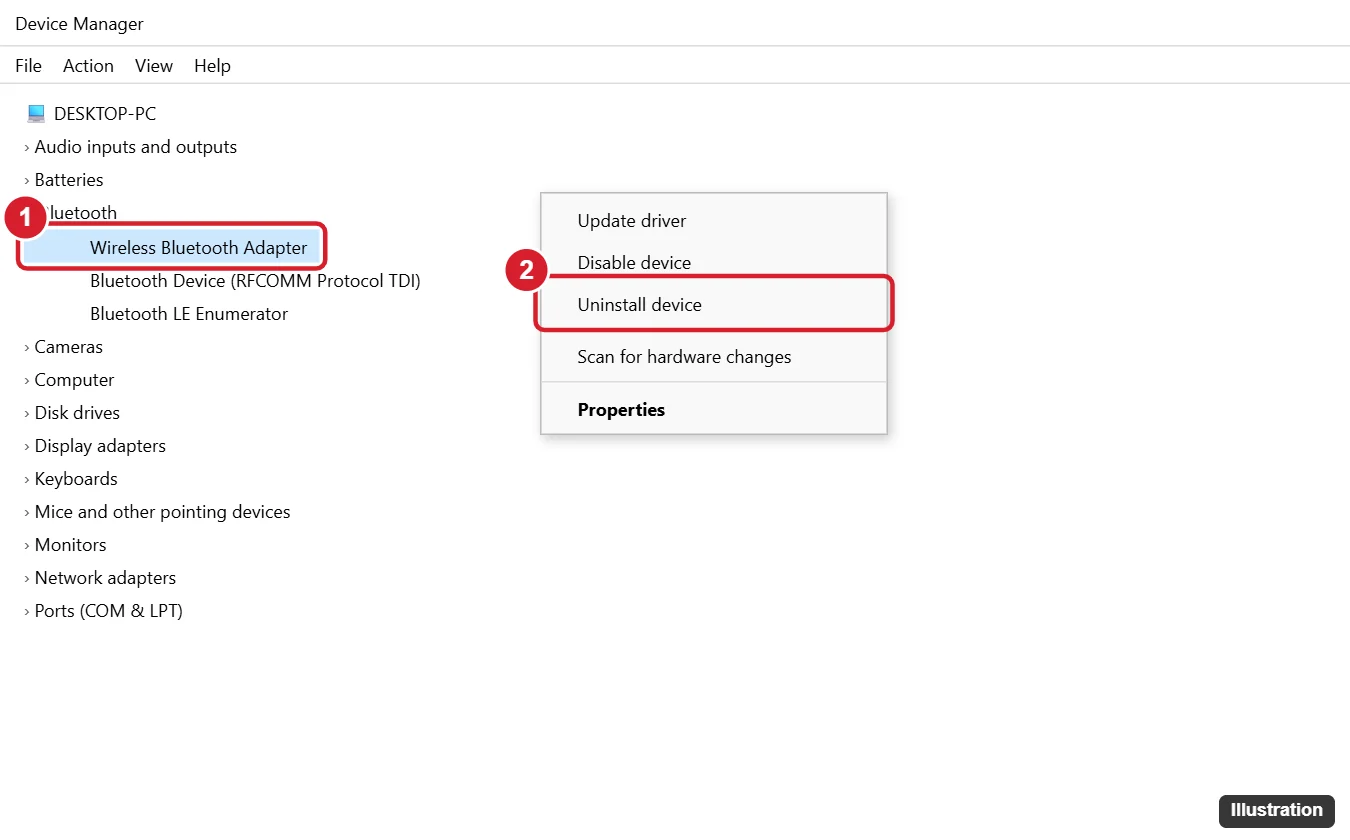
The uninstall dialog may also offer a check box to remove the driver software. Leave it cleared unless you have the PC maker’s driver ready to install, because removing the software means Windows may have nothing to fall back on.
When Bluetooth is still broken
- Do a real restart. With fast startup on, Shut down doesn’t fully reload drivers. Use Restart, or see turning off fast startup in Windows 10.
- Repair system files. If several devices broke after the same update, running an SFC scan in Windows 10 checks Windows files.
- Check the Wi-Fi side. Many laptops use one combined Wi-Fi and Bluetooth card. If Wi-Fi also failed after the update, reinstalling the Wi-Fi driver on Windows 10 may be needed too, and on a newer PC reinstalling the Wi-Fi driver on Windows 11 covers the same job.
Avoid driver download sites and “driver updater” utilities. Your PC maker’s support page and Windows Update are the sources that match your hardware.
Bluetooth rollback questions
Does rolling back the driver remove my paired devices?
Usually not, because pairings are stored separately from the driver files. If a device stops connecting after the rollback, remove it and pair it again.
Can I roll back more than one version?
Roll Back Driver returns to the previously installed driver only. For an older version, install it from your PC maker’s support page.
Should I roll back on a PC that’s moving to Windows 11 soon?
Yes, if Bluetooth is broken now. The rollback takes minutes and doesn’t affect an upgrade later; the new system installs its own drivers.

Kermit Matthews runs Live2Tech from just outside Philadelphia. He is an IT specialist with over 20 years of experience, from a university help desk to small-business IT, IT management and his own consulting practice, and has written tech guides full time since 2020. Steps are checked against the current software on a real device or the maker’s official documentation. More about Kermit.