Your Pokémon GO Trainer Code and the box for a friend’s code sit on the same screen: from the map, open your Trainer Profile, tap the Friends tab, then Add Friend. Your 12-digit code and its QR code are shown there; read the digits out or paste them into a message for someone far away, or let a player next to you scan the QR code.
The code is not a password: it only lets another player send you a friend request, which you can accept or ignore.
One screen, both directions: your code and theirs
Pokémon GO’s Help Center describes the route from the map screen (it calls it Map View). Your own code and the tools for adding other people live on the same Add Friend screen, so you only need to learn one path.
- Open Pokémon GO and wait for the map to load.
- Tap your Trainer avatar to open your Trainer Profile. On most phones the avatar sits in the lower-left corner of the map.
- Tap the Friends tab at the top of the screen. Your Friend List opens.
- Tap Add Friend.
- Your Trainer Code appears on this screen as 12 digits, together with your QR code. Depending on your app version, you’ll see buttons to copy the code or send it through your phone’s share sheet.
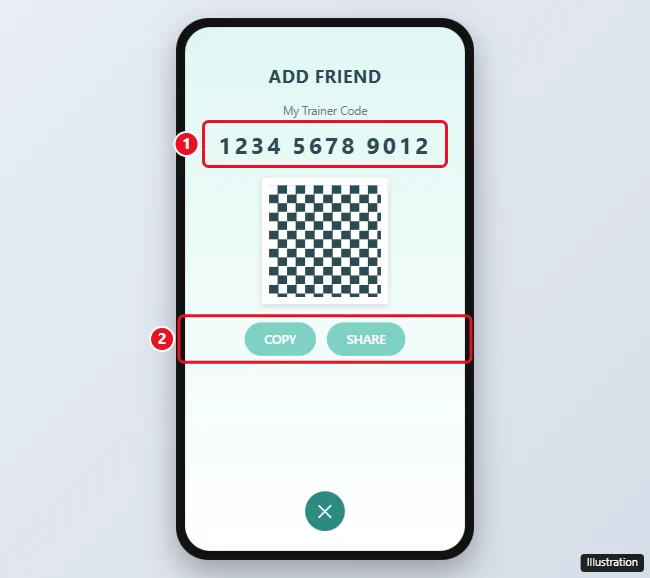
Every Trainer has a unique code. If you play on two accounts, each one has its own code, so check which account is signed in before you hand the number to anyone. If you need to switch accounts first, see how to log out of Pokémon GO.
To add someone else from the same screen:
- To use digits: enter the other player’s 12-digit Trainer Code in the entry field and send the request.
- To use a QR code: tap the QR Code tab in the top corner. The game opens your camera, and you point it at your friend’s QR code. Allow camera access if your phone asks.
- Wait for the other Trainer to accept. Until they do, the request is pending.
A request doesn’t last forever. Per the Help Center, if the other player doesn’t respond, the friend request expires after 7 days. If a week has passed, send a new one.
Adding friends from your phone’s contacts
Pokémon GO can also suggest friends from your device’s contacts once you give it permission. The Help Center lists a few rules for this:
- Only 2,000 contacts can sync with the game.
- Contacts are not stored permanently in Pokémon GO and expire if you revoke access.
- Trainers with child accounts can’t add friends from Contacts.
To stop sharing contacts later, turn off the game’s Contacts permission in your phone’s settings.
Before you post your code anywhere
It helps to know what accepting a request shares. The Help Center’s Friend List page says that friends see your Trainer profile, achievements, and the Pokémon you have caught. It also says friends may find out about your location when you send them a Gift or trade Pokémon with them.
A few practical habits follow from that:
- Accept requests only from people you’re comfortable with. You choose who becomes a friend; the code alone doesn’t add anyone.
- If you’d rather not show which Pokémon you’ve caught, the Help Center says you can turn that off in the game’s Settings menu.
- Think twice before sending Gifts to or trading with people you’ve never met, since both can hint at where you play.
- Never share your account password or login details with anyone. Pokémon GO’s account security page gives the same advice, and a Trainer Code is all another player ever needs from you.
Changed your mind about someone? You can remove a friend at any time: tap them in your Friend List, then tap Remove Friend at the bottom of their profile. Deleting a friend in Pokémon GO walks through it, and the Help Center notes that removing a friend in one Scopely Explore game removes them from the company’s other games too.
Resetting your code: when it makes sense
Older guides say a Trainer Code can’t be changed. That is no longer true. The Help Center says that if you want to change your Trainer Code, you tap the refresh icon to permanently reset it. The Help Center doesn’t say exactly where the icon sits; look for it on the Add Friend screen around your code.
A reset is worth it when your code was posted somewhere public and you keep getting requests you don’t want, or when someone you don’t know keeps resending requests. It’s not needed for an ordinary mix-up, since you can simply deny a request.
Two things to keep in mind before you tap it. The reset is permanent, so any code you shared earlier stops being the one on your screen, and you’ll need to send the new digits to anyone you still want to add. The Help Center page doesn’t say what happens to existing friendships, so check your Friend List afterward.
Giving your code to someone nearby or far away
How you share the code depends on where the other player is. The table sums up the usual choices.
| Situation | Best way to share | Why |
|---|---|---|
| Standing next to each other | Let them scan your QR code | No typing, so there is no chance of a wrong digit. |
| A friend in another city or country | Send the 12 digits in a private message | They type or paste the code on their own Add Friend screen. |
| Someone already in your phone’s contacts | Use the Contacts option instead of a code | The game can match contacts who also play (see the Contacts rules above). |
| Reading it aloud | Split it into three groups of four digits | Shorter groups are easier to say and check. |
A quick check helps with remote sharing: after the other player sends the request, it shows up in your Friend List, where you can accept or deny it. If nothing appears after a few minutes, ask them to read the code back to you. A single swapped digit sends the request to someone else or to no one.
Friend requests, points and Gifts
Why won’t my friend request go through?
One of these limits is usually the cause:
- Friend List is full. The Help Center says you can have up to 650 friends in your Scopely Explore Friend List, and that count includes friends from other Scopely Explore games. Once you hit it, remove friends before you add new ones. The other player’s list can be full too.
- Child accounts. Social features on a child account depend on permissions a parent sets in the Kids at Scopely Explore Parent Portal or on the Pokémon Trainer Central website, per the Help Center.
- Wrong digits. Codes are exactly 12 digits. Ask the other player to read theirs back, or switch to the QR code if you’re together.
How many friendship points can we earn each day?
The Help Center says up to one friendship point can be earned per day, though some features, such as Weekly Challenges, may allow more. Levels run from Good Friends up to Forever Friends; to track how close you are to the next one, see how many days are left before the next friendship level.
Why do new friends matter for trading and raids?
At higher friendship levels, the Help Center lists Stardust discounts on trades, a small attack boost when you battle together, and an extra Premier Ball when you raid with a Great Friend or better. For battle practice, see where the Team Leader battles are in Pokemon GO.
Too many Gift alerts after adding friends?
More friends means more Gifts. On an iPhone, you can quiet them with the steps in turning off gift notifications in Pokémon GO.
Once your code is out and the first requests are accepted, pick a buddy to walk with while you build those friendships; changing your buddy Pokémon shows how. For anything not covered here, the official Adding Friends page in the Pokémon GO Help Center is the source to check, along with its Friend List and Friendship Levels page, the child account social features page, and the account security tips.

Kermit Matthews runs Live2Tech from just outside Philadelphia. He is an IT specialist with over 20 years of experience, from a university help desk to small-business IT, IT management and his own consulting practice, and has written tech guides full time since 2020. Steps are checked against the current software on a real device or the maker’s official documentation. More about Kermit.