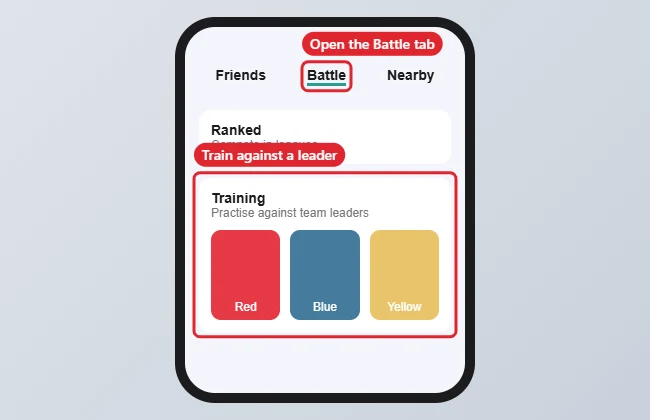
Team Leader battles in Pokémon GO are in the Battle menu: tap the Poké Ball on the map, tap Battle, scroll to Training, and tap Blanche, Candela or Spark. Then choose a league (Great, Ultra or Master), pick your team and battle. You can train any time, anywhere, and earn rewards once a day.
Quick Answer
Poké Ball > Battle > Training > tap a Team Leader > choose a league > pick your team.
Steps to Battle a Team Leader
- From the map, tap the Poké Ball (Main Menu) button.
- Tap Battle.
- Scroll past GO Battle League to Training.
- Tap a Team Leader and choose Great, Ultra or Master League.
- Select three Pokémon that fit the league’s CP limit and start.
Leagues at a Glance
| League | CP limit |
|---|---|
| Great League | 1,500 |
| Ultra League | 2,500 |
| Master League | No limit |
Tips
- Training battles don’t cost items, and your Pokémon don’t need healing afterwards.
- Rewards (including Stardust and XP) are available once per day.
- Use Training to test teams before GO Battle League.
Troubleshooting
- Battle button missing: Battling requires reaching the level set by the game; keep playing to unlock it.
- Battles won’t load: Check your connection and update the app. See fixing Pokémon GO crashes.
- Battling friends instead? You’ll need their Trainer Code. See finding your Trainer Code.
Frequently Asked Questions
Do I have to be near a Gym?
No. Team Leader training works anywhere.
Which leader should I pick?
All three work the same way; their teams differ, so pick one your Pokémon counter well.
Does it cost anything?
No. Training battles are free.
Summary
- Tap the Poké Ball on the map.
- Tap Battle and scroll to Training.
- Pick a Team Leader and a league.
- Choose your team and battle.

Kermit Matthews is a freelance writer based in Philadelphia, Pennsylvania with more than a decade of experience writing technology guides. He has a Bachelor’s and Master’s degree in Computer Science and has spent much of his professional career in IT management.
He specializes in writing content about iPhones, Android devices, Microsoft Office, and many other popular applications and devices.