Inside a Messages conversation, tap the Plus button to open your iMessage apps, pick a game, and send it as your first move. If you don’t have a game yet, the same Plus button leads to the App Store for iMessage, where you can get one without leaving the chat.
These steps follow Apple’s current instructions for iMessage apps on iPhone and iPad.
What makes a game an iMessage game
An iMessage game is an iMessage app: a small add-on that runs inside Messages instead of on your Home Screen. Apple’s iPhone User Guide page on iMessage apps lists playing a game alongside sending a poll among the things these apps do.
Many iMessage games are turn-based. You make a move, it arrives in the chat as a message bubble, and the other person taps the bubble to reply with their move. Some apps bundle many small games in one download. For example, the App Store listing for GamePigeon is marked “Only for iMessage” and names games such as 8-Ball and Basketball. That is one example the App Store shows, not a ranking.
Check these first
- The chat must be an iMessage chat. Apple’s page on the difference between iMessage, RCS and SMS/MMS explains that iMessages appear in blue bubbles, while carrier messages appear in green. iMessage apps are described for iMessage conversations, so a green-bubble chat is the first thing to rule out.
- iMessage must be on. If your messages go out green to other Apple users, check the iMessage switch in the Messages settings. The steps to turn iMessage off on iPhone show where it is, and the same switch turns it back on.
- Your opponent needs an Apple device with iMessage. A friend with an Android phone receives your texts in a green-bubble chat, so iMessage games are not available to them.
- Update if the Plus button is missing. Apple’s instructions are written for the latest version of iOS and iPadOS, and older versions placed iMessage apps in a different spot.
Get a game from the App Store for iMessage
The illustration below shows these steps in an older layout; current screens may look a little different.
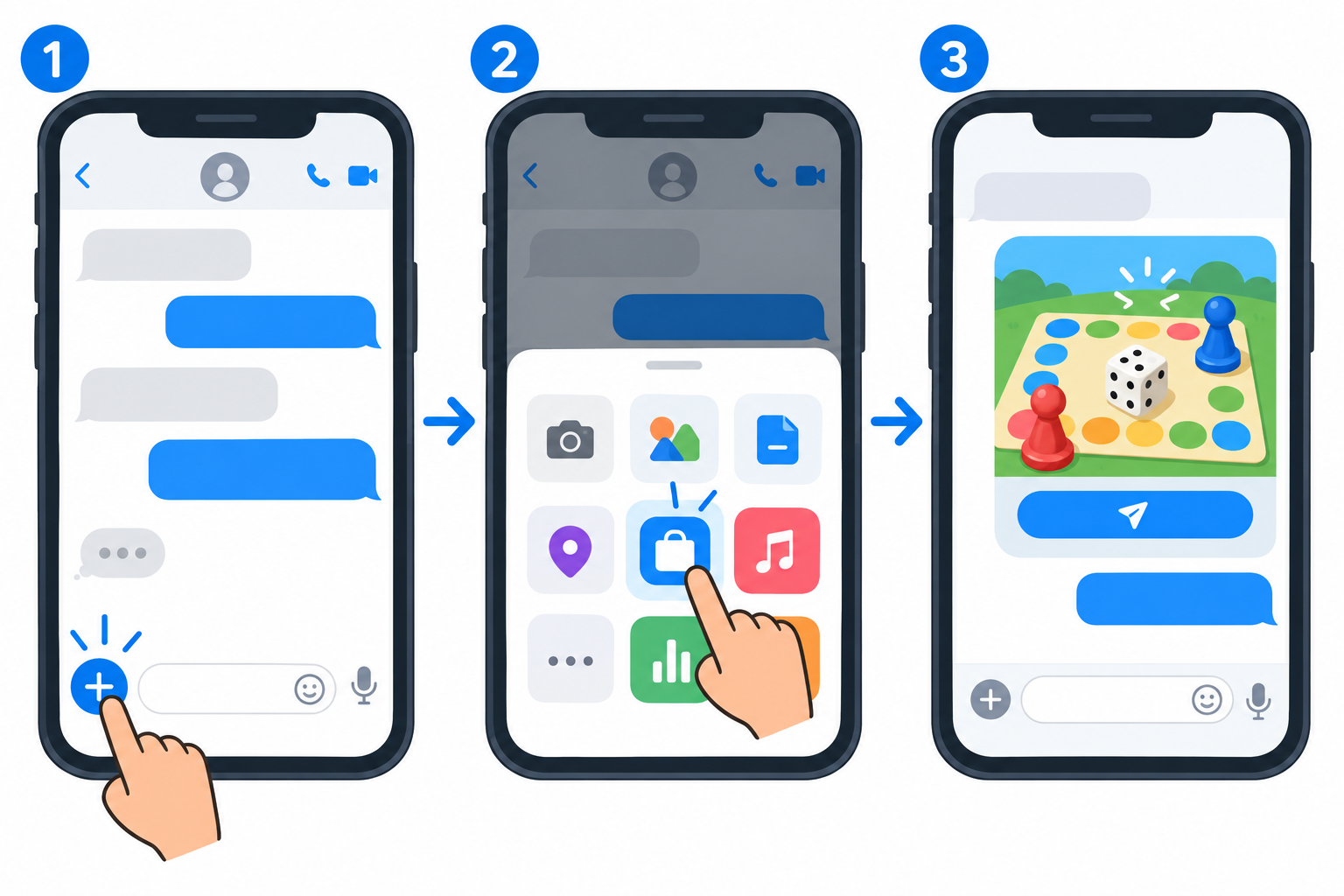
- Open Messages. Tap the Compose button to start a new message, or open an existing conversation.
- Tap the Plus button next to the message field.
- Tap the Store icon. This opens the App Store for iMessage.
- Find a game, then tap the Get button or the price icon next to it.
- Tap Install. You might need to enter your Apple Account password.
Check the listing before you install. It shows whether the game has in-app purchases and whether it is only for iMessage or also works as a regular app.
Start a game and take turns
- Open the conversation with the person you want to play.
- Tap the Plus button. Swipe up to see more of your apps if the game is not in the first list.
- Tap the game, then choose a game mode or board if it asks.
- Make your first move or tap the game’s send option. The game lands in the chat as a bubble.
- Your friend taps the bubble to open the game and plays a turn, which comes back to you as a new bubble.
If your friend does not have the game, tapping your bubble may lead them to get it first. If the game doesn’t open for them, a quick “install this first” text can save a stalled match.
Find, reorder and turn off game apps
Once you have several iMessage apps, a little housekeeping keeps your games easy to reach. Apple’s support article Use iMessage apps on your iPhone and iPad describes each of these:
- Move a game up the list: touch and hold any app icon in the list until it shrinks a little, then drag it to a new spot.
- Keep favorites handy: add apps to your Favorites so they are quick to reach in the app drawer.
- Turn a game off without deleting it: in Settings, tap Apps, tap Messages, tap iMessage Apps, then tap the app to turn it on or off.
- Remove it completely: Apple notes that you can also delete an app you no longer want.
Playing in a group chat or on iPad
Some iMessage games can be sent to a group conversation; check the game’s App Store listing for the number of players it supports. Start or open the group conversation first, then send the game from the Plus button there. If the group gets noisy once a match is over, here is how to leave a group text on iPhone.
On iPad, the steps are the same, because Apple’s iMessage apps instructions cover iPhone and iPad together. The iPad needs Messages set up with iMessage before games appear.
A Windows PC is a different story. Apple documents iMessage apps for iPhone and iPad only, so even if you use iMessage on Windows through Phone Link, start and play games on the iPhone or iPad.
Limits for a child’s iPhone
Parents can manage what a child installs and buys with Screen Time. Apple’s page Block features or content with Screen Time starts in Settings: tap Screen Time, then tap Content & Privacy Restrictions. From there you can set limits for the App Store, including purchases, using the options Apple lists for the current iOS version.
iMessage games are downloaded from the App Store for iMessage, so check the App Store and purchase options on that page. Some games offer in-app purchases, so blocking or requiring approval for purchases is worth a look.
When a game won’t show up or start
| What you see | What to check |
|---|---|
| Green bubbles in the conversation | The chat is not using iMessage. Check that iMessage is on, and that the other person uses an Apple device with iMessage. |
| The game is installed but not in the list | Swipe up in the app drawer, then check Settings > Apps > Messages > iMessage Apps to see if it is turned off. |
| No Plus button | Update iOS or iPadOS; older versions showed iMessage apps differently. |
| Your friend’s bubble won’t open the game | They may not have the game. Ask them to install it, then tap the bubble again. |
| Can’t download games on a child’s device | Screen Time Content & Privacy Restrictions may block App Store installs or purchases. |
Apple’s other multiplayer route: the Games app
Not every game with friends runs inside Messages. Apple’s guide to playing with friends in the Apple Games app describes sending friend requests, competing on leaderboards, and challenging friends: tap Friends, then tap Challenge Your Friends. Multiplayer games that support Game Center can also send invites by AirDrop.
Those invites come from Game Center, not from an iMessage app. If they arrive more often than you want, you can turn off Game Center invites on iPhone without affecting your iMessage games.
iMessage game questions
Do iMessage games cost money?
Each listing in the App Store for iMessage shows the price or a Get button and whether there are in-app purchases. Check the listing; the price is set by the developer.
Can I play while my friend is offline?
With turn-based games, your move is sent as a message, so it waits in the conversation until your friend opens it. Live or timed games may behave differently; check the game’s listing.
Will turning off a game delete my match history?
Turning an app off in Settings removes it from the Messages app drawer without deleting it. What happens to saved matches if you delete the app depends on the game, so check its listing or support page first.
Games in other chat apps work differently; Facebook’s app has its own, covered in how to play games on Messenger. For a different kind of iPad gaming, see using a SNES emulator on iPad. And for ordinary texts rather than game moves, you can schedule an iMessage to send later.
Next step: open a blue-bubble chat with a friend, tap Plus, and send one quick game to check that everything works before a longer match.
Messages also takes avatar stickers, and emoji vs Bitmoji on iPhone sorts out which comes from Apple and which from Snap.

Kermit Matthews runs Live2Tech from just outside Philadelphia. He is an IT specialist with over 20 years of experience, from a university help desk to small-business IT, IT management and his own consulting practice, and has written tech guides full time since 2020. Steps are checked against the current software on a real device or the maker’s official documentation. More about Kermit.