To turn off Wi-Fi Assist on an iPhone SE, open Settings > Cellular (Mobile Data or Mobile Service in some regions), scroll to the very bottom, and turn off Wi-Fi Assist. Your iPhone then stays on Wi-Fi even when the signal is weak, instead of quietly switching to cellular data. That helps if you have a small data plan.
Quick Answer
Settings > Cellular > scroll to the bottom > turn off Wi-Fi Assist.
Turn Off Wi-Fi Assist
- Open Settings and tap Cellular.
- Scroll past the list of apps to the bottom.
- Turn off Wi-Fi Assist.
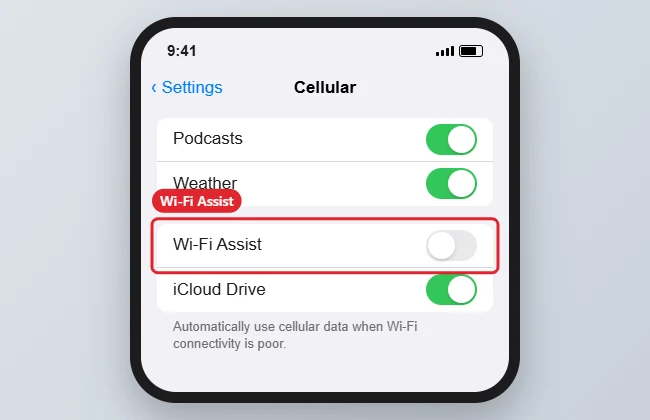
The number under Wi-Fi Assist (when on) shows how much cellular data it has used in the current period.
How Wi-Fi Assist Works
| Wi-Fi Assist | Weak Wi-Fi behavior |
|---|---|
| On | Switches to cellular for apps in the foreground to keep things loading |
| Off | Stays on Wi-Fi; pages may load slowly or fail |
It doesn’t work while data roaming, and it doesn’t run for background downloads or some streaming apps.
Other Ways to Control Data Use
- Turn off cellular data for specific apps in the same Cellular screen.
- Turn on Low Data Mode in Cellular Data Options.
- Reset your usage counter to track a billing cycle.
Troubleshooting
- Can’t find it: Search “Wi-Fi Assist” in the Settings search bar.
- Still using data on Wi-Fi: Check that Wi-Fi is actually connected and not a captive portal that needs sign-in.
- Traveling? See data roaming on iPhone.
- Want to see what’s using data? See cutting data use from autoplay.
Frequently Asked Questions
Does Wi-Fi Assist cost extra?
It uses your cellular data, which may count against your plan.
Is it on by default?
Yes, on most iPhones.
Summary
- Settings > Cellular.
- Scroll to the bottom.
- Turn off Wi-Fi Assist.
- Use Low Data Mode for more savings.

Kermit Matthews is a freelance writer based in Philadelphia, Pennsylvania with more than a decade of experience writing technology guides. He has a Bachelor’s and Master’s degree in Computer Science and has spent much of his professional career in IT management.
He specializes in writing content about iPhones, Android devices, Microsoft Office, and many other popular applications and devices.