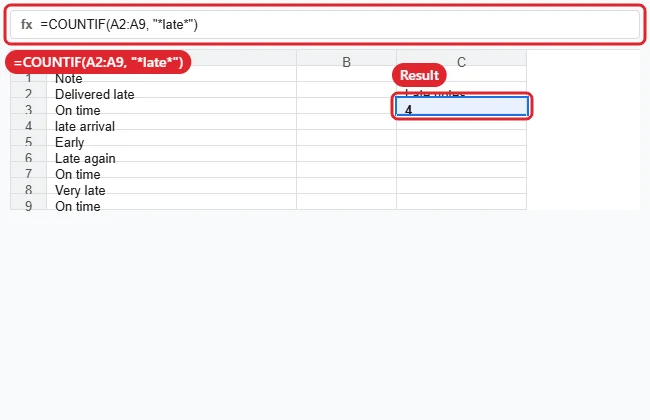
To count how many times a word appears in Google Sheets, use COUNTIF. =COUNTIF(A2:A9, "late") counts cells that contain exactly “late”, and =COUNTIF(A2:A9, "*late*") counts cells that contain the word anywhere. COUNTIF counts cells, not repeats inside a cell, so use a SUMPRODUCT formula if a word can appear more than once in the same cell.
Quick Answer
Cells containing the word: =COUNTIF(A2:A9, "*late*"). Every occurrence, including repeats in one cell: =SUMPRODUCT((LEN(A2:A9)-LEN(SUBSTITUTE(LOWER(A2:A9),"late","")))/LEN("late")). Those counts are also easy to turn into a picture when you make a graph in Google Sheets from them.
Steps to Count a Word With COUNTIF
- Click an empty cell where you want the result.
- Type
=COUNTIF(and select the range, for example A2:A9. - Type a comma and the word in quotes. Add asterisks around it, like “*late*”, to match cells where the word is part of longer text.
- Close the bracket and press Enter.
Use a Cell Instead of Typing the Word
Put the word in D1 and use =COUNTIF(A2:A9, "*"&D1&"*"). Change D1 to count a different word without editing the formula.
Which Formula to Use
| Goal | Formula |
|---|---|
| Cells that are exactly the word | =COUNTIF(A2:A9, "late") |
| Cells that contain the word | =COUNTIF(A2:A9, "*late*") |
| Every occurrence, even repeats | SUMPRODUCT with LEN and SUBSTITUTE |
| Case-sensitive count of cells | =SUMPRODUCT(--REGEXMATCH(A2:A9, "late")) |
Working with numbers? See rounding up in Google Sheets.
Using Excel? Read how to count a word in Excel.
Troubleshooting
- Count is too high: “*late*” also matches “latest” and “chocolate”. Use exact matching or a REGEXMATCH pattern with word boundaries for whole words.
- Result is 0: Check for extra spaces in cells; TRIM can clean them.
- Want word totals instead? See counting words in Google Sheets.
- Just need to find the word? See searching in Google Sheets. For Excel, see counting a word in Excel.
Frequently Asked Questions
Is COUNTIF case-sensitive?
No. “Late” and “late” are counted the same. REGEXMATCH is case-sensitive by default.
Can I count more than one word?
Add COUNTIF results together, or use COUNTIFS when every condition must match in different columns.
Does COUNTIF work across several columns?
Yes. Use a range such as A2:C9 to count across all those cells.
Summary
- Use COUNTIF with the word in quotes for exact matches.
- Add asterisks to count cells that contain the word.
- Use SUMPRODUCT with SUBSTITUTE to count every occurrence.
- Reference a cell to change the word easily.

Kermit Matthews runs Live2Tech from just outside Philadelphia. He is an IT specialist with over 20 years of experience, from a university help desk to small-business IT, IT management and his own consulting practice, and has written tech guides full time since 2020. Steps are checked against the current software on a real device or the maker’s official documentation. More about Kermit.