Counting how often a word shows up in Excel depends on what you mean: cells that equal the word, cells that contain it, or every occurrence including repeats within a cell. COUNTIF handles the first two, and a short SUMPRODUCT formula handles the third.
Quick Answer
To count cells containing a word, use =COUNTIF(A2:A100,”*cat*”). For cells that exactly equal it, drop the asterisks. To count every occurrence, use =SUMPRODUCT((LEN(A2:A100)-LEN(SUBSTITUTE(LOWER(A2:A100),”cat”,””)))/LEN(“cat”)).
How to Count How Many Times a Word Appears in Excel
- Decide whether you want exact matches, cells that contain the word, or every occurrence.
- For exact matches, type =COUNTIF(range,”word”) in an empty cell.
- For cells containing the word anywhere, use wildcards: =COUNTIF(range,”*word*”).
- For total occurrences (a cell with the word twice counts as 2), use the SUMPRODUCT formula from the Quick Answer.
- Point the formula at a cell holding the word, such as “*”&C1&”*”, so you can change the word without editing the formula.
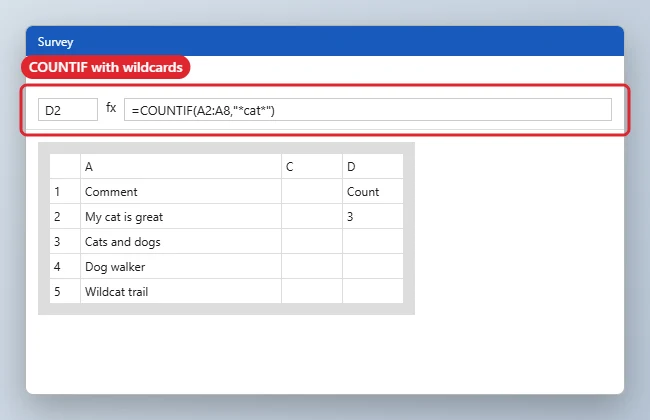
Which Formula to Use
| Goal | Formula |
|---|---|
| Cells equal to the word | =COUNTIF(A:A,”cat”) |
| Cells containing the word | =COUNTIF(A:A,”*cat*”) |
| Every occurrence | SUMPRODUCT with LEN and SUBSTITUTE |
| Case-sensitive count | SUMPRODUCT with EXACT |
Worked Example
Here’s how each formula behaves on the same five cells, so you can see why the results differ.
| Cell | Text |
|---|---|
| A2 | cat |
| A3 | Cat food |
| A4 | wildcat |
| A5 | cat and cat |
| A6 | dog |
| Formula | Result | Why |
|---|---|---|
=COUNTIF(A2:A6,"cat") |
1 | Only A2 is exactly “cat” |
=COUNTIF(A2:A6,"*cat*") |
4 | Every cell containing “cat,” including wildcat, counted once each |
=SUMPRODUCT((LEN(A2:A6)-LEN(SUBSTITUTE(LOWER(A2:A6),"cat","")))/LEN("cat")) |
5 | Counts both words in A5 as well |
=SUMPRODUCT(--EXACT(A2:A6,"cat")) |
1 | Case-sensitive exact match |
Count Whole Words Only
The occurrence formula above also counts “cat” inside “wildcat” or “category.” To count it only as a separate word, add a space on each side of the text and of the word:
=SUMPRODUCT((LEN(" "&LOWER(A2:A6)&" ")-LEN(SUBSTITUTE(" "&LOWER(A2:A6)&" "," cat ","")))/LEN(" cat "))
On the example data this returns 4, because wildcat no longer counts. It treats only spaces as word boundaries, so a word followed by a comma or full stop is missed. If your text has punctuation, clean it first with SUBSTITUTE, or count the punctuated form separately.
Use a Cell Instead of Typing the Word
Put the word in a cell, such as C1, and point the formula at it. Then you can change the word without editing the formula:
- Exact match:
=COUNTIF(A2:A100,C1) - Contains:
=COUNTIF(A2:A100,"*"&C1&"*") - Every occurrence:
=SUMPRODUCT((LEN(A2:A100)-LEN(SUBSTITUTE(LOWER(A2:A100),LOWER(C1),"")))/LEN(C1))
Count Several Words or Several Sheets
To total the cells that contain either of two words, wrap COUNTIF in SUM with an array of criteria: =SUM(COUNTIF(A2:A6,{"*cat*","*dog*"})). On the example it returns 5. A cell that contains both words is counted twice, so use this for a total of mentions rather than a count of unique cells.
COUNTIF works on one range at a time, so add results together when the data is on more than one sheet: =COUNTIF(Sheet1!A:A,"cat")+COUNTIF(Sheet2!A:A,"cat").
If you only need cells that contain a word, rather than every occurrence, the shorter guide on how to count a word in Excel walks through COUNTIF with screenshots.
Troubleshooting
- The count is too high: wildcards match parts of words, so *cat* also counts wildcat and category.
- The count is zero: check for extra spaces with TRIM, or confirm the range covers your data.
- To find where the word appears, see how to search for a word in Excel.
- Using Google Sheets instead? Read how to count a word in Google Sheets.
Related: insert a date and time in Excel.
Frequently Asked Questions
Is COUNTIF case-sensitive?
No. COUNTIF ignores case. Use SUMPRODUCT with EXACT for case-sensitive counts.
Can I count several words at once?
Add COUNTIF results together, or use COUNTIFS for conditions across columns.
Does this work in older Excel versions?
Yes. COUNTIF and SUMPRODUCT work in every current and older version.
Summary
- Choose exact, contains, or every occurrence.
- Use COUNTIF for exact or contains.
- Use SUMPRODUCT for total occurrences.
- Reference a cell for the search word.

Kermit Matthews runs Live2Tech from just outside Philadelphia. He is an IT specialist with over 20 years of experience, from a university help desk to small-business IT, IT management and his own consulting practice, and has written tech guides full time since 2020. Steps are checked against the current software on a real device or the maker’s official documentation. More about Kermit.