To change a cell’s color in Google Sheets, select the cells, click the Fill color button (the paint bucket) in the toolbar, and choose a color. For a color that isn’t in the palette, click Custom and enter a hex code. To color cells automatically based on their values, use Format > Conditional formatting instead.
Quick Answer
Select cells > Fill color (paint bucket) > pick a color.
Fill Cells With a Color
- Select a cell, a range, or a whole row or column (click its header).
- Click Fill color in the toolbar. If you don’t see it, click the three-dot More button.
- Choose a color, or click + under Custom to enter a hex code like #FFF2CC.
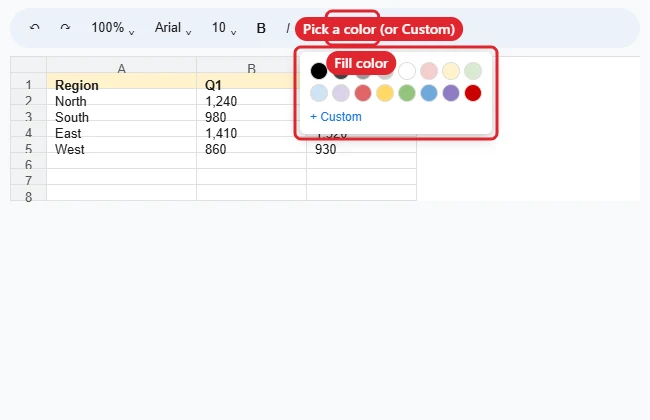
To remove the color, select the cells, open Fill color, and click Reset.
Color Cells Automatically
- Select the range.
- Click Format > Conditional formatting.
- Under Format rules, choose a condition, such as Greater than 1000 or Text contains “Done”.
- Pick a fill color under Formatting style and click Done.
Coloring Options Compared
| Tool | Best for |
|---|---|
| Fill color | Manual highlighting |
| Conditional formatting | Colors that change with the data |
| Color scale (in conditional formatting) | Heat maps from low to high values |
| Alternating colors (Format menu) | Striped rows for easier reading |
| Text color (A with a bar) | Changing the font color instead of the background |
Cleaning up a task list? See how to remove multiple checkboxes.
Ready to share? See how to make a Google Sheets file public.
For formulas that pull values from other tabs, see linking cells in Google Sheets.
Troubleshooting
- Color won’t change: A conditional formatting rule may be overriding it. Check Format > Conditional formatting.
- Whole row colors when you didn’t want it: The rule’s range covers the row. Edit Apply to range.
- Can’t edit: You have view-only access, or the range is protected.
- Finding colored cells later? Use filters by color: Data > Create a filter, then filter by color. For text, see searching in Google Sheets.
Related: Highlight in Google Sheets.
Related: Center across a selection in Google Sheets.
Related: Change chart colors in Google Sheets.
Frequently Asked Questions
Can I copy a cell’s color to other cells?
Yes. Use the Paint format button (the paint roller), then click the target cells.
Can I change the color on the mobile app?
Yes. Select cells, tap the Format (A) icon, then Cell > Fill color.
Summary
- Select cells and click Fill color.
- Use Custom for exact hex colors.
- Use Conditional formatting for automatic colors.
- Click Reset to remove the fill.

Kermit Matthews runs Live2Tech from just outside Philadelphia. He is an IT specialist with over 20 years of experience, from a university help desk to small-business IT, IT management and his own consulting practice, and has written tech guides full time since 2020. Steps are checked against the current software on a real device or the maker’s official documentation. More about Kermit.