Skip to content
Live2Tech
  • iPhone
  • Windows
    • Windows 11
    • Windows 10
  • Office
    • Word
    • Excel
    • Powerpoint
    • Outlook
  • Google
    • Google Docs
    • Google Sheets
    • Google Slides
    • Gmail
    • Chrome
    • Google Drive
  • Mac & Apple
    • Mac
    • iPad
    • Apple Watch
  • All Tutorials

Mac

Troubleshooting Bluetooth Connectivity Issues with Apple Mouse: A Guide

November 10, 2026April 1, 2024 by Kermit Matthews

Struggling to connect your Apple Mouse via Bluetooth? Our guide has tips to fix common connectivity issues and get you back on track. Continue Reading Troubleshooting Bluetooth Connectivity Issues with Apple Mouse: A Guide
Categories Mac
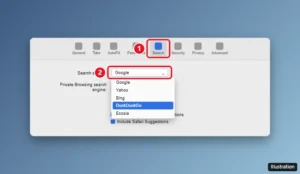
Safari Settings window on a Mac with the Search tab selected and the Search engine drop-down menu open

How to Change the Default Search Engine in Safari on a Mac

November 14, 2026November 21, 2018 by Kermit Matthews

Change the default search engine in Safari on a Mac from Settings > Search, set a separate private browsing engine, and fix a search engine that keeps changing. Continue Reading How to Change the Default Search Engine in Safari on a Mac

Categories MacBook Air, Mac
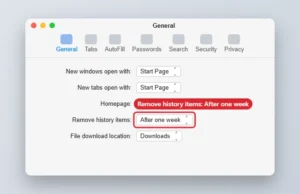
Mac web browser General settings with Remove history items set to After one week

How to Automatically Clear Safari History Every Week on a Mac

November 10, 2026September 26, 2018 by Kermit Matthews

Set Safari on a Mac to remove history items after one week in Settings > General, or clear history immediately from the History menu. Continue Reading How to Automatically Clear Safari History Every Week on a Mac

Categories MacBook Air, Mac
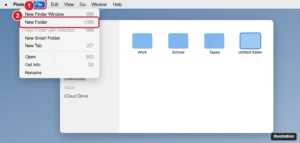
Mac Finder with the File menu open and New Folder highlighted

How to Create a New Folder on a MacBook Air

November 10, 2026September 14, 2018 by Kermit Matthews

Create a new folder on a MacBook Air with Shift + Command + N, the File menu, or a right-click, and make folders from selected files. Continue Reading How to Create a New Folder on a MacBook Air

Categories MacBook Air, Mac
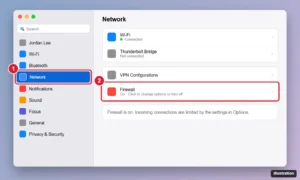
Mac System Settings window with Network selected in the sidebar and the Firewall toggle highlighted

How to Turn Off the Firewall on a Mac (All macOS Versions)

November 10, 2026August 12, 2018 by Kermit Matthews

Turn the Mac firewall off or on in macOS Sequoia, Sonoma, Ventura, and older versions like High Sierra, plus the Terminal command and how to allow a single app. Continue Reading How to Turn Off the Firewall on a Mac (All macOS Versions)

Categories Mac
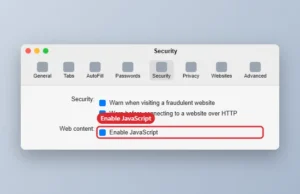
Mac browser Settings window on the Security tab with the Enable JavaScript checkbox

How to Disable JavaScript in Safari on a Mac

November 10, 2026August 8, 2018 by Kermit Matthews

Turn off JavaScript in Safari on a Mac in Settings > Security, disable it temporarily from the Develop menu, and see what changes when it is off. Continue Reading How to Disable JavaScript in Safari on a Mac

Categories Mac
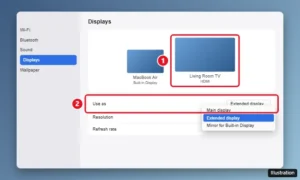
macOS System Settings Displays pane with the MacBook Air and a TV shown, and the Use as menu set to mirror or extended display

How to Connect a MacBook Air to a TV With HDMI

November 14, 2026February 2, 2018 by Kermit Matthews

Connect a MacBook Air to a TV with a USB-C to HDMI adapter, mirror or extend your screen, send sound to the TV, and fix no picture or overscan issues. Continue Reading How to Connect a MacBook Air to a TV With HDMI

Categories MacBook Air, Mac
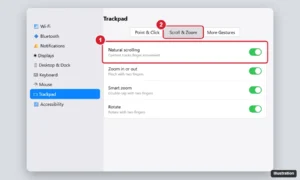
Laptop System Settings Trackpad pane on the Scroll and Zoom tab with the Natural scrolling switch highlighted

How to Change Scrolling Direction and Speed on a MacBook Air

November 10, 2026December 20, 2012 by Kermit Matthews

Change scrolling on a MacBook Air: turn natural scrolling off or on, adjust trackpad and mouse scroll speed, and always show scroll bars. Continue Reading How to Change Scrolling Direction and Speed on a MacBook Air

Categories Mac, MacBook Air
Newer posts
← Previous Page1 Page2

Join Our Free Newsletter

Featured guides and deals

You may opt out at any time.
Read our Privacy Policy

Live2Tech

Plain-English, step-by-step guides for the devices and apps you use every day.

Apple

  • iPhone
  • iPad
  • Mac
  • Apple Watch

Windows

  • Windows 11
  • Windows 10

Microsoft Office

  • Word
  • Excel
  • Powerpoint
  • Outlook

Google

  • Google Docs
  • Google Sheets
  • Google Slides
  • Gmail
  • Chrome
  • Google Drive
  • About Us
  • Contact
  • Disclaimer
  • Privacy Policy
© Live2Tech.com 2026
  • iPhone
  • Windows
    • Windows 11
    • Windows 10
  • Office
    • Word
    • Excel
    • Powerpoint
    • Outlook
  • Google
    • Google Docs
    • Google Sheets
    • Google Slides
    • Gmail
    • Chrome
    • Google Drive
  • Mac & Apple
    • Mac
    • iPad
    • Apple Watch
  • All Tutorials