You can’t buy Windows 10 from Microsoft anymore. Microsoft stopped selling Windows 10 licenses in January 2023, and Windows 10 support ended on October 14, 2025. If you need a Windows license today, the best option is to buy Windows 11 from the Microsoft Store or a trusted retailer. Microsoft lists Windows 11 Home at $139 and Windows 11 Pro at $199 in the US. A Windows 11 key generally also activates the same edition of Windows 10, if your PC can’t run Windows 11 yet.
Below, we explain your options, how to activate a key, how to avoid fake key sellers, and what to do if your PC is stuck on Windows 10.
Your options at a glance
| Situation | Best option |
|---|---|
| Your PC meets Windows 11 requirements | Upgrade to Windows 11. It’s free if Windows 10 is already activated. |
| You need a new license | Buy Windows 11 Home or Pro from Microsoft or an authorized retailer |
| Your PC can’t run Windows 11 | Use a Windows 11 key on Windows 10, and consider Extended Security Updates or a new PC |
| You’re building a PC | Buy Windows 11 on USB or as a digital download |
Check whether you already have a license
Many people don’t need to buy anything. Go to Settings > Update & Security > Activation. If it says “Windows is activated with a digital license,” you already own it, and upgrading to Windows 11 is free on supported hardware.
How to buy and activate a Windows license
- Go to the Microsoft Store website or app, or an authorized retailer like Best Buy or Amazon (sold by Amazon), and choose Windows 11 Home or Windows 11 Pro.
- Complete the purchase. You’ll get a product key by email or in the box, or a digital license linked to your Microsoft account.
- On your PC, open Settings > Update & Security > Activation.
- Click Change product key, type the 25-character key, and click Next, then Activate.
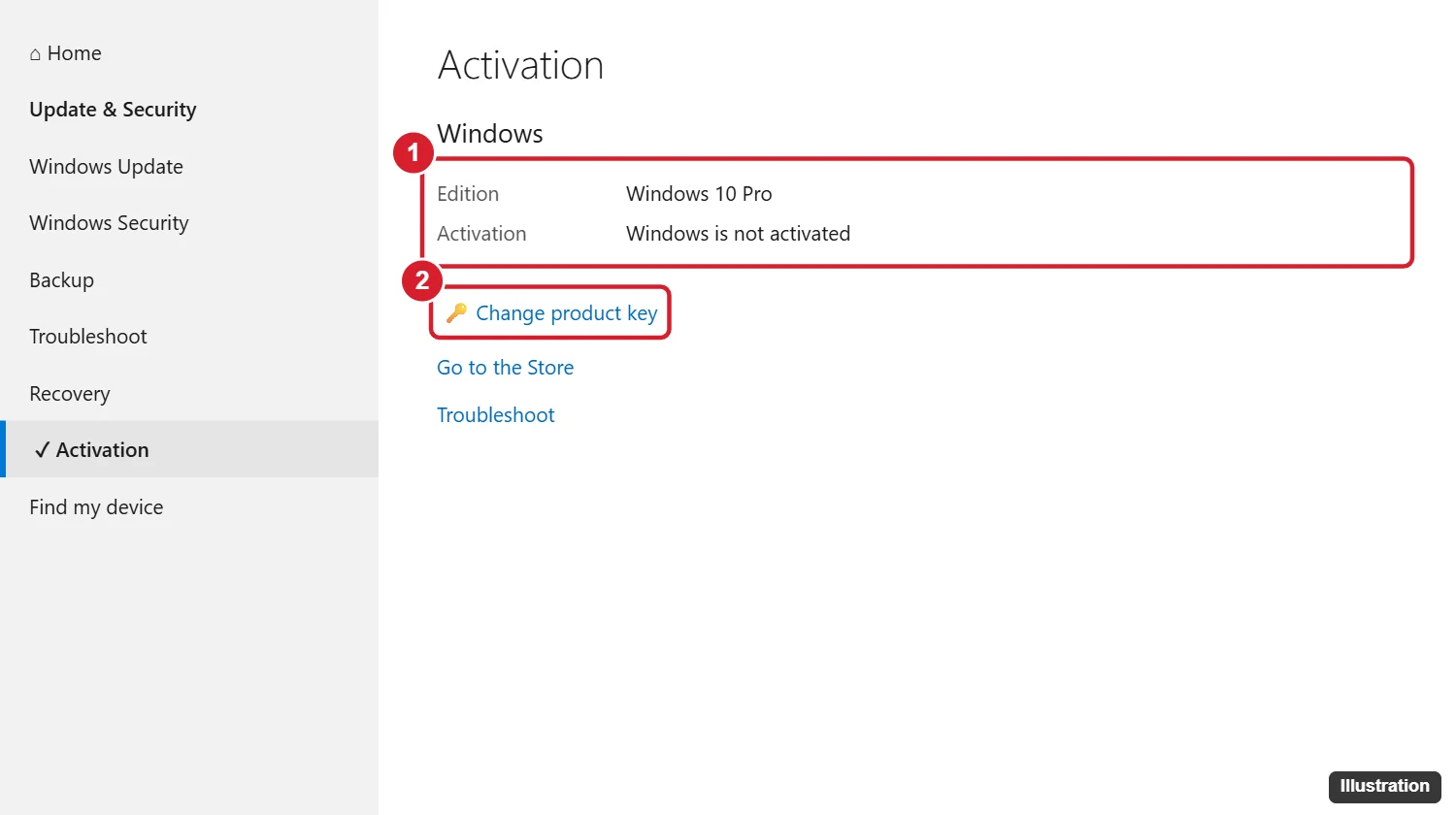
If you’re installing Windows fresh, download it with Microsoft’s Media Creation Tool, then enter the key during setup or after.
Home vs. Pro
- Home is enough for most people: browsing, Office, games, and streaming.
- Pro adds BitLocker drive encryption, Remote Desktop hosting, Hyper-V, and tools for joining a work domain. You can upgrade from Home to Pro later in Activation settings.
Beware of cheap Windows keys
Sites and marketplaces often sell Windows keys for $10 to $30. Some are volume, education, or OEM keys that weren’t meant to be resold, and Microsoft can deactivate them later. Others are stolen or bought with fraudulent credit cards. If a price seems far too low, buy from Microsoft or a major retailer instead so you get support and a key that keeps working.
If your PC is stuck on Windows 10
Windows 10 no longer gets regular security updates. Your options:
- Extended Security Updates (ESU): Microsoft offers home users extended security updates through October 12, 2027. Look for the enrollment option in Settings > Update & Security > Windows Update.
- Check Windows 11 compatibility with the PC Health Check app. Some older PCs only need TPM or Secure Boot turned on in the BIOS.
- Replace the PC when practical. New PCs include a Windows 11 license.
Other Windows license questions
Can I still download Windows 10?
Microsoft’s download page may still offer the Windows 10 installer, but there’s no new way to buy a Windows 10 license from Microsoft. Use a Windows 10 or 11 key you already own.
Is it legal to use Windows 10 without activating it?
Windows keeps working unactivated with a watermark and limited personalization, but Microsoft’s license terms require a valid license.
Can I transfer my Windows license to a new PC?
Retail licenses can usually be moved. OEM licenses that came with a PC are tied to that computer.

Kermit Matthews runs Live2Tech from just outside Philadelphia. He is an IT specialist with over 20 years of experience, from a university help desk to small-business IT, IT management and his own consulting practice, and has written tech guides full time since 2020. Steps are checked against the current software on a real device or the maker’s official documentation. More about Kermit.